 Hack the Route Start learning Open app
The idea
Rosa keeps a lighthouse on a rock at sea. Its only link to shore is a radio line that fails in every storm, and the lamp's software still has to arrive whole.
Steps
-
Test the radio line
Rosa's lighthouse,
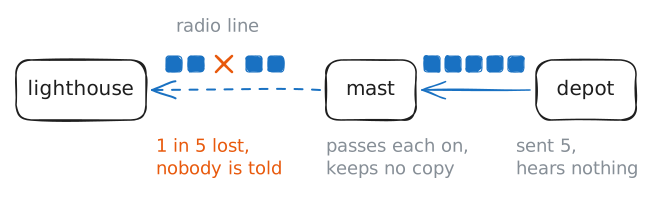
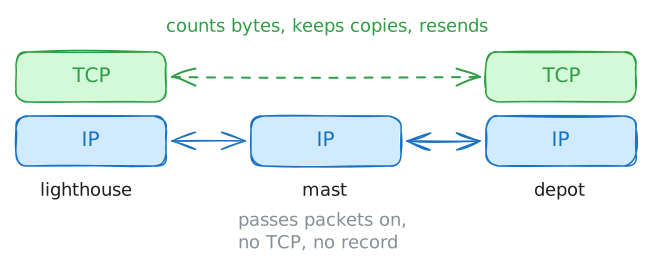
10.0.1.10, reaches the depot on shore,10.0.2.10, over the radio line and a Router called mast. A storm is on the line now.A network promises very little. The Internet Protocol (IP) passes each packet from router to router and keeps no copy of it. If a line loses the packet, IP does nothing about it and tells nobody.
Send 30 pings from the lighthouse to see how much gets through.
lighthouse:~# ping -c 30 -i 0.2 10.0.2.10
-
Download the lamp update through the storm
Rosa needs the lamp update, a file of 131072 bytes. One packet holds about 1400 bytes, so the depot sends the file in about 90 packets. At one packet in five, the storm will take about 18 of them.
The file size alone can't prove the download worked, because a damaged file can have the right size. So Rosa also downloads the depot's hash of the file. A hash is a short fingerprint of a file: change one byte and the hash changes.
Download both files, then compare them with
sha256sum -c.lighthouse:~# curl -s -w '%{size_download} bytes in %{time_total} seconds\n' -O http://10.0.2.10:8000/lamp-update.bin -O http://10.0.2.10:8000/lamp-update.sha256 lighthouse:~# sha256sum -c lamp-update.sha256 -
Watch a connection open and close
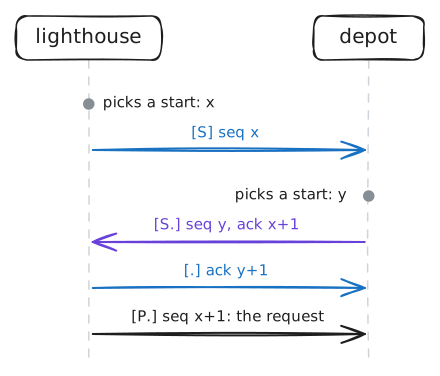
IP already delivers packets, so why does TCP set anything up first? TCP's whole job rests on numbering bytes, and two machines have to agree on the numbers before they can use them.
Each machine picks its own starting number. An attacker can't guess it, and a stray packet from an old connection is unlikely to fit it.
Each one must tell the other that number and hear that it arrived. On a line that loses packets, neither machine can assume it did.
Ask the depot for
version.txt, a tiny file, while the lab records every packet in a capture withtcpdump. The line stays calm for this step. Then list the depot's connections withss -tan, to see what a closed connection leaves behind.lighthouse:~# curl -s http://10.0.2.10:8000/version.txt depot:~# ss -tan
-
Count bytes, not packets
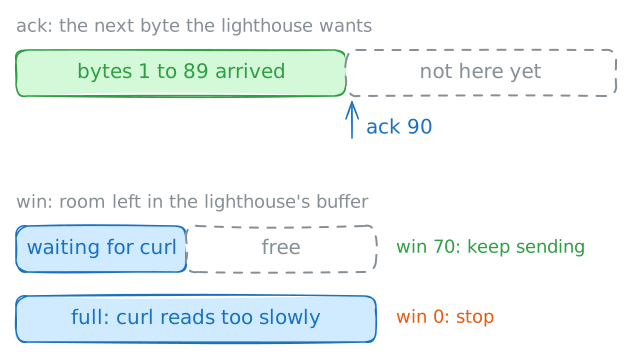
TCP numbers every byte it sends. A program hands TCP one long stream of bytes, and TCP cuts it into packets as it sees fit. A count of packets would mean nothing.
A packet's
seqsays which bytes it holds.ack, short for acknowledge, is the number the other machine sends back to say how much has arrived.Every
ackalso carrieswin, for a different problem. The depot can send faster than a program on the lighthouse reads, and those bytes need somewhere to wait. So the lighthouse keeps telling the depot how much room it has left.Run the same fetch again and read
seqandack. Then start a download that reads 8 KB a second, on a line that carries over 100 KB a second. The lab records only the lighthouse's replies.lighthouse:~# curl -s http://10.0.2.10:8000/version.txt lighthouse:~# curl -s --limit-rate 8K -m 7 -o /dev/null -w '%{size_download} bytes in %{time_total} seconds\n' http://10.0.2.10:8000/sea-charts.bin -
Find the packet that went missing
A router that loses a packet on a line or in a full queue tells nobody. The two ends have to work it out from the numbers.
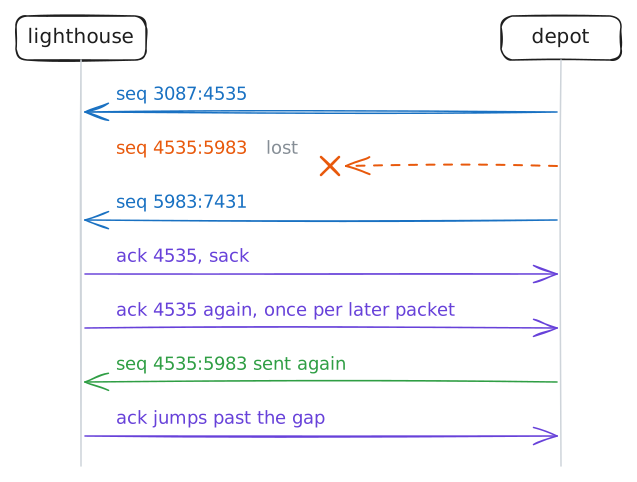
ackcan say only one thing: the next byte wanted.Suppose bytes 1000 to 1999 go missing while later bytes arrive. The lighthouse can't say "I have 2000 onward" with
ackalone, so it keeps saying "I still want byte 1000". Those repeats are the signal.The line now loses one packet of a small file, the tide table, so the capture stays short.
Inrows with aseqrange carry the file from the depot.Outrows are the lighthouse's replies.lighthouse:~# curl -s -w '%{size_download} bytes in %{time_total} seconds\n' -O http://10.0.2.10:8000/tide-table.txt -
Count the resends in a storm
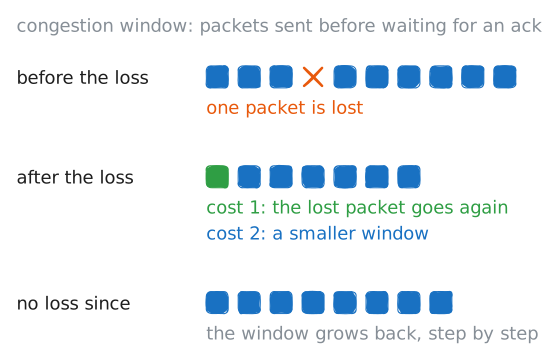
A lost packet costs TCP twice. The first cost is the resend, and the depot's counters show that one. The second cost is speed, and it comes from a bad day in the internet's history.
In October 1986, transfers between two sites in Berkeley fell from 32 Kbit/s to 40 bit/s. Machines kept resending into full lines, and the resends filled those lines further. The fix went into TCP: when packets go missing, slow down.
The storm is back on the line. Read the depot's counters, download the lamp update again, and read them once more.
depot:~# nstat -az TcpOutSegs TcpRetransSegs lighthouse:~# curl -s -w '%{size_download} bytes in %{time_total} seconds\n' -O http://10.0.2.10:8000/lamp-update.bin depot:~# nstat -az TcpOutSegs TcpRetransSegs -
Cut the line during a download
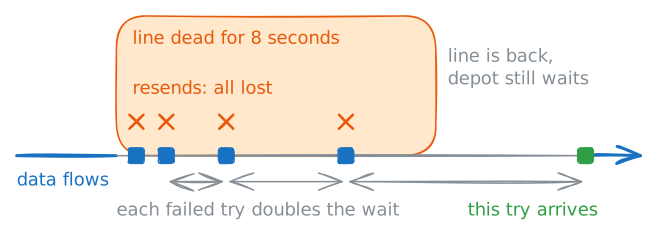
A connection feels like a wire between two machines, but a plain router on the way keeps no record of it. The designers of the internet chose this on purpose. They kept a connection's record in the two machines, so a router that dies need not take a connection with it.
This step breaks the line on purpose, and the lab brings it back. Start the sea charts, a 13-second download, and the lab cuts the line for 8 seconds. The whole step takes about 30 seconds.
During the cut, the depot prints its list of connections.
lighthouse:~# curl -s -w '%{size_download} bytes in %{time_total} seconds\n' -O http://10.0.2.10:8000/sea-charts.bin -O http://10.0.2.10:8000/sea-charts.sha256
depot:~# ss -tn
lighthouse:~# sha256sum -c sea-charts.sha256
Run these steps on real machines