 Hack the Route Start learning Open app
The idea
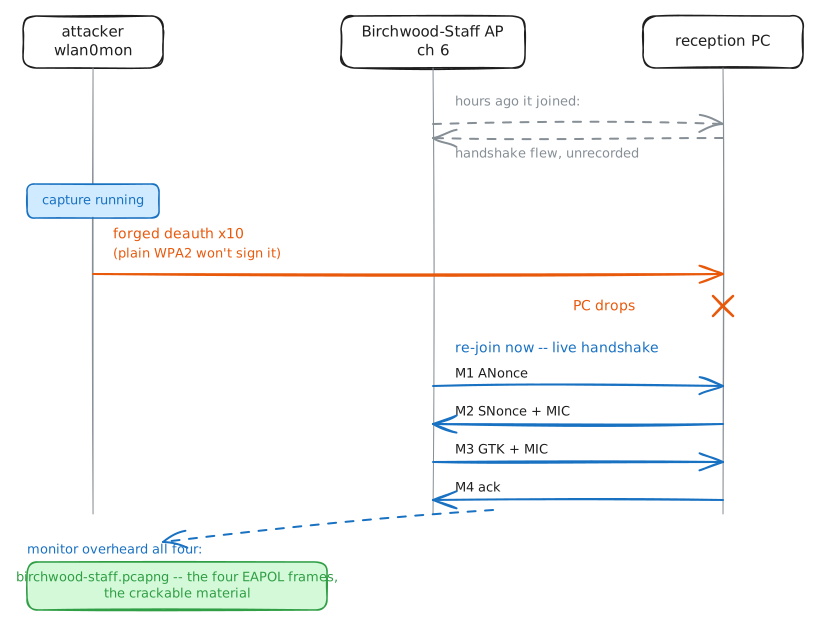
Lab 1 handed you two targets off one post behind reception at Birchwood Clinic: Birchwood-Staff, WPA2, with the reception PC connected, and Birchwood-Cams, WPA2, with a wireless security camera connected. To try passphrases offline you first need each network's 4-way handshake — the four frames a device and the access point exchange when the device joins — but both clients joined hours ago, so there is nothing to record right now. This lab makes each handshake happen on your terms, once noisily and once quietly, then meets the PMKID shortcut you will hear about and finds out why it is not the answer here — all on Birchwood-Staff, the target the playbook runs on, whose handshake you catch here and crack in the last lab.
Steps
-
Lock on and write it down
A sweep hops the whole band; a capture stays on one channel and one AP and saves every frame to a file. Point
airodump-ngat the target the same way lab 1 did —-c 6for its channel and--bssid 02:88:03:0a:10:06for its radio — and add-wto write the frames to disk instead of only showing them.The reception PC is already connected, so it shows up in the STATION table as the capture fills. But being connected is not the same as joining: the four handshake frames fly only at the moment a device associates, and that was hours ago. Sitting here recording a device that is already on will never catch them.
Read the capture back with
aircrack-ng, which lists each network it found and whether the file holds that network's handshake.attacker:~# airmon-ng start wlan0 attacker:~# airodump-ng -c 6 --bssid 02:88:03:0a:10:06 -w /root/birchwood-staff wlan0mon attacker:~# aircrack-ng /root/birchwood-staff-01.cap
-
Knock it off so it comes back
A deauthentication frame tells a device the AP has dropped it. In plain WPA2 those management frames are unprotected: anyone can send one that looks like it came from the AP, and the device believes it. The device drops the connection and, a second later, re-joins — and that re-join is the 4-way handshake, now flying while you record.
aireplay-ng --deauth 10sends ten of them.-a 02:88:03:0a:10:06names the AP; with no-cfor one client, it goes to the broadcast address, so every device on that AP is told to leave. You do not need the PC's address, and you do not need the passphrase: a deauth is a management frame, and management frames take no key.Record again, fire the deauth, stop, and read the file back. This time
aircrack-ngshould find the handshake.attacker:~# airodump-ng -c 6 --bssid 02:88:03:0a:10:06 -w /root/birchwood-staff wlan0mon attacker:~# aireplay-ng --deauth 10 -a 02:88:03:0a:10:06 wlan0mon attacker:~# aircrack-ng /root/birchwood-staff-01.cap
-
The same move, a quieter aim
The broadcast deauth from the last step is loud: it tells every client on the AP to leave, which a watchful admin or a wireless intrusion sensor notices at once. When you know which client you want, aim at that one device instead. The move is the same; only the aim changes.
Turn to the camera network, Birchwood-Cams. It has a wireless security camera connected — the recorder is wired, but the camera talks to it over the air, so it sits in the STATION table as a steady client. Lock onto the network the way you did the staff network, and this time read the STATION table under the AP: each connected device is a row, and its address is in the
STATIONcolumn.Then aim the deauth at that one address with
-c.aireplay-ng --deauth 10 -a 02:88:03:0c:22:11 -c <camera>sends the burst to the camera alone, not the broadcast address. The camera drops, re-joins, and its 4-way handshake lands in your capture — same result as the staff network, far less noise on the air.attacker:~# airodump-ng -c 11 --bssid 02:88:03:0c:22:11 -w /root/birchwood-cams wlan0mon attacker:~# aireplay-ng --deauth 10 -a 02:88:03:0c:22:11 -c 02:88:03:40:ca:01 wlan0mon attacker:~# aircrack-ng /root/birchwood-cams-01.cap
-
The shortcut you'll hear about: the PMKID
You will read, often, about a way to skip all of this — no client, no deauth, no waiting. It is worth understanding, and worth knowing why it did not come up above.
When a device joins a WPA2 network, the AP's first handshake frame can carry a PMKID: a hash of the master key, the AP's address and the device's address. Some APs put it in that first frame and hand it to anyone who merely begins to associate — so in principle you need no client and no deauth.
hcxdumptool -i wlan0 -c 11a --exitoneapol=1begins the association and grabs the frame, andhcxpcapngtoolwrites the PMKID as the same hashcat-22000 line lab 3 cracks. That is the "clientless" capture every write-up mentions.Here is the catch, and the real lesson: not every AP volunteers one. Many Linux and enterprise access points — anything running hostapd, which is exactly what Birchwood's two networks run — put no PMKID in that first frame, so
hcxdumptoolwaits and comes back empty.When that happens you fall back to forcing a handshake, which is what you already did on both networks. That is why the first thing you checked, back in lab 1, was whether a client was present: a client means the deauth route always works, PMKID or no PMKID.
-
The defender's answer
The deauth route you used on both networks leans on one weakness: plain WPA2 leaves the frames that run a connection unsigned, so anyone can forge a
deauthand the client believes it. One setting closes that door; a second answers the PMKID shortcut from the last step.Protected management frames (802.11w), the
ieee80211w=2line, sign the frames that run a connection — including deauthentication. A forged deauth now fails a signature check and is dropped, so the client stays put and no handshake is forced. Turn it on at the AP and the reception PC together (both ends must agree), send the same deauth, and watch the PC hold its connection.The PMKID shortcut has a different answer: WPA3/SAE. SAE replaces the pre-shared key with an exchange that never exposes a PMKID to grind, and never lets an offline guess test a passphrase at all — so even an AP that would have volunteered one gives nothing away. The last lab of this playbook comes back to why.
attacker:~# aireplay-ng --deauth 10 -a 02:88:03:0a:10:06 wlan0mon
pc:~# wpa_cli status
Run these steps on real machines