 Hack the Route Start learning Open app
The idea
You are in the waiting room at Birchwood Clinic with a Kali laptop, one Wi-Fi card, and no network joined. This is the first stage of one job run end to end: read the air, catch the target's handshake, crack its passphrase. It starts with knowing what is even there — the names, the channels, the kind of lock on each one, and which networks already have someone connected — all of it on the air, in the open, for a card that will listen.
Steps
-
Turn the card into an ear
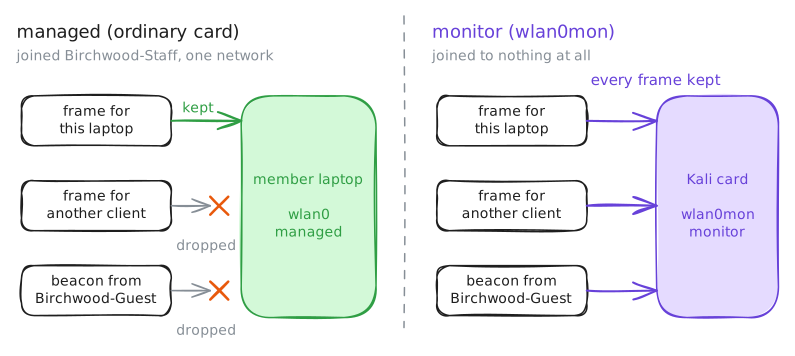
An ordinary Wi-Fi card is built to join one network and keep only the frames addressed to it. For reconnaissance you want the opposite: a card that joins nothing and keeps every frame it hears, whoever it is for. That is monitor mode.
The attacker's card arrives as
wlan0, in the normal managed mode. One tool flips it:airmon-ng, part of the aircrack-ng suite.airmon-ng start wlan0makes a second interface on the same radio,wlan0mon, in monitor mode — the interface every other tool in this playbook will listen on.First look at the card as it comes, with
iw dev, which lists the machine's wireless interfaces and the mode of each. Then start monitor mode, and look again.attacker:~# iw dev attacker:~# airmon-ng start wlan0 attacker:~# iw dev
-
Sweep the band
Now point
airodump-ngat the monitor interface. Left to itself it hops across the 2.4 GHz channels, a quarter-second on each, and builds a table of every access point (AP) it hears beaconing, plus the stations talking to them.Read the top table column by column.
BSSIDis the AP's radio address,CHis its channel, andENC,CIPHERandAUTHare the lock —OPNis open,WPA2 CCMP PSKis WPA2-Personal with a shared passphrase.ESSIDis the network's name, unless the AP withholds it, and then airodump shows the name's length in angle brackets instead. airodump never stops on its own, so this run ends once it has caught Birchwood Clinic's beacons.attacker:~# airodump-ng wlan0mon
-
Who is already on it?
A beacon tells you an AP exists. It does not tell you whether anyone is using it — and that matters, because the next lab catches a network's handshake by knocking a connected device off so it reconnects. No connected device, no one to knock off.
To see the stations on one network, stop hopping and camp on it:
-c 6locksairodump-ngto Birchwood-Staff's channel, and--bssidlimits it to that one AP. Now the lower STATION table fills in. Each row is a device: its address, and in the first column the BSSID of the AP it is talking to.This run ends once a station shows up under Birchwood-Staff.
attacker:~# airodump-ng -c 6 --bssid 02:88:03:0a:10:06 wlan0mon
-
The hidden network is not hidden
Back to the AP with no name. Its owner set it to leave the name out of its beacons, hoping it stays secret. The flaw: a hidden name only means the AP stays quiet, and the devices that use it do not.
When a device looks for a hidden network, it calls the name out loud in a probe; when it joins, it names the network in its association. Both are ordinary management frames, unencrypted, in the air.
Camp on the hidden AP's channel (
-c 11) and its name appears the moment one of its devices speaks. This run ends once the name leaks.attacker:~# airodump-ng -c 11 --bssid 02:88:03:0b:22:11 wlan0mon
Run these steps on real machines