 Hack the Route Start learning Open app
The idea
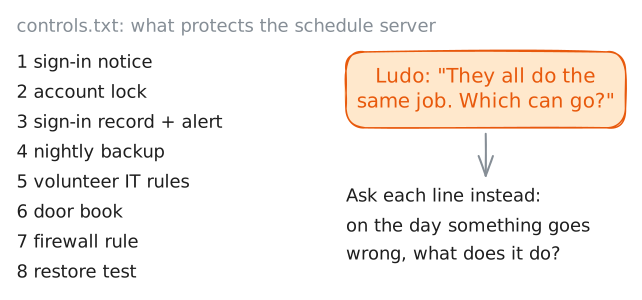
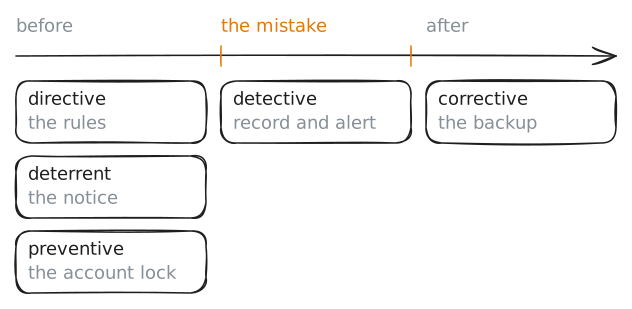
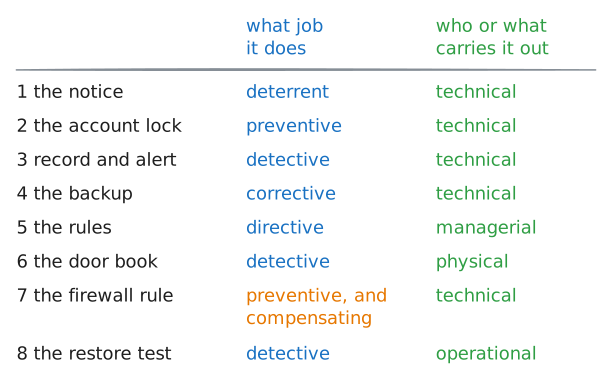
Ines is the volunteer technician at Tern Radio 104.6, and the station's treasurer, who watches the money, has found her list of eight things that protect the schedule server. To him they all do one job, so most of them can go. Go through the list with her, one ordinary mistake at a time, and see what each line is there for.
Steps
-
Eight things on a list
Tern Radio is a volunteer station. One computer, the server, holds its schedule of shows, and Ines keeps a list of everything that protects it.
Security people call each thing on such a list a control: anything put in place to make trouble less likely or less costly. A lock on an account is one, and so is a rule on paper.
Ludo, the treasurer, left a note at the bottom of the list. Each task names the machine to type on:
stationServeris the server.stationServer:~# cat /srv/station/controls.txt
-
The account lock stops the next try
Volunteers sign in to the schedule program, Cuesheet, with a name and a password. A password can be guessed, and a program that allows endless tries lets a guesser work through thousands of them.
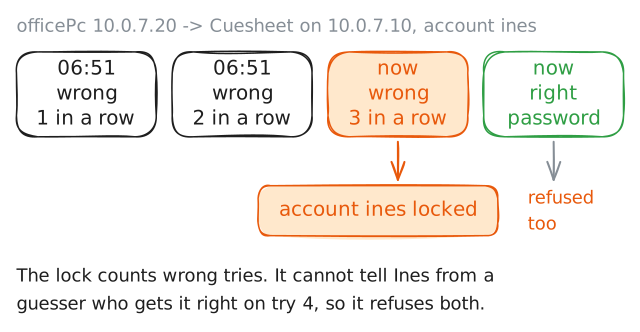
Line 2 of the list limits the tries. After 3 wrong passwords in a row, Cuesheet locks the account.
Ines mistyped her password twice at 06:51 this morning, then gave up and made coffee. Her password is
marsh-heron-58.From the office PC,
10.0.7.20, mistype it once more on purpose, with the last two digits swapped:marsh-heron-85. Then send it correctly.10.0.7.10is the server's address on the station's network.officePc:~# curl -s -u ines:marsh-heron-85 http://10.0.7.10/edit officePc:~# curl -s -u ines:marsh-heron-58 http://10.0.7.10/edit
-
The record and the alert notice it
If accounts locked every night, Ines would want to know, and the lock tells nobody.
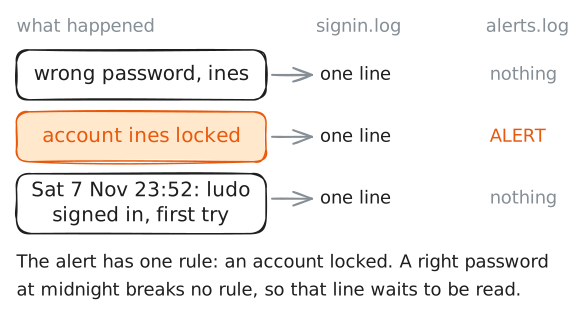
Line 3 of the list is two things. Cuesheet writes every try at signing in, right or wrong, to a file, and security people call such a record a log. When an account locks, Cuesheet also writes one line to a second file, the alerts.
On a real server the alert would reach Ines's phone. Here it is a line in a file.
Read the sign-in record, then the alerts. Then unlock the account with
cuesheet, the technician's command. It runs on the server itself, so it needs no Cuesheet sign-in.stationServer:~# cat /var/log/cuesheet/signin.log stationServer:~# cat /var/log/cuesheet/alerts.log stationServer:~# cuesheet unlock ines
-
The backup repairs it afterwards
Some trouble gets past every lock, because the person who causes it is allowed in. A volunteer who may change the schedule may also delete it by mistake. Nothing was guessed, so no lock closes and no alert fires.
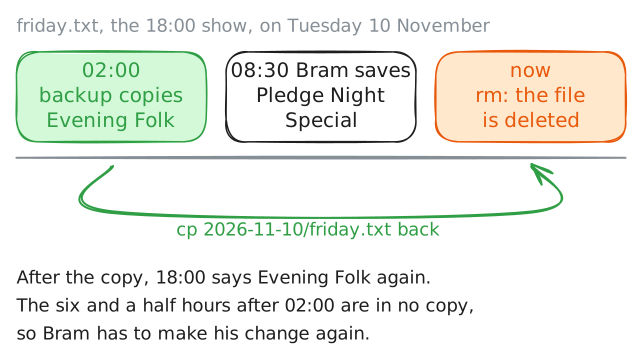
Line 4 of the list is for the morning after. Every night at 02:00 a job copies the schedule files to a backup folder, one folder for each night, named for its date. Last night's is
2026-11-10.Bram changed Friday's 18:00 show at 08:30 this morning. Look at Friday's page on the server itself, at
127.0.0.1, the address a machine uses to reach itself.Now make a tired volunteer's mistake on purpose: delete Friday's file and look at the page. This is a practice server, and the next command copies last night's file back.
stationServer:~# curl -s http://127.0.0.1/schedule/friday
stationServer:~# rm /srv/cuesheet/schedule/friday.txt
stationServer:~# curl -s http://127.0.0.1/schedule/friday
stationServer:~# cp /var/backups/cuesheet/2026-11-10/friday.txt /srv/cuesheet/schedule/friday.txt
stationServer:~# curl -s http://127.0.0.1/schedule/friday
-
The notice, the rules and the door book work on people
Three lines on the list work on people, not on machines.
Line 1 is a notice that Cuesheet shows before anybody signs in. Line 5 is the volunteers' written rules. Line 6 is the book at the studio door, signed by everybody who comes in outside office hours. The server holds a typed copy of that paper book.
From the office PC, ask for the edit page without a name or password, to see the notice. Then, on the server, read the rules and the door book.
officePc:~# curl -s http://10.0.7.10/edit
stationServer:~# cat /srv/station/policy/volunteer-it-rules.txt
stationServer:~# cat /srv/station/records/door-book-2026-11.txt
-
The firewall rule stands in for a control that can't be had
Line 7 guards the transmitter remote: a small web page from 2011 that can switch the station's signal off. It asks for no sign-in, and its maker closed years ago, so no update will ever add a password.
When the right control can't be had, a different one goes in its place. The server has a firewall, a filter that decides which machines may connect to which of its programs. Two rules in it let the studio PC,
10.0.7.30, reach the remote and refuse every other machine.The remote waits on the server's port 9000, the number that picks this program on the server. Ask for it from the office PC, then from the studio PC. Then print the rules.
officePc:~# curl -sS -m 3 http://10.0.7.10:9000/
studioPc:~# curl -sS -m 3 http://10.0.7.10:9000/
stationServer:~# iptables -S STATION
Run these steps on real machines
Keep reading
- Professor Messer: the six control types and four categories for Security+, with one example for every pair, in a short video video
- F5 Labs: what security controls are, sorted by what they are made of and by what they do, with everyday examples article
- TechTarget: what a compensating control is, with a small shop's example and the conditions the card industry sets for one article