 Hack the Route Start learning Open app
The idea
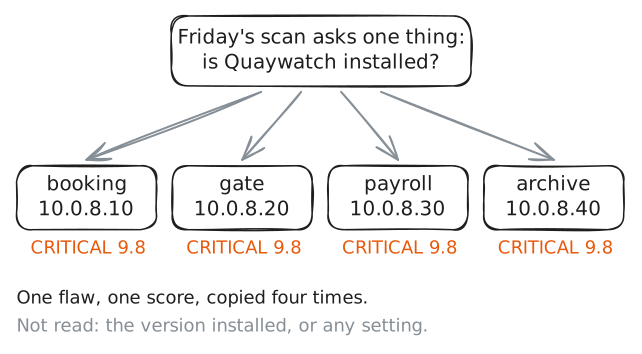
It is Friday evening at Skerry Line, a ferry company with two boats and one IT person, Signe. The weekly scan has come back with the same critical flaw on four machines, and she has time to update one of them before the first sailing. Read what the flaw's maker wrote with her, then check each machine to find the one that cannot wait.
Steps
-
Four criticals and one free hour
Skerry Line pays a small firm, Northlight IT, to scan its machines every Friday. A scan is a program that lists the known flaws it thinks each machine has, one finding to a line.
This Friday's report has arrived. Signe opens it on
opsDesk, her desk machine.opsDesk:~# cat /srv/scan/report.txt
-
The advisory: what the maker wrote
Every finding points at
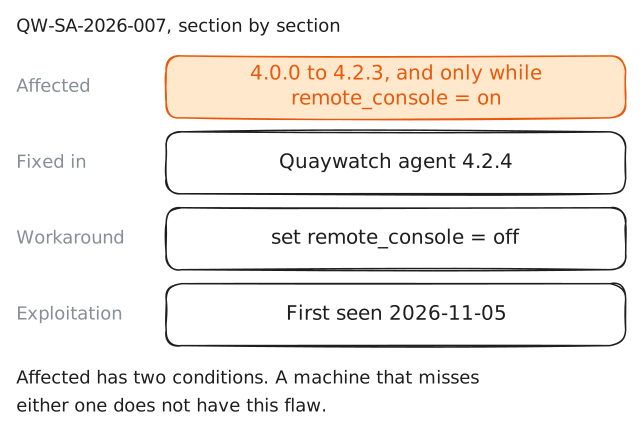
QW-SA-2026-007. That is the number of a security advisory: the notice a software maker publishes about a flaw in its product, usually together with the fix.The maker knows the code, so the advisory is the first-hand source. A scan report only repeats it.
Advisories from different makers look much alike. Each says what is wrong, which versions are affected, which version fixes it, and what to do while an update has to wait.
Signe saved this one on Wednesday. Read it, and find the section
Affected.opsDesk:~# cat /srv/advisories/QW-SA-2026-007.txt
-
Take the 9.8 apart
The
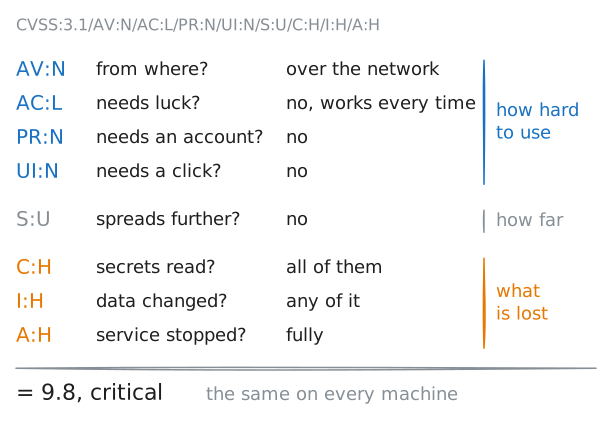
9.8comes from the Common Vulnerability Scoring System (CVSS), a public recipe that turns a flaw into a number from 0 to 10. From 9.0 up the label is critical. High is 7.0 to 8.9, medium 4.0 to 6.9, and low 0.1 to 3.9.The number is worked out from eight short answers about the flaw. An advisory prints those answers beside the score, as the vector. Each part of a vector is a question, a colon and an answer.
Print the advisory's CVSS line.
opsDesk:~# grep CVSS /srv/advisories/QW-SA-2026-007.txt
-
Two feeds: is anyone using it
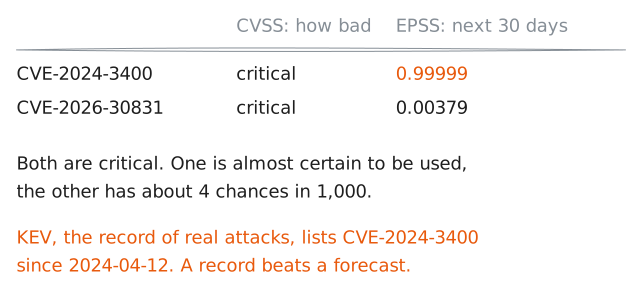
A 9.8 says how bad a flaw would be, not whether any attacker has picked it up. Most flaws are never used: in a typical month attackers are seen using about 2 of every 100.
Two public sources, called threat feeds, answer that question for a flaw with a CVE id. Quaywatch is made up, so neither knows it. Signe saved one record from each for a real flaw,
CVE-2024-3400, a 2024 firewall flaw.The first is the Known Exploited Vulnerabilities (KEV) catalog kept by CISA, a United States agency: a list of flaws seen in real attacks. The second is the Exploit Prediction Scoring System (EPSS): a daily forecast, from 0 to 1, of the chance that a flaw will be used in the next 30 days.
opsDesk:~# cat /srv/feeds/kev-CVE-2024-3400.json
opsDesk:~# cat /srv/feeds/epss-2026-11-10.csv
-
Check one: which version is installed
The feeds describe the flaw out in the world. The rest is about Signe's own four machines, and only their owner can check those.
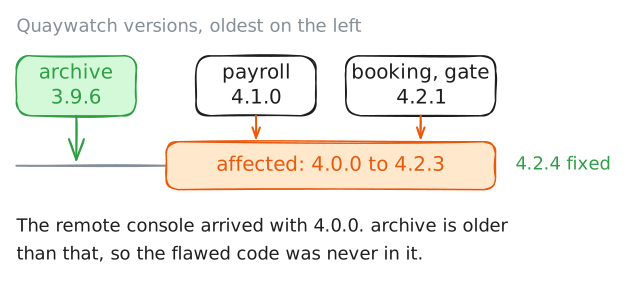
The advisory gave her the first question: is the installed version one of the affected ones,
4.0.0to4.2.3? Nobody has to try the flaw to find out. Comparing a version number with the advisory disturbs nothing.Most programs answer
--version. Ask the Quaywatch agent on each of the four machines. Its command isquaywatch.booking:~# quaywatch --version gate:~# quaywatch --version payroll:~# quaywatch --version archive:~# quaywatch --version
-
Check two: is the feature switched on
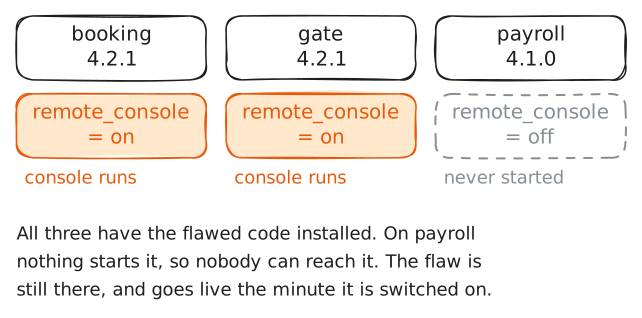
The advisory's second condition is a setting. The flaw is in the remote console, a small web page for looking after the agent from another machine. The console only runs while
remote_console = on, and code that never runs cannot be attacked.Many advisories carry a condition like this. The real
CVE-2024-3400affected only the firewalls that had one feature set up, a gateway or sign-in portal for staff who work from outside. An owner who skips this check spends the night updating machines that had nothing to fear.Quaywatch keeps its settings in
/etc/quaywatch/quaywatch.conf. Print the lines about the console on the three machines that are left.booking:~# grep console /etc/quaywatch/quaywatch.conf gate:~# grep console /etc/quaywatch/quaywatch.conf payroll:~# grep console /etc/quaywatch/quaywatch.conf
-
Check three: who can reach it
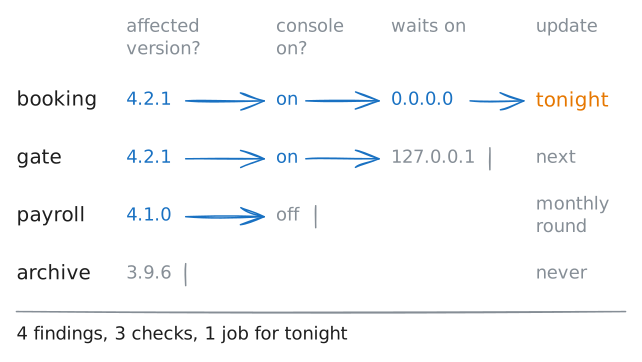
Two machines have the flaw switched on. The vector said
AV:N: the flaw is used over the network. So the last question is who can connect to port 7070 on each of them.A program waits for connections on an address and a port. On
0.0.0.0it answers every machine that can reach this one. On127.0.0.1it answers only programs on the same machine.The lab Ports and sockets: one address, many programs teaches this.
List the waiting ports on
bookingand ongate. Then fetch each console's greeting fromopsDesk, which stands in for any other machine. A fetch sends the console no command.booking:~# ss -ltn gate:~# ss -ltn opsDesk:~# curl -sS -m 3 http://10.0.8.10:7070/ opsDesk:~# curl -sS -m 3 http://10.0.8.20:7070/
Run these steps on real machines
Keep reading
- CISA: the Known Exploited Vulnerabilities catalog, and the three rules a flaw must meet to be listed article
- FIRST: how to read an EPSS score, and the three local checks that turn it into a priority article
- FIRST: the CVSS v3.1 specification, with every part of the vector and each answer it can take article
- Professor Messer: analysing vulnerabilities for Security+, from false positives to CVSS, in a short video video