 Hack the Route Start learning Open app
The idea
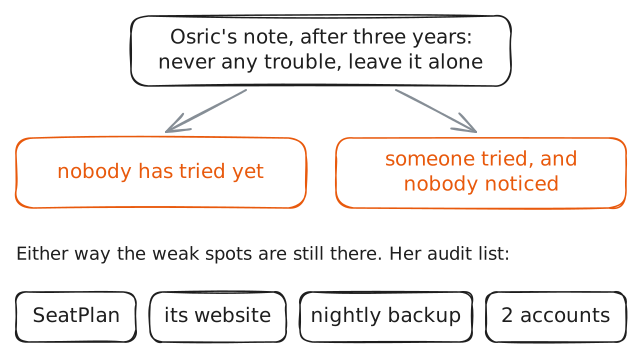
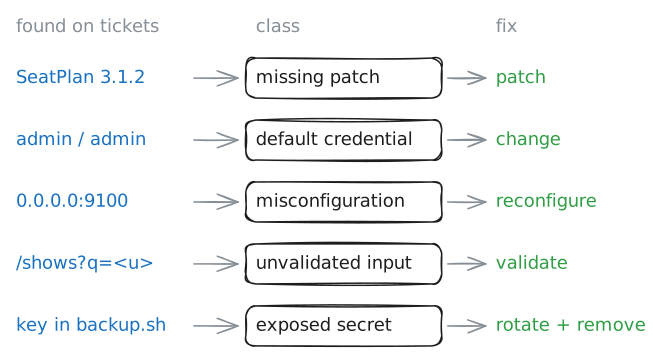
Zofia is the new technician at the Farrow Planetarium, and as of this week the ticket server in the cupboard behind the box office is hers. The man who ran it for three years left a note: it has never given any trouble, leave it alone. Go through the server with her before she trusts it, and sort what you find by kind, because each kind is fixed in a different way.
Steps
-
It has never given any trouble
Osric ran the planetarium's ticket server for three years. He retired in October and left Zofia a note.
A server can run for years with a weak spot nobody has used yet. Security people call such a weak spot a vulnerability: something an attacker could use, there whether or not anyone has tried. "No trouble so far" only means that nobody has tried yet, or that nobody noticed.
So Zofia does an audit: she goes through the server herself, as its owner, with checks that read and change nothing.
tickets:~# cat /root/handover/note.txt
-
Finding 1: the fix that was never installed
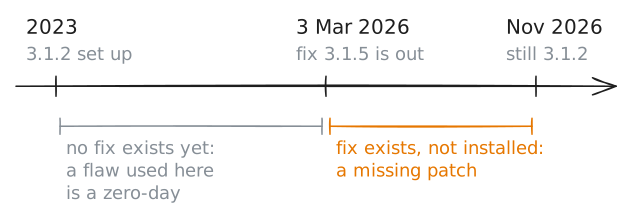
Software has flaws, and its makers keep finding them. When a maker finds one, it publishes a corrected version, called a patch or an update, and a notice that says which versions are affected. Attackers read such notices too.
SeatPlan's maker mails its notices to customers. Osric printed the last one and filed it in the handover folder.
To learn whether a server has a known flaw, an auditor does not use the flaw, which could break the service. She compares two numbers: the version that is installed, and the version the notice asks for.
Ask SeatPlan for its version, then read the notice.
tickets:~# seatplan --version
tickets:~# cat /root/handover/seatplan-notice.txt
-
Finding 2: the password printed in the manual
SeatPlan has an admin page,
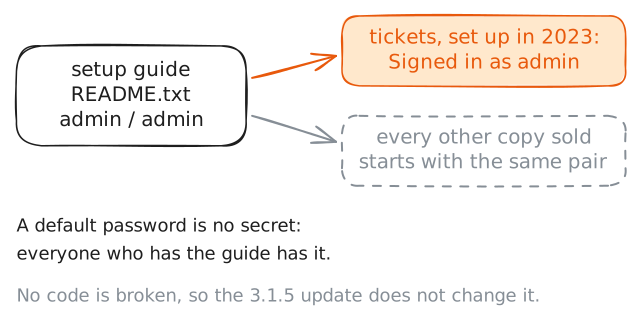
/admin, where staff change prices and refund bookings. Many programs that come with an admin page come with a first password too, so that someone can sign in to set it up.On SeatPlan that first password is the same on every copy sold, and it is printed in the setup guide. The term is default credentials.
Find the guide's line about the first sign-in. Then try that user name and password on this server's own admin page.
127.0.0.1is the address a machine uses to reach itself.tickets:~# grep -A1 'First sign-in' /opt/seatplan/README.txt tickets:~# curl -s -u admin:admin http://127.0.0.1/admin
-
Finding 3: a port that answers the whole building
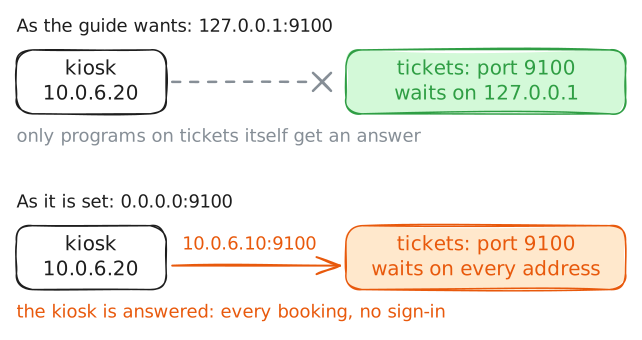
A program that takes requests over the network waits on a port, and the address it waits on decides who can reach it. On
127.0.0.1, only programs on the same machine can.0.0.0.0stands for every address the machine has. A port that waits there answers every machine that can reach this one, unless something in between blocks it. The lab Ports and sockets: one address, many programs teaches this.SeatPlan's guide says its maintenance port, 9100, asks for no sign-in and belongs on
127.0.0.1. The nightly backup uses that port to fetch every booking.List the ports
ticketshas open. Then ask for port 9100 fromkiosk, the self-service screen in the foyer. It reaches the server at10.0.6.10, the server's address in the building.tickets:~# ss -ltn kiosk:~# curl -s http://10.0.6.10:9100/
-
Finding 4: the page that repeats what it is told
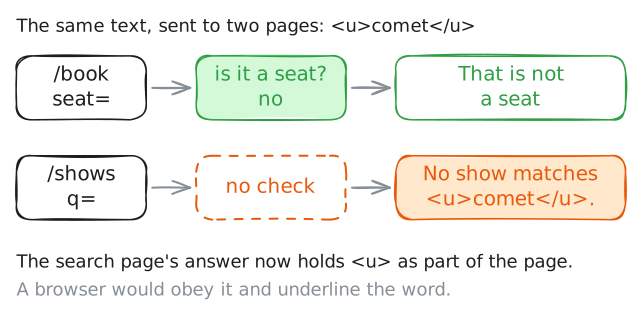
Every box a visitor can type into is a way to hand a program text its author did not expect. A careful program compares each input with what that input should look like before it uses it. That comparison is called input validation.
SeatPlan's website takes input in two places:
/booktakes a seat, and/showstakes a search word. Send both the same odd text,<u>comet</u>.In a web page,
<u>is an instruction to underline. So this text is not a seat and not a word anyone searches for. It harms nothing.tickets:~# curl -s 'http://127.0.0.1/book?seat=<u>comet</u>' tickets:~# curl -s 'http://127.0.0.1/shows?q=<u>comet</u>'
-
Finding 5: a key every account can read
Every night a backup script, a file of commands, sends the bookings to a store outside the building. The store wants proof that the sender is the planetarium, and the proof is a key: a long password made for programs. The handiest place to keep that key is the script itself.
A key in a file is as secret as the file. Look at who may read the backup script, then look for the key in it.
ls -lstarts each line with the file's permissions. After the first character come three letters for the owner, three for the file's group and three for every other account. Anrmeans "may read".tickets:~# ls -l /opt/seatplan/backup.sh tickets:~# grep -n KEY /opt/seatplan/backup.sh
Run these steps on real machines
Keep reading
- NCSC: what a vulnerability is and where vulnerabilities come from, in one short page article
- Professor Messer: misconfiguration vulnerabilities for Security+, from default logins to open ports, in a short video video
- OWASP: how to keep secrets out of files, and the steps to take when one leaks article