 Hack the Route Start learning Open app
The idea
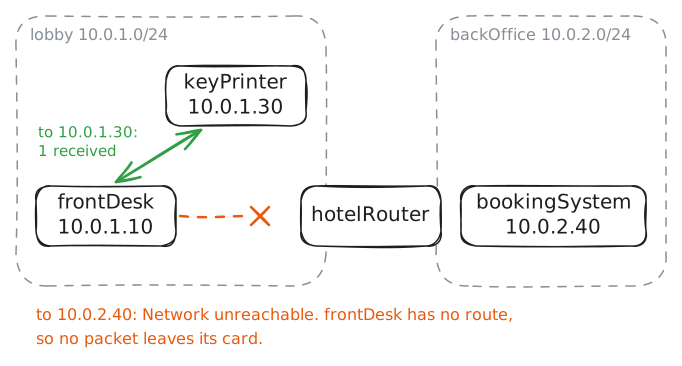
The hotel's new front-desk machine reaches the key-card printer beside it, but the booking system in the back office never answers. Find what the machine is missing, and bring tonight's rooms up on its screen.
Steps
-
Ping beyond the lobby
This hotel has two networks. A network here means a group of machines that reach each other directly, through one Switch:
lobbyholds the addresses that start10.0.1, andbackOfficeholds those that start10.0.2.frontDesk(10.0.1.10) andkeyPrinter(10.0.1.30) sit onlobby, andbookingSystem(10.0.2.40) sits onbackOffice. Between them standshotelRouter, a Router, the machine that carries traffic from one network to another, with a network card on each.Nadia set up
frontDeskthis morning. She gave it an address and a mask, the setting that says which addresses are on its own network, and she left the rest blank.Run both pings from
frontDesk.pingsends a test packet and waits for a reply:-c 1sends one packet, and-W 2waits 2 seconds. The lab records everythingfrontDesksends toward the booking system.frontDesk:~# ping -c 1 -W 2 10.0.1.30 frontDesk:~# ping -c 1 -W 2 10.0.2.40
-
Name the way out
Run
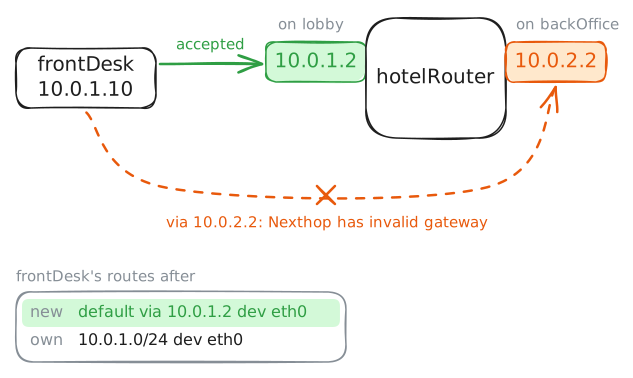
ip routeonfrontDeskto print its routes, the list of where it can send. You will see how little it knows.What's missing is a default gateway, the router a machine hands every packet that isn't for its own network. You might expect a machine to carry a map of the internet instead. It can't, because routers at the center of the internet hold about a million routes, and those change all day.
So the internet's designers split the work. Routers hold the maps, and an ordinary machine holds two facts: which addresses are on my own network, and which router takes the rest. That's why a phone reaches any website in the world with a list of two lines.
The word goes back to the start of the internet. A 1974 paper by Vint Cerf and Bob Kahn, the one that set out TCP, called the box between two networks a gateway. Standards later moved to the word router, but the settings screen on your laptop still says Default Gateway, and
defaultkeeps its everyday meaning: what to do when nothing else applies.hotelRouterhas two addresses, one for each card:10.0.1.2onlobbyand10.0.2.2onbackOffice. Try the one beside the booking system first, and then the other. A refused command changes nothing, so this is safe.frontDesk:~# ip route frontDesk:~# ip route add default via 10.0.2.2 frontDesk:~# ip route add default via 10.0.1.2 frontDesk:~# ip route
-
Ping the booking system again
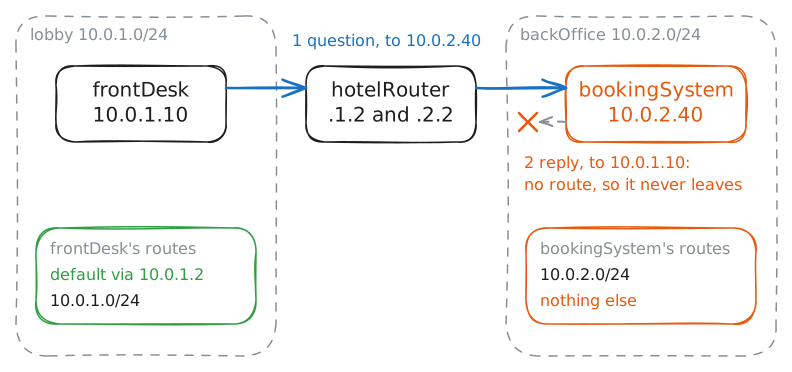
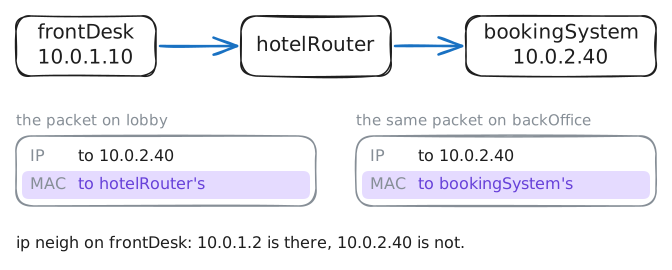
frontDeskhas a way out now. For10.0.2.40it finds no line for that network, so it takes thedefaultline, finds the hardware address of10.0.1.2, and hands the packet tohotelRouter.hotelRouterhas a card onbackOffice, so it delivers the packet there.Before you run it, think about the whole trip: a ping needs a reply, and the settings on
bookingSystemwere typed in by hand too.Run the same
ping. This time the lab records what reachesbookingSystem. Then look at the machine on the other end: runip routeonbookingSystem, and ask it how it would reachfrontDeskwithip route get, which shows the way a machine would send to an address without sending anything.frontDesk:~# ping -c 1 -W 2 10.0.2.40 bookingSystem:~# ip route bookingSystem:~# ip route get 10.0.1.10
-
Give the reply a way back
You know the fault now, so write the fix yourself.
bookingSystemneeds its own default gateway, and the rule from before still holds: it must be an address onbookingSystem's own network. You tried that address earlier, from the side where it was refused.Then run three commands on
frontDesk. Traceroute lists each router on the way to an address:-nprints addresses without looking up names,-q 1sends one probe per stop, and-w 2waits up to 2 seconds for each.curl -sfetches the booking page and shows it as text, andip neighlists the hardware addresses a machine has found.bookingSystem:~# ip route add default via 10.0.2.2 frontDesk:~# traceroute -n -q 1 -w 2 10.0.2.40 frontDesk:~# curl -s http://10.0.2.40/ frontDesk:~# ip neigh
Run these steps on real machines