 Hack the Route Start learning Open app
The idea
Every night the ski resort's backup swamps the old cable to the summit, and the lift operators' screens lag. Move the backup, and only the backup, onto the radio link by adding one line to a routing table.
Steps
-
Read the base router's table
A Router joins networks. Each time a packet comes in, the router must choose where to send it next, and the list it reads is its routing table, one line for each block of addresses it knows about.
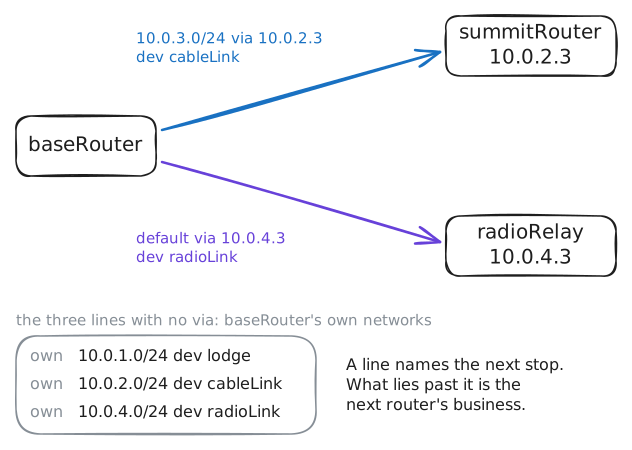
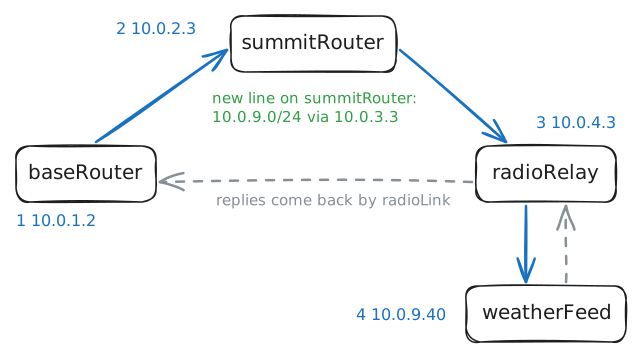
baseRouterstands at the bottom of the mountain with three network cards, each named after its network:lodge, whereticketDesksits;cableLink, the old cable up tosummitRouter; andradioLink, a faster radio link toradioRelay, which stands at the summit and reaches both thesummitnetwork and the outside world.Run
ip routeonbaseRouterand read its routing table. The lines come in two kinds, and the wordviatells them apart.baseRouter:~# ip route
-
Ask which line wins
The backup store at
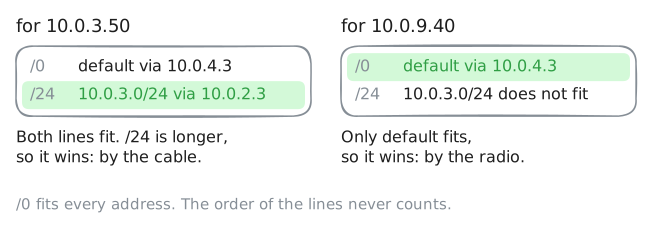
10.0.3.50fits two lines in that table:10.0.3.0/24, anddefault, which fits every address there is. A router sends each packet one way only, so it needs a rule for choosing.ip route getshows the choice without sending anything. AskbaseRouterabout the backup store, then about the weather feed at10.0.9.40, which is on a network it has no line for.baseRouter:~# ip route get 10.0.3.50 baseRouter:~# ip route get 10.0.9.40
-
Move one machine to the radio
Now fix the backup. Changing the
10.0.3.0/24line would move all ofsummit,liftControlincluded, and the lift operators want to stay on the cable. You need a line narrower than/24.The narrowest line of all is
/32, which pins down all 32 bits of an address, so it fits one machine. It's called a host route.10.0.3.50/32 via 10.0.4.3sends that one address toradioRelay.Trace the path from
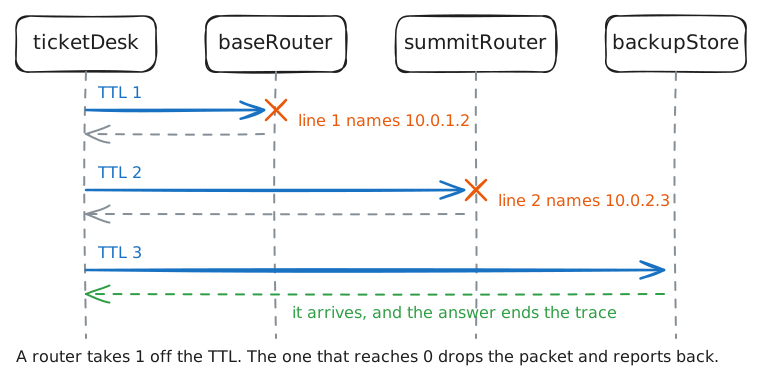
ticketDeskfirst. Traceroute lists each router on the way, and line 2 is the router afterbaseRouter. Add the line onbaseRouter, then trace both summit machines.ticketDesk:~# traceroute -n -q 1 -w 2 10.0.3.50 baseRouter:~# ip route add 10.0.3.50/32 via 10.0.4.3 ticketDesk:~# traceroute -n -q 1 -w 2 10.0.3.50 ticketDesk:~# traceroute -n -q 1 -w 2 10.0.3.20
-
Send the weather by cable
A storm is coming, and the radio link drops out in storms. The resort wants the weather feed at
10.0.9.40on the cable from now on.That feed has no line of its own on
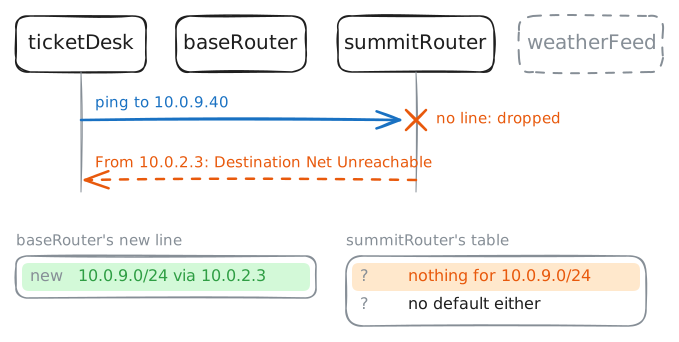
baseRouter, so it goes bydefault. Add a line for its network,10.0.9.0/24 via 10.0.2.3, which is narrower thandefault, so packets for the feed go tosummitRouter. Then ping the feed fromticketDesk.Keep in mind who
summitRouteris: it was set up to serve the summit and the way back tolodge, and nothing more.baseRouter:~# ip route add 10.0.9.0/24 via 10.0.2.3 ticketDesk:~# ping -c 1 -W 2 10.0.9.40 summitRouter:~# ip route
-
Give the next router a line
summitRouterneeds its own line for10.0.9.0/24. Work out the next stop from what you know: the feed is beyondradioRelay, andradioRelayhas a card on thesummitnetwork with the address10.0.3.3, whichsummitRoutercan reach directly.Add the line on
summitRouter. Then trace the path fromticketDeskand open the feed withcurl, which fetches a web page and shows it as text. This trace sends three probes to each stop, because a router allows itself only a few of these notes each second, and a lost one prints as*.summitRouter:~# ip route add 10.0.9.0/24 via 10.0.3.3 ticketDesk:~# traceroute -n -w 1 10.0.9.40 ticketDesk:~# curl -s http://10.0.9.40/
-
Read a table you haven't seen
One short routine reads any routing table:
- Find every line whose block holds the address.
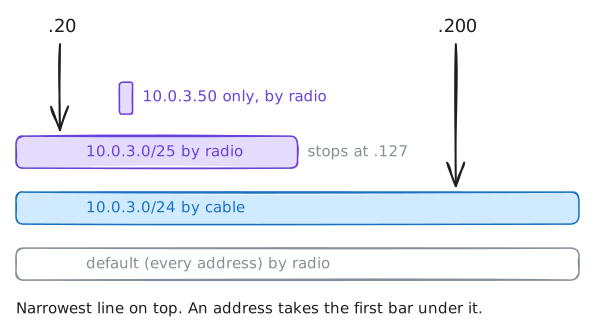
- Take the line with the biggest number after the slash.
- Read its
via: that's the next stop. With novia, the machine is on that card's own network.
The lab has added one more line to
baseRouter, and these are the lines that matter:default via 10.0.4.3 dev radioLink 10.0.3.0/24 via 10.0.2.3 dev cableLink 10.0.3.0/25 via 10.0.4.3 dev radioLink 10.0.3.50 via 10.0.4.3 dev radioLink/25pins down one more bit than/24, so it covers half the block:10.0.3.0/25runs from.0to.127, and10.0.3.128/25would be the other half. Work out the next stop for10.0.3.200before you askbaseRouter, then ask about10.0.3.20as well.baseRouter:~# ip route get 10.0.3.200 baseRouter:~# ip route get 10.0.3.20
Run these steps on real machines