 Hack the Route Start learning Open app
The idea
A rural clinic reads patient records over a fiber link, and pays for a mobile link it hopes never to use. Set the routes by hand so the backup waits its turn, then cut the fiber, then break it in the one way the backup can't see.
Steps
-
See what the router knows
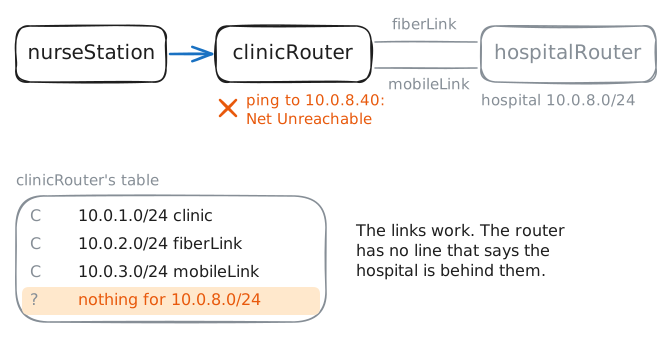
clinicRouterjoins the clinic to the hospital in two ways.fiberLinkis fast and paid by the month, whilemobileLinkcharges for every gigabyte, so the clinic keeps it for emergencies. Today neither one carries anything, because nobody has told the router that the hospital exists.ip route addwould give it a line, but that line goes straight into the table Linux forwards with, and the next restart wipes it. Real routers work from a config instead: a list of settings they read each time they start.This lab uses FRRouting, or FRR, free routing software that runs on Linux. Its shell,
vtysh, works much like the command line on a Cisco router, so what you type here carries over.Ping the records server from
nurseStation, then askclinicRouterwhat it knows.nurseStation:~# ping -c 1 -W 2 10.0.8.40 clinicRouter:~# vtysh -c "show ip route"
-
Add a static route
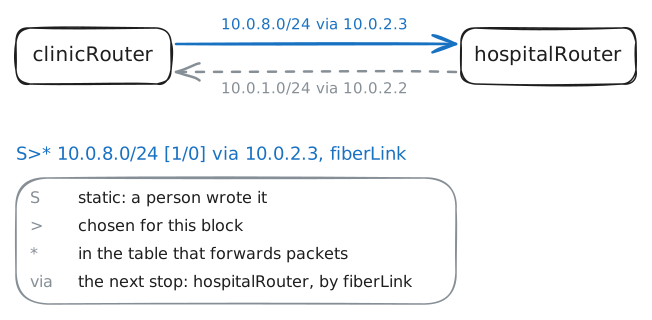
A static route is a line in a routing table that a person wrote. The router never changes it on its own, which is the point: it does exactly what you said, and it never surprises you.
The command has two parts.
configure terminalopens config mode, where a line changes what the router does, andip route 10.0.8.0/24 10.0.2.3is the line: for this block, hand packets to10.0.2.3, which ishospitalRouterat the far end of the fiber. Cisco spells the mask out, as inip route 10.0.8.0 255.255.255.0 10.0.2.3, and means the same thing.Add the route on
clinicRouter, read the table, then open the records page fromnurseStation.clinicRouter:~# vtysh -c "configure terminal" -c "ip route 10.0.8.0/24 10.0.2.3" clinicRouter:~# vtysh -c "show ip route" nurseStation:~# curl -s -m 3 http://10.0.8.40/
-
Survive a power cut
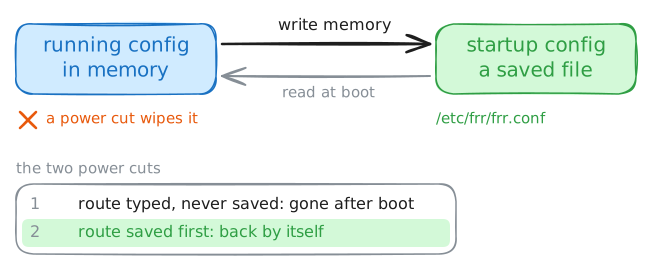
The route works, and right now it lives in the router's memory and nowhere else. A router's config comes in two copies. The running config is what the router is doing now, and the startup config is a file it reads when it boots.
Everything you type changes the running config only. The lab is about to cut the power to
clinicRouterand turn it back on, and you'll read the table afterward. Then you'll set the route again, save it withwrite memory, read the saved file, and go through a second power cut.clinicRouter:~# vtysh -c "show ip route" clinicRouter:~# vtysh -c "configure terminal" -c "ip route 10.0.8.0/24 10.0.2.3" clinicRouter:~# vtysh -c "write memory" clinicRouter:~# cat /etc/frr/frr.conf clinicRouter:~# vtysh -c "show ip route 10.0.8.0/24"
-
Add a route that waits
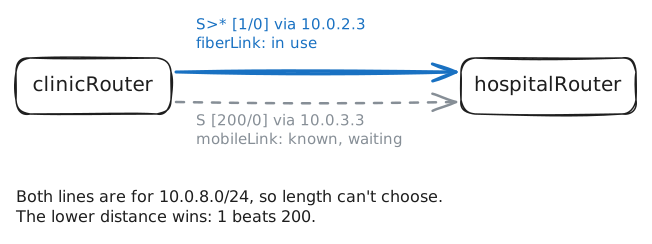
Now the backup. Both routes cover the same block,
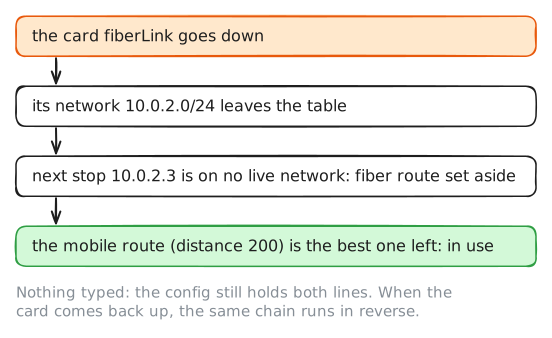
10.0.8.0/24, so they're the same length and longest match can't choose. The router's next test is a number called administrative distance, which says how much it trusts the source of a route, and the lower number wins.The number exists because routes don't all come from people. A routing protocol is software that lets routers tell each other what they can reach, and protocols measure in different ways: one counts routers and another adds up link speeds. Their numbers can't be compared, so the router ranks the sources instead.
Connected networks get 0 and static routes get 1, and the protocols sit higher: BGP between networks 20, OSPF 110, RIP 120.
A number at the end of
ip routesets the distance by hand. Add the mobile route with200, read the table, trace the path fromnurseStation, and save.clinicRouter:~# vtysh -c "configure terminal" -c "ip route 10.0.8.0/24 10.0.3.3 200" clinicRouter:~# vtysh -c "show ip route" nurseStation:~# traceroute -n -q 1 -w 2 10.0.8.40 clinicRouter:~# vtysh -c "write memory"
-
Cut the fiber
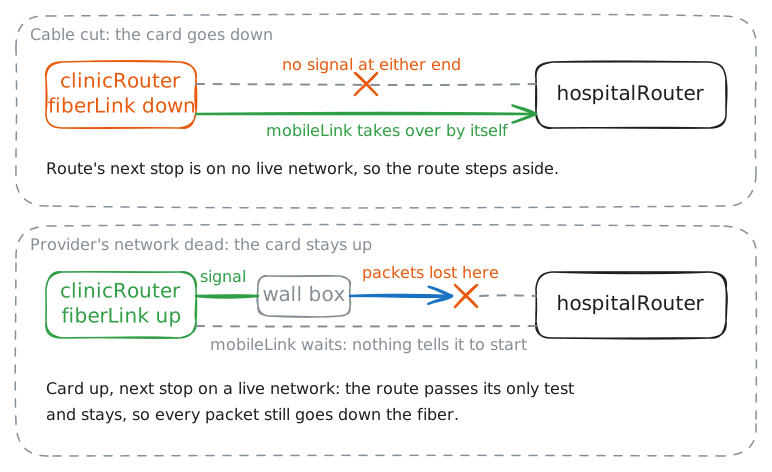
Start with the failure a router can see. Picture the fiber as one run of glass between the two routers, and a digger going through it: the card at each end loses its signal, and the operating system marks it down.
ip link set fiberLink downdoes that toclinicRouter's card, and the lab does the same onhospitalRouter, since a cut cable hits both ends.This takes the main link away on purpose, and you'll bring it back at the end of the step. In between, read the routes for the block and open the records page.
clinicRouter:~# ip link set fiberLink down
clinicRouter:~# vtysh -c "show ip route 10.0.8.0/24"
nurseStation:~# curl -s -m 3 http://10.0.8.40/
clinicRouter:~# ip link set fiberLink up
clinicRouter:~# vtysh -c "show ip route 10.0.8.0/24"
-
Break the provider's network
The clinic's fiber isn't one run of glass, and few are. It stops at a box on your wall that belongs to the provider, and from there it crosses the provider's network. When that network dies, the box on your wall stays powered, and your card keeps its signal.
The lab now does exactly that: every packet on
fiberLinkis lost, and both cards stay up. Ping the records server, then read the route and the card.nurseStation:~# ping -c 5 -W 1 10.0.8.40 clinicRouter:~# vtysh -c "show ip route 10.0.8.0/24" clinicRouter:~# ip -br link show fiberLink
-
Move the traffic by hand
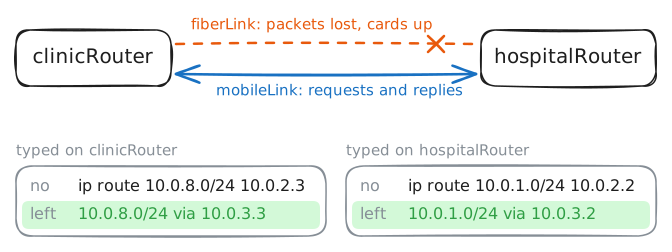
The nurses are phoning you. You know what the router doesn't, so make the change it couldn't: take the fiber route out of the running config. Putting
noin front of a config line undoes it, which is how you delete anything on a router.With the fiber route gone, the floating route is the best one left. The hospital's team makes the same change on its end, since the replies have to move too.
clinicRouter:~# vtysh -c "configure terminal" -c "no ip route 10.0.8.0/24 10.0.2.3"
clinicRouter:~# vtysh -c "show ip route 10.0.8.0/24"
nurseStation:~# curl -s -m 3 http://10.0.8.40/
Run these steps on real machines