 Hack the Route Start learning Open app
The idea
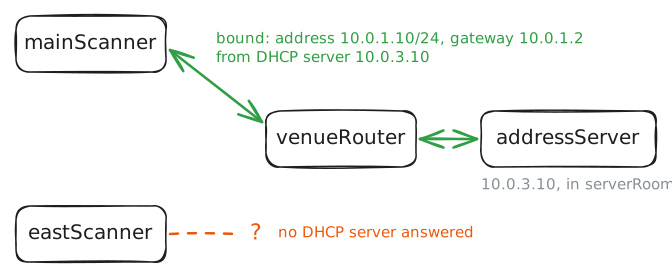
A conference opens the east hall tomorrow, and its badge scanner gets no address, while the main hall's scanner gets one from the same server. Find what the main hall has and the east hall lacks, and get the scanner online before the doors open.
Steps
-
Ask for an address
A machine can't do much on a network until it has an address, and nobody wants to type one into every badge scanner. DHCP, the Dynamic Host Configuration Protocol, does that job instead: a machine wakes up, asks the network for its settings, and a server lends it an address for a fixed time, called a lease.
This venue runs one such server,
addressServer, in the server room next tobadgeSystem, the program every scanner reports to.venueRouterjoins three networks,mainHall,eastHallandserverRoom, with one network card in each, named after that network.mainScannerandeastScannerare the same model, set up the same way.The main hall opened last month and it works. Ask for a lease from
mainScanner, then fromeastScanner.mainScanner:~# dhcp-renew eastScanner:~# dhcp-renew
-
Follow the broadcast
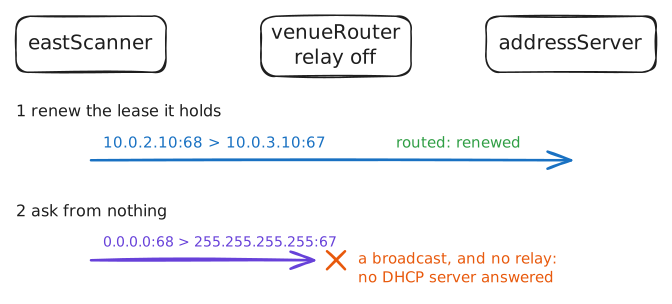
Put yourself in the scanner's place. It has no address to send from, it doesn't know the server's address, and it has no gateway to hand anything to. It can't write a normal packet, because every field it would need is the thing it's asking for.
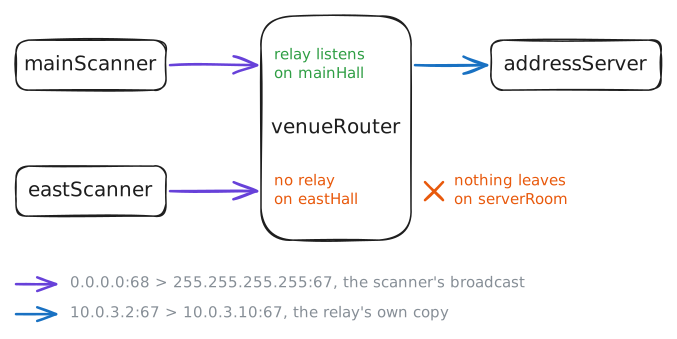
So it shouts. It sends a broadcast from
0.0.0.0, which means "I have no address yet", to255.255.255.255, which means "everyone on this network". Every machine on the network hears it, and any DHCP server among them answers."Among them" is the catch, because
addressServerisn't on the east hall's network. A router forwards a packet by looking up its destination in its routing table, and255.255.255.255never gets that far: the standard tells routers to keep such a packet and never pass it on, whatever their table says. Without that rule, every broadcast from every machine would spread across every network in the building.The lab records DHCP traffic on
venueRouterwithtcpdump, a tool that prints the packets a machine's cards see, whileeastScannerasks again. Its filter is ports 67 and 68, the two DHCP uses. Then you'll dropmainScanner's lease, so that it starts from nothing aseastScannerdoes, and ask again while the lab records that too.eastScanner:~# dhcp-renew mainScanner:~# dhcp-release mainScanner:~# dhcp-renew
-
Relay the east hall
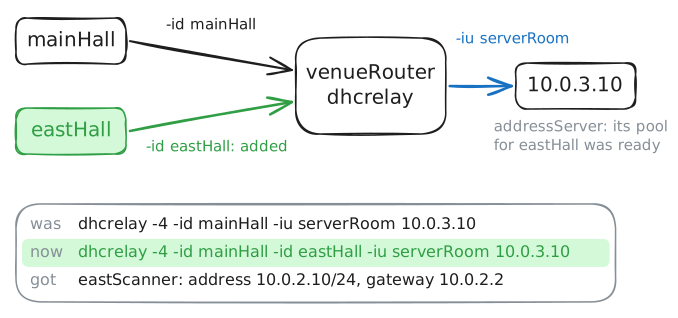
The relay on
venueRouteris a program calleddhcrelay, and it takes its settings from its command line, so ask Linux to print that line. Check the other end before you change anything: ifaddressServerhas no addresses for the east hall, a relay won't help. Its settings are in/etc/dnsmasq.conf, because the DHCP server here is a small program called dnsmasq.Then fix it. Stop the relay and start it again with the east hall added. The main hall has no relay for those few seconds, and for a reason you'll see shortly, its scanners won't notice.
After that, ask for a lease on
eastScannerand open the badge system.venueRouter:~# pgrep -af ^dhcrelay addressServer:~# grep east /etc/dnsmasq.conf venueRouter:~# pkill dhcrelay venueRouter:~# dhcrelay -4 -id mainHall -id eastHall -iu serverRoom 10.0.3.10 eastScanner:~# dhcp-renew eastScanner:~# curl -s -m 3 http://10.0.3.20/
-
Read the relay's note
The scanner works, and something about it should bother you.
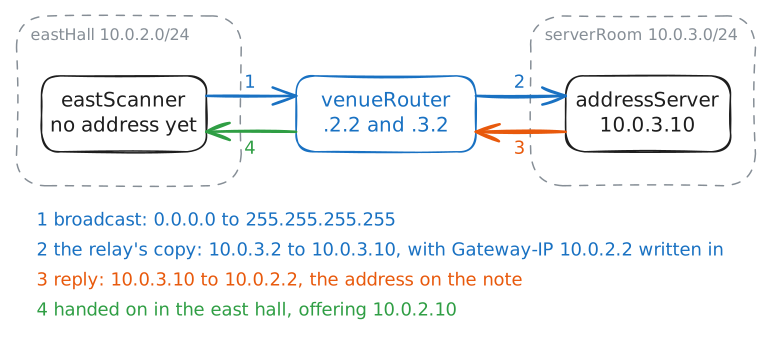
addressServerhas one card, in10.0.3.0/24, and it lent out10.0.2.10, in a network it has no part in.It holds settings for each hall, and every request reaches it through that one card, on behalf of a scanner with no address. So how did it pick the east hall's settings?
The relay tells it. A DHCP packet has a field for this, called
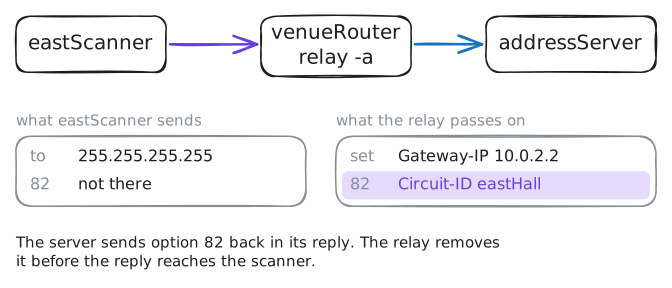
giaddr(gateway IP address) in the standard, and a client always leaves it empty. When the relay passes a request on, it writes in the address of the card that heard the broadcast.Hand back
eastScanner's lease and ask again, so that a full exchange crosses the relay, while the lab records onaddressServer. The-voption makestcpdumpprint every field that's filled in, so each packet fills about fifteen lines, and the scanner's Discover comes first.eastScanner:~# dhcp-release eastScanner:~# dhcp-renew
-
Stop the relay
Now picture the relay dying at 2 a.m. Who notices?
You've already seen the numbers that decide it. In the last recording, the server's offer has
RN (58), length 4: 1800andRB (59), length 4: 3150, the two timers of every lease.At half the lease, the renewal time, a machine asks its server for more time. At seven eighths, the rebinding time, if that server still hasn't answered, the machine asks any server that will listen.
A renewing machine differs from a starting one in the way that matters here. It has an address, a gateway and the server's address, which is everything
eastScannerlacked in the first step.You're about to stop the relay on purpose, and you'll start it again in the last step. Stop it, renew on
eastScannerwhile the lab records onaddressServer, then hand the lease back and ask again, which stands in for a scanner restarting.venueRouter:~# pkill dhcrelay eastScanner:~# dhcp-renew eastScanner:~# dhcp-release eastScanner:~# dhcp-renew
-
Name the card that asked
The note tells the server which network a request came from, and sometimes that isn't enough. A hotel may put 300 rooms on one network, so
Gateway-IPis the same for all of them, and the front desk wants to know which room is asking.Option 82, the relay agent information option, is a second note for that. The relay adds it to the request, naming the line the request came in on, and the server can use that to choose settings or to limit each line to one lease. It came from companies selling internet access over cable and phone lines, who need to tie a lease to a customer's physical line.
Start the relay again, this time with
-a, which adds option 82.eastScannerhas kept asking all this while, so its own retry may get a lease as soon as the relay is back. Clear whatever it holds and ask again while the lab records onaddressServer, so that a full exchange crosses the relay.venueRouter:~# dhcrelay -4 -a -id mainHall -id eastHall -iu serverRoom 10.0.3.10 eastScanner:~# dhcp-release eastScanner:~# dhcp-renew
Run these steps on real machines
Keep reading
- Understanding DHCP Relay Agents, a step-by-step walk through what the relay changes in each message article
- Troubleshoot DHCP in Enterprise Networks, Cisco's guide with real captures of relayed traffic article
- What is DHCP and why is it important?, a plain tour of leases and the four messages article
- DHCP Explained, a short animated video of how a machine gets its address video