 Hack the Route Start learning Open app
The idea
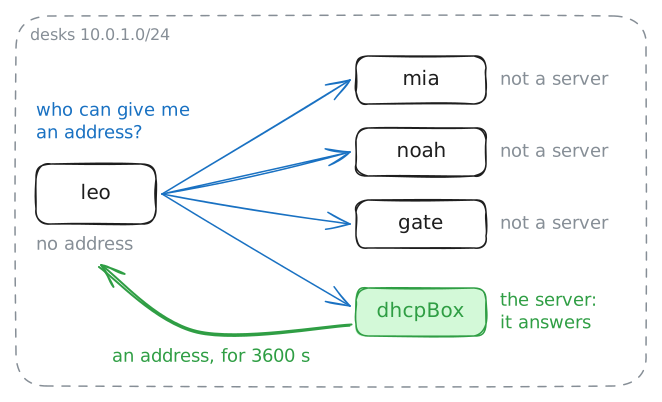
Leo opens his laptop at a new desk. His card is on, and he has no address, no way out and no idea who to ask. A few seconds later he is online, and nobody typed a thing.
Catch what he says in those seconds, and see what happens when nobody answers.
Steps
-
Join a network with nothing
In the lab IP addresses you gave a card an address by hand. That works for one machine. An office has hundreds, each needing an address nobody else holds, and a phone in a café needs one within seconds, on a network it has never seen.
DHCP, the Dynamic Host Configuration Protocol, lets a machine get one by asking. A protocol is an agreed set of rules for what each side says.
List Leo's addresses, ask for one, and list them again.
leo:~# ip -br -4 addr
leo:~# udhcpc -i eth0 -q -n
leo:~# ip -br -4 addr
-
Catch the four messages
Leo had a problem no machine in these labs has had. Every message names a sender and a destination, and he had no address of his own and none for a server. He didn't even know a server existed.
The destination has a way round that:
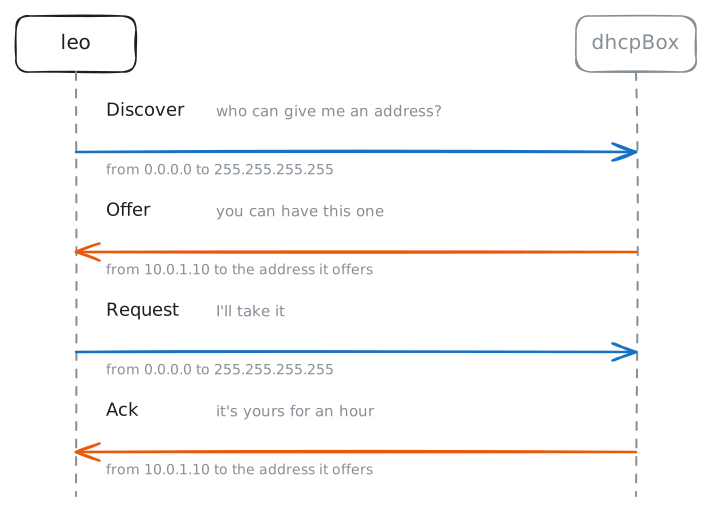
255.255.255.255means everyone on this network, a broadcast. The sender is harder, because Leo can't leave it out, and the capture shows what he writes there.Here is how DHCP works, in four messages that books remember as DORA.
- Discover: Leo asks who can give him an address.
- Offer: a server offers one.
- Request: Leo asks for that address.
- Ack: the server confirms. Ack is short for acknowledge.
Why four, when a question and an answer would do? A network can hold two servers, and both can offer. Leo's Request also goes to everyone, so each server learns which offer he took, and the other one keeps its address for someone else.
The lab takes Leo's address away so he has to ask again, and runs
tcpdumpondhcpBox, the server. Then read the server's log.leo:~# udhcpc -i eth0 -q -n dhcpBox:~# grep -E 'DHCP[A-Z]' /var/log/dnsmasq.log
-
Read what else the answer carried
An address gets Leo to the machines on his own network and no further. The lab IP addresses showed why: a machine sends anything far to its default gateway, and it has to know which machine that is.
Names have the same problem. You type a name, and a machine needs an address. It asks a DNS server to turn the one into the other, and it has to know that server's address first.
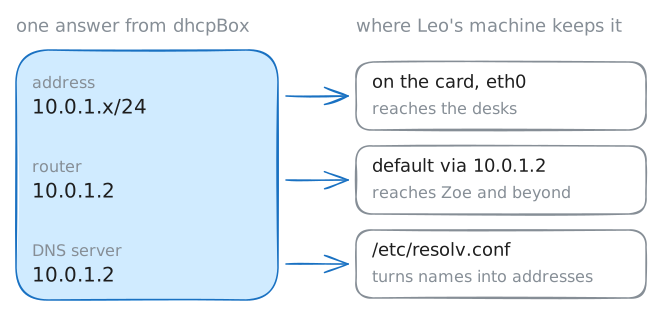
So a machine needs three things before a network is any use: its own address with the
/24, a gateway and a DNS server. The machines you have met so far came with all three. A phone in a café has nobody to give it them.Leo asked for an address, and
udhcpcreported an address. Find out what else his machine has: print Leo's routes, print the file that names his DNS server, and ping Zoe on the other network.leo:~# ip route leo:~# cat /etc/resolv.conf leo:~# ping -c 1 10.0.2.10
-
Read the server's list
A machine could ask a server for its address long before DHCP. An older protocol, BOOTP, did that in 1985, and the address it gave was the machine's for good. That suits a machine that stays on its desk.
DHCP arrived in 1993 and added the lease, an address on loan for a set time. Why lend it?
A laptop rarely says goodbye. It closes and walks out, and the server is left holding an address for a machine that may never come back.
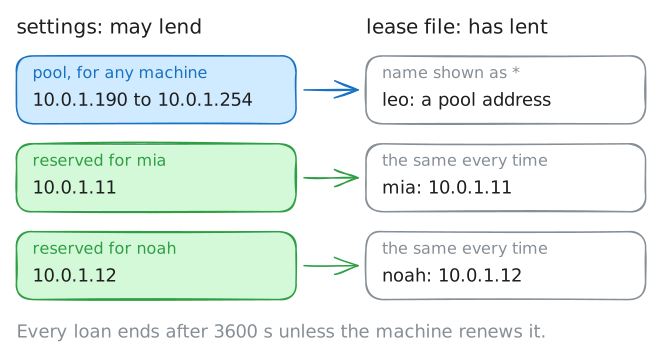
A network like this one has room for about 250 machines, and a café sees more visitors than that in a week. With a lease, an address nobody renews goes back in the pool, the set of addresses the server may lend, when its time is up.
So the server keeps two lists: what it may lend, in its settings, and what it has lent, in its lease file.
Print the two kinds of line that matter from the settings, then the lease file, then the time now.
dhcpBox:~# grep -E 'dhcp-range|dhcp-host' /etc/dnsmasq.conf
dhcpBox:~# cat /var/lib/misc/dnsmasq.leases
dhcpBox:~# date +%s
-
Renew a lease
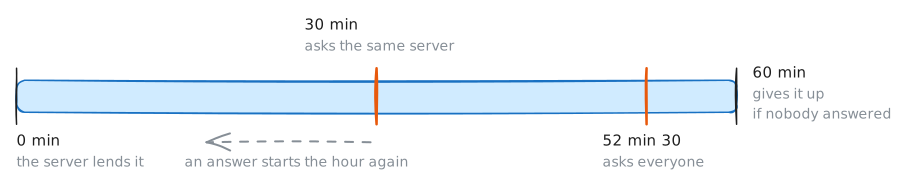
Mia's lease lasts an hour, and she is at her desk all day. Starting again from four messages would risk a new address, and everything she has open would break, because a download or a call in progress is tied to the address it started from.
So a client renews: halfway through the lease, it asks the server for more time on the same address. For Mia that is 30 minutes in.
It needs no broadcast for that. Mia has an address and knows the server's, so she writes to it directly.
If the server doesn't answer, her machine tries again for a while. Close to the end it asks everyone, in case another server can help. If the lease runs out with no answer, she has to stop using the address.
Half an hour is too long to wait here. Mia's
udhcpcstayed running after she joined, because she never gave it-q, and it renews at once when it gets a signal, a short poke from one program to another.Print the lease file, renew on Mia's machine, and print the file again. The lab runs
tcpdumpon the server.dhcpBox:~# cat /var/lib/misc/dnsmasq.leases mia:~# killall -USR1 udhcpc dhcpBox:~# cat /var/lib/misc/dnsmasq.leases
-
Lose the server
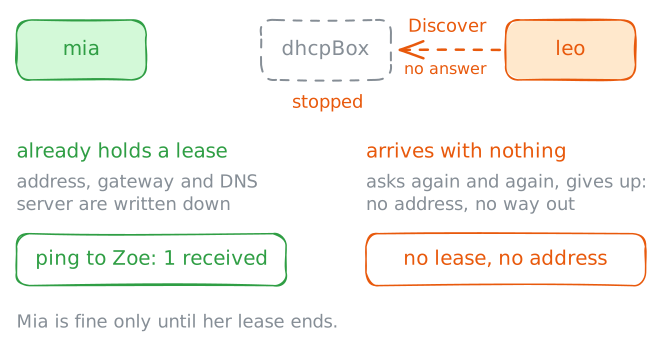
Every machine on the desks got its address from one box. If that box dies, what breaks? Asking one machine won't tell you, so ask two.
The lab stops the server on
dhcpBoxand takes Leo's address away, which makes him a new arrival. Then Leo tries to join, you list his addresses, and Mia, who holds a lease, pings Zoe.leo:~# udhcpc -i eth0 -q -n leo:~# ip -br -4 addr mia:~# ping -c 1 10.0.2.10
Run these steps on real machines