 Hack the Route Start learning Open app
The idea
Mia knows Noah's address, 10.0.1.12, and the switch between them has never heard of it. A switch delivers to cards, so
before her machine sends anything, it asks a question out loud. Catch that question, and see who believes the answer.
Steps
-
Watch a machine learn a MAC address
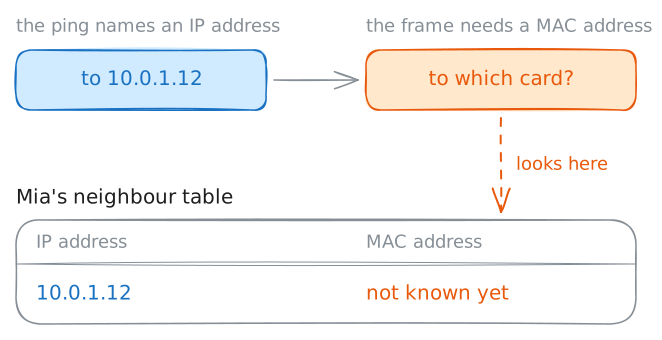
Every card, the part of a machine that plugs into the network, has an address built into it: its MAC address. A switch delivers by that address alone. It reads it off the frame, the wrapper each message travels in, and it never looks at an IP address.
A program knows only the IP address. So Mia's ping to Noah's
10.0.1.12can't leave until her machine knows a second address for him, and nobody has told it one.Her machine keeps the MAC addresses it finds in a short list called the neighbour table. The machine started a moment ago, so the list is empty.
Print the table, ping Noah, and print it again.
mia:~# ip neigh show
mia:~# ping -c 1 10.0.1.12
mia:~# ip neigh show
-
Catch the question and the answer
Why does a machine have two addresses at all? Ethernet, the system behind most wired networks, dates from the 1970s, and it carries frames from card to card. IP was built to join networks of every kind, so it couldn't depend on one kind of card.
That left a gap: IP says where a message is going, and the cable needs a card to deliver it to.
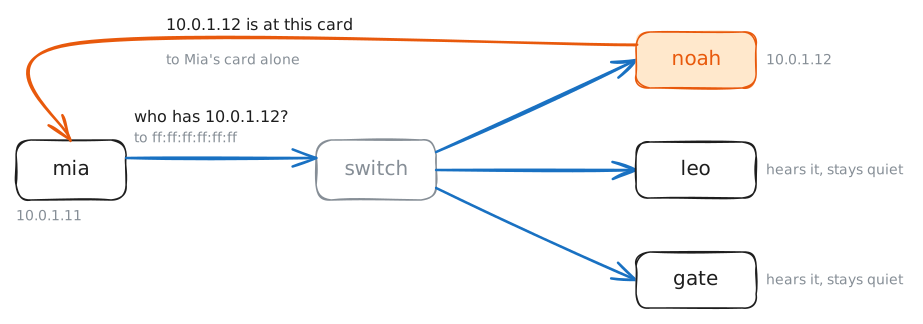
In 1982 a short standard closed the gap: ARP, the Address Resolution Protocol. Here is how ARP works, in two messages.
- The question goes to everyone, because Mia doesn't know who to ask. It uses the broadcast MAC
address,
ff:ff:ff:ff:ff:ff, which every card accepts. - The answer is addressed to Mia's card alone, because the question told Noah where she is.
Empty Mia's table so she has to ask again, then ping Noah. The lab runs
tcpdumpon her card and on Leo's, and shows what each one hears. Last, read Noah's table.mia:~# ip -s neigh flush dev eth0 mia:~# ping -c 1 10.0.1.12 noah:~# ip neigh show
- The question goes to everyone, because Mia doesn't know who to ask. It uses the broadcast MAC
address,
-
Ask for a machine on another network
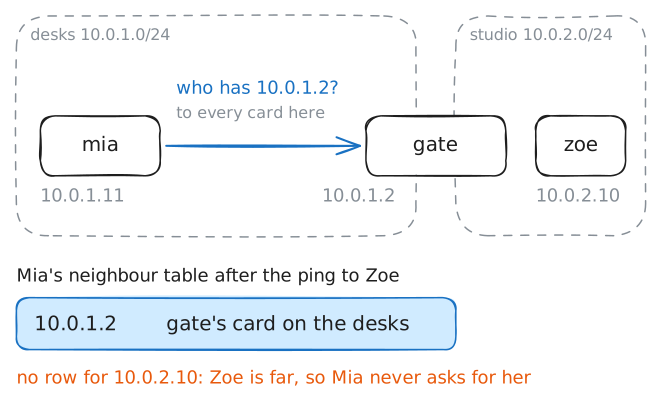
The question stops at the router. The lab Network devices showed that:
gateheard a ping sent to everyone and passed it on to nobody. So Mia's machine has no way to ask for Zoe's MAC address.It doesn't need to. A frame only has to reach the next machine on the way, and the lab IP addresses showed which one that is. Mia's routing table sends anything far to her default gateway,
10.0.1.2.Ping Zoe's
10.0.2.10, read Mia's neighbour table, then look upgate's card on the desks, the network Mia sits on.mia:~# ping -c 1 10.0.2.10 mia:~# ip neigh show gate:~# ip -br link show dev desks
-
Follow one ping across a router
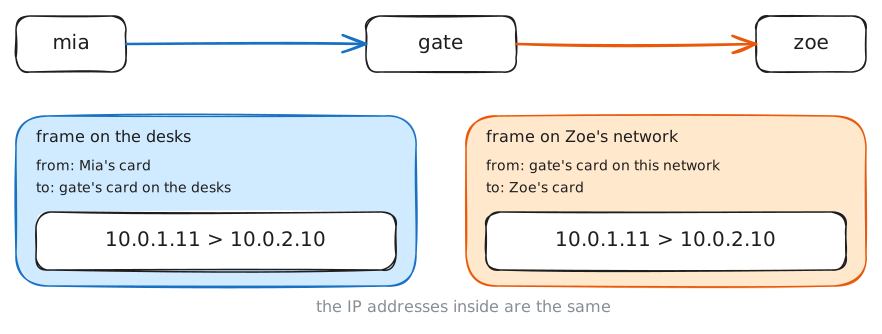
A letter sent across town goes in an envelope, and at the sorting office it can move to a new envelope for the next leg. The name on the letter stays the same the whole way.
A message on a network works the same way. The IP addresses sit on the packet, which is the letter, and they name the two ends. The frame is the envelope, and its MAC addresses name the two cards on this one stretch of cable.
A MAC address means something only on its own network, and the next network may not use the same kind of frame at all. So a router takes each packet out of the frame it came in, and builds a new frame for the next network.
Ping Zoe. The lab runs
tcpdumpon Mia's card and on Zoe's, with-eso it prints the MAC addresses. Then readgate's neighbour table.mia:~# ping -c 1 10.0.2.10 gate:~# ip neigh show
-
Ping an address nobody holds
The lab IP addresses left a question open. Mia's routing table sends
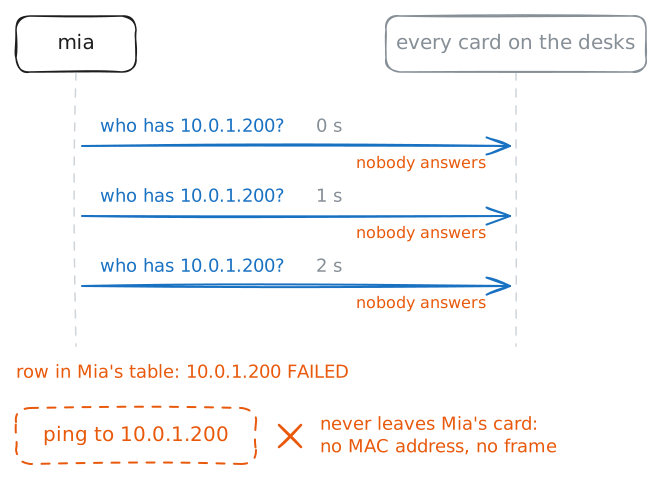
10.0.1.200straight out of her card, and no machine holds that address.Now the rest of the story shows up. Before the ping can leave, her machine needs a MAC address to put on the frame, so it asks, and nobody answers. It asks again, and gives up after a few tries.
Ping
10.0.1.200while the lab runstcpdumpon Mia's card, and read her neighbour table. Then meetarping, which sends the ARP question with no ping attached, and aim it at Noah.mia:~# ping -c 1 10.0.1.200 mia:~# ip neigh show mia:~# arping -c 2 -I eth0 10.0.1.12
-
Watch Mia believe the wrong machine
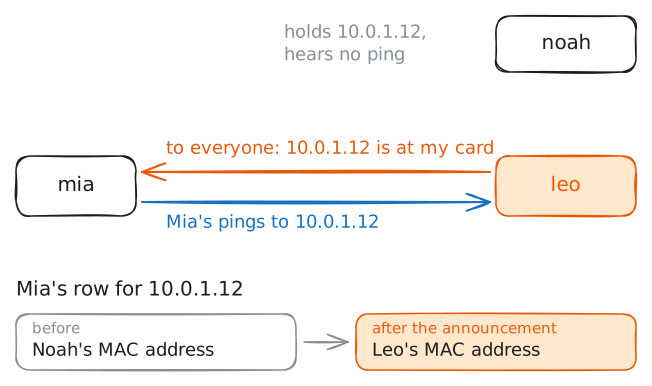
ARP has no way to prove that a message is true. And one kind of ARP message is news nobody asked for.
That news has an honest use. When a spare server takes over a failed server's address, it sends an announcement: this address is now at my card. The machines that were sending to the dead server hear it, and they stop.
Any machine can send the same message, though. The lab has put Noah's address on Leo's card, beside Leo's own, and Mia's table has a row for Noah, whose card answered her a moment ago.
Send an announcement from Leo's machine, and read Mia's neighbour table. Then ping
10.0.1.12from her machine. The lab runstcpdumpon Leo's card and on Noah's, and shows what each one hears.leo:~# arping -c 2 -U -I eth0 -s 10.0.1.12 10.0.1.12 mia:~# ip neigh show mia:~# ping -c 2 10.0.1.12
Run these steps on real machines