 Hack the Route Start learning Open app
The idea
Priya moved her tea shop's website to a new server this morning, and her customers still see the old one. Her web host says to wait 48 hours, and Priya wants to know what exactly she is waiting for.
Steps
-
Ask for a name
Computers reach each other by IP address, and people remember names. So every time a customer opens Priya's site, something has to turn
www.orchard.labinto an address.In the early 1980s that something was one text file,
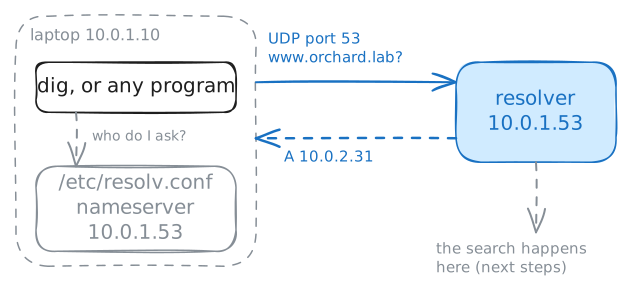
HOSTS.TXT, kept by one office in California. Every machine on the network downloaded a copy, and as the network grew, the file couldn't keep up. In November 1983 Paul Mockapetris published the replacement: the Domain Name System (DNS), a directory shared out across many servers, where no server holds the whole list.A laptop doesn't search that directory itself. It hands every question to one server, called its Recursive resolver. The file
/etc/resolv.confnames that server.Read that file, then ask for the shop with
dig, a tool that sends one DNS question and prints the whole reply. The lab also runs a capture on the laptop, which lists the DNS packets it sends and receives.laptop:~# cat /etc/resolv.conf laptop:~# dig www.orchard.lab
-
Follow the name from the root
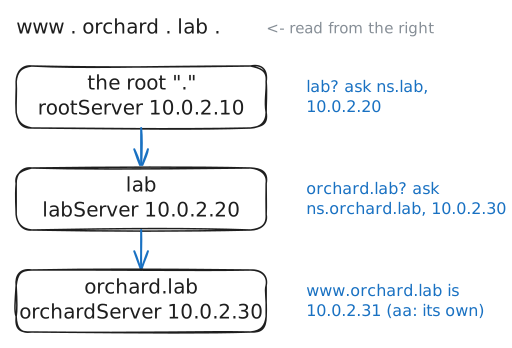
The resolver doesn't hold the shop's address, so where does it find it? No server knows every name. Names form a tree instead, and you read a name from right to left.
www.orchard.lab.really ends in a dot, and that dot is the root of the tree. Under the root sitslab, in the place where.comsits on the real internet. Underlabsitsorchard.lab, which belongs to Priya, andwwwis a name inside it.Each level hands the part below it to someone else's server, and that is called delegation. A part of the tree that one server answers for is a zone, and that server is an authoritative server for it. It answers for its own zone and nothing more, so a search starts at the top and moves down.
Do the resolver's job by hand now. Every resolver is built with the addresses of the root servers, because something has to be known before the first question. In this lab that is
10.0.2.10.laptop:~# dig +norecurse @10.0.2.10 www.orchard.lab laptop:~# dig +norecurse @10.0.2.20 www.orchard.lab laptop:~# dig +norecurse @10.0.2.30 www.orchard.lab
-
Watch the resolver search, then remember
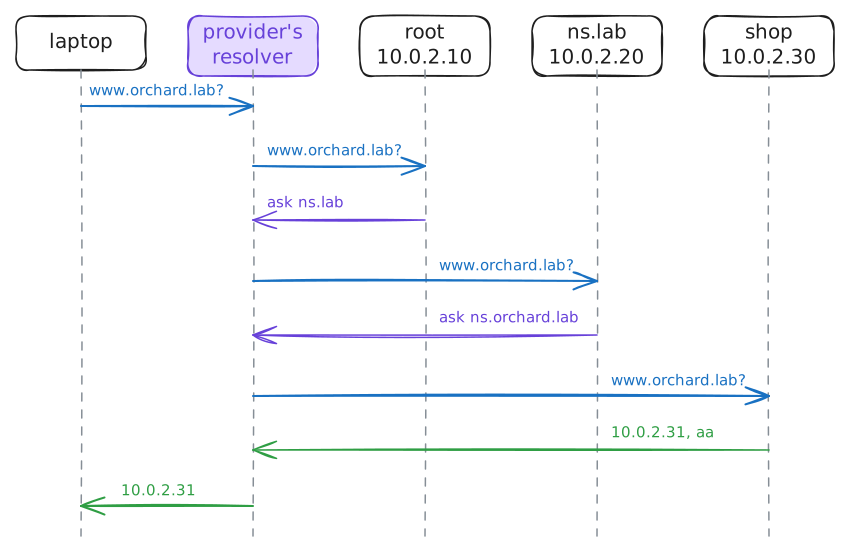
The walk you did by hand took three questions. A full walk for every click would be slow, and the root servers would drown in questions. So a resolver keeps each answer for a while.
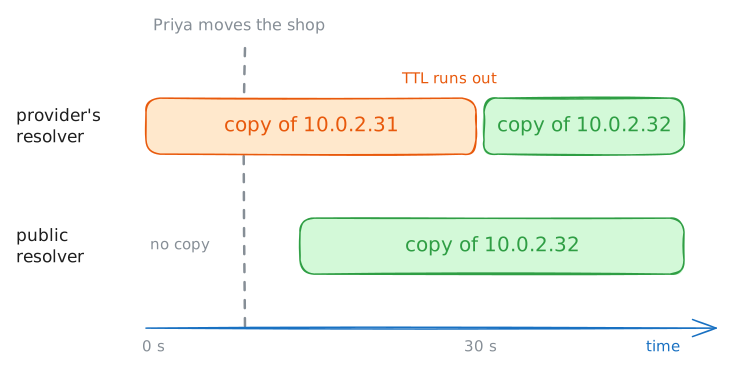
That store is its cache, and the record's owner decides how long a copy may stay, with a number called the time to live (TTL).
Be careful with that word. The TTL in
pingcounts routers in an IP packet, and this one counts seconds on a DNS record. They share only a name, and the30you saw in the last steps is the second kind.Now watch the resolver do the walk itself. The lab clears its memory first, so it starts from nothing, and for each question a capture on the resolver lists every DNS packet.
You will ask three times:
www, thenwwwagain 5 seconds later, thenshop.orchard.lab, a name the resolver hasn't seen.laptop:~# dig +noall +answer www.orchard.lab laptop:~# dig +noall +answer www.orchard.lab laptop:~# dig +noall +answer shop.orchard.lab
-
Move the shop and watch two resolvers disagree
Now do what Priya did. Her record lives on one server,
orchardServer, so a move means changing one line there. The lab will pointwwwaway from the old web server,10.0.2.31, and at the new one,10.0.2.32.People call what happens next propagation, as if the new address spreads out across the world. That word makes you picture a push, and DNS has no push. A name server doesn't know which resolvers hold a copy of its records, and it never contacts them.
Two resolvers will show what happens instead. The provider's resolver asks for the shop a few seconds before the move.
The public resolver at
10.0.2.53stands in for free ones such as Google's8.8.8.8or Cloudflare's1.1.1.1, and it has no copy. You ask both after the move, and@picks which one.laptop:~# dig +noall +answer www.orchard.lab laptop:~# dig +noall +answer @10.0.2.53 www.orchard.lab laptop:~# dig +noall +answer www.orchard.lab
-
Read the three ways DNS says no
Most DNS trouble doesn't come as a wrong address. It comes as a program printing
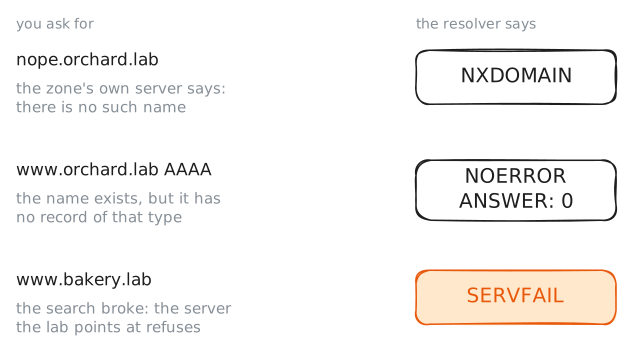
Could not resolve host, which hides the reason.digshows the reason instatus.Three different failures look alike in a browser: the name doesn't exist, the name exists with no record of the type you asked for, or the resolver couldn't finish the search. They point at different people, so you need to tell them apart.
digcalls the first oneNXDOMAINand the last oneSERVFAIL.Each of these has a real example here.
nope.orchard.labwas never created.www.orchard.labhas an IPv4 address and no IPv6 address, andAAAAis the record type that holds an IPv6 address.The third needs a broken neighbor, so the lab adds one to the
labzone:bakery.lab, handed to10.0.2.30. That is Priya's server, and it holds no such zone.laptop:~# dig nope.orchard.lab laptop:~# dig www.orchard.lab AAAA laptop:~# dig www.bakery.lab
-
See what programs really ask
Every test so far used
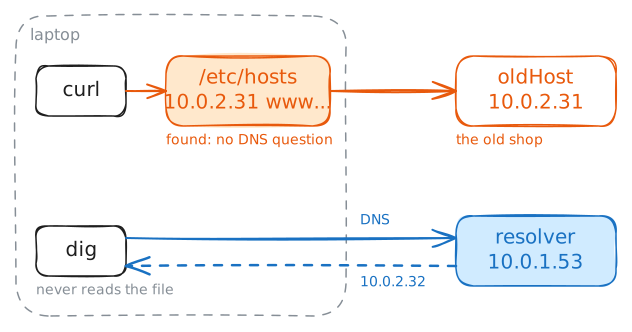
dig, anddigtalks to a DNS server and nothing else. Browsers,curlandpingwork differently. They call the system's own name lookup, and that has more than one place to look.One of those places is a plain file, the hosts file:
/etc/hostson Linux and macOS, andC:\Windows\System32\drivers\etc\hostson Windows. It is the same idea as the oldHOSTS.TXT: an address and a name on a line, with no TTL. A line in it stays until someone deletes it.Developers add lines there to test a site before a move, and then forget them. Suppose someone did that on this laptop months ago. The lab adds the line
10.0.2.31 www.orchard.lab, and the zone still points at the new server.getent hostsdoes the same lookup that programs do, and prints what they would get.dig +shortprints only the answer.laptop:~# getent hosts www.orchard.lab laptop:~# dig +short www.orchard.lab laptop:~# curl -sS -m 5 http://www.orchard.lab/
Run these steps on real machines