 Hack the Route Start learning Open app
The idea
Lena runs the network for a small ferry company. The ticket desk on the quay reaches the booking server across the strait, and today it keeps failing in a new way every hour. Each failure leaves a short message, and Lena wants to know who wrote it and what it means.
Steps
-
Ping the booking server
Ticket sales stopped for a minute this morning, and the first command Lena typed was
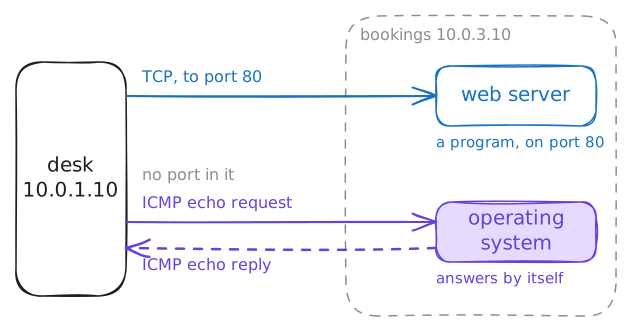
ping. Most people start there, so it pays to know what it really sends.IP moves packets and promises nothing, and on its own it has no way to say what went wrong. So the Internet Control Message Protocol (ICMP) was written alongside it, and published in 1981 as a part of IP that every machine must speak. Machines and routers use it to talk about packets.
ICMP rides directly inside IP, beside TCP and UDP, not on top of them. So it has no ports, and no program listens for it.
A ping is an ICMP echo request, and the machine's operating system answers with an echo reply by itself. Mike Muuss wrote
pingin 1983 and named it after sonar: send a sound, then time the echo.The desk is
10.0.1.10, and the booking server is10.0.3.10, two routers away. The lab also runs a capture on the booking server: it lists the ICMP packets that machine sees, the waytcpdumpdoes on a real one.desk:~# ping -c 3 10.0.3.10
-
Find out who gave up
IP is a best-effort service: a router that can't pass a packet on drops it. If that were all, the sender would wait in silence and learn nothing. So the router also sends an ICMP error back to the packet's source address.
That error is a packet of its own, with its own source address, so it names the machine that gave up. Read that address first, because it tells you how far your packet got.
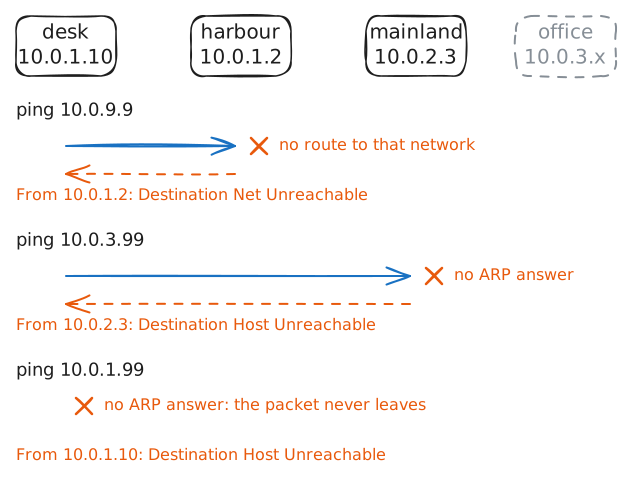
The error is called Destination Unreachable, and a code inside gives the reason. A router with no route for the address gives up at once: net unreachable. A router with that network on one of its network cards calls out for the machine with ARP, the way machines find their neighbors, and after about 3 seconds of silence it gives up: host unreachable.
Between the desk and the booking server sit two routers,
harbourandmainland. Now try three addresses that nobody holds.10.0.9.9is on a network no router here knows.10.0.3.99is free on the booking server's network, and10.0.1.99is free on the desk's own network.desk:~# ping -c 1 10.0.9.9 desk:~# ping -c 1 10.0.3.99 desk:~# ping -c 1 10.0.1.99
-
Read the packet inside the error
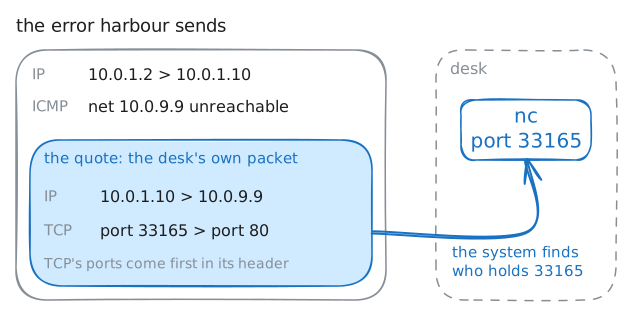
An error arrives from a router, and it has no Port to land on. A machine may have dozens of programs talking at once, so how does the system know which one to tell?
The error quotes the packet that caused it. The ICMP standard says each error must carry the failed packet's IP header, the part with its addresses, and at least its next 8 bytes.
TCP and UDP put their port numbers in those first bytes, so the quote shows which conversation failed. The system looks up those ports, finds the connection that failed, and can tell its program the reason.
Watch this with
nc, which tries to open a TCP connection to an address and a port. Try port 80 at10.0.9.9again, and this time the capture prints what is inside the error.desk:~# nc -v 10.0.9.9 80
-
Walk the path with time exceeded
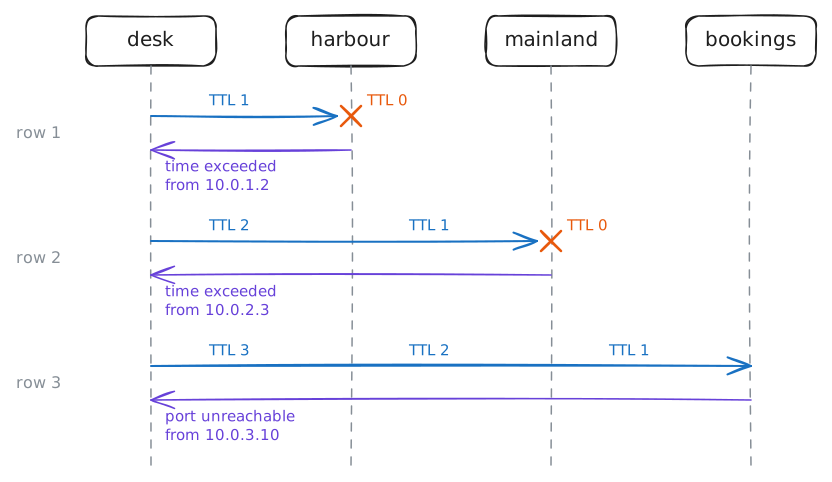
A wrong route can send packets around in a circle, and with nothing to stop them they would circle forever and fill the loop. So every packet carries TTL. Each router lowers it by 1, and the router that reaches 0 drops the packet and sends back Time Exceeded.
In the late 1980s Van Jacobson used this safety valve to map a network, and no router had to change. Send a packet with TTL 1, and the first router reports itself. TTL 2 gets the second router, and so on.
The tool he wrote is
traceroute. Try the idea by hand withping -t, which sets the starting TTL, then lettraceroutedo the work.On Linux,
traceroutesends UDP packets to a high port that nothing holds, by default. Each of those packets is called a probe, and the capture shows every one.desk:~# ping -c 1 -t 1 10.0.3.10 desk:~# ping -c 1 -t 2 10.0.3.10 desk:~# traceroute -n -q 1 10.0.3.10
-
Tell silence from a dead machine
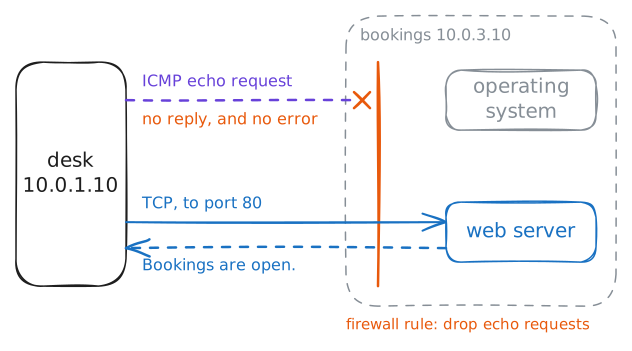
Errors help you, and they also tell strangers about your network, so many networks limit them. Windows' own Firewall often drops pings, and so do plenty of cloud servers. A firewall that drops a packet writes no error, so the sender hears nothing at all.
That leaves three results to tell apart:
- A reply means the machine answered.
- A
Fromline means something on the path told you why it failed. - Nothing at all means the packet or its reply vanished, and that alone can't tell you why or where.
Routers go quiet too. Many limit how many Time Exceeded messages they send, to protect themselves, and some send none. That is what puts stars in a
traceroute.The lab makes two changes: the booking server drops echo requests, and
mainlandstops sending Time Exceeded. Then you ask the same machine three ways.desk:~# ping -c 2 -W 1 10.0.3.10 desk:~# curl -sS -m 5 http://10.0.3.10/ desk:~# traceroute -n 10.0.3.10
-
Block ICMP and watch big pages hang
After all that, someone usually says: block all ICMP, it's safer. Here is what that costs.
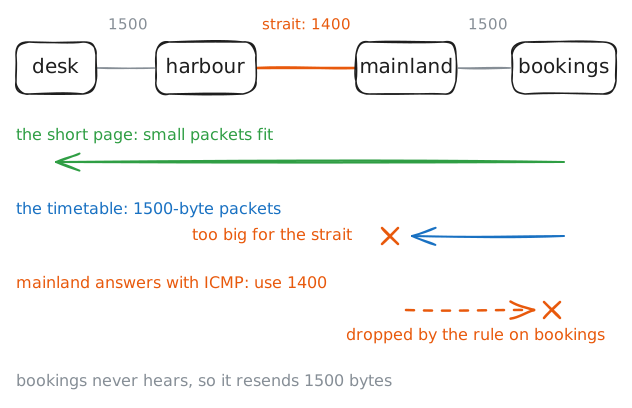
Every network has a largest packet it carries, its maximum transmission unit (MTU), often 1500 bytes. The strait between
harbourandmainlandcarries only 1400, as VPN links often do.TCP marks its packets Don't Fragment, which tells routers not to cut them into pieces. So a router with a packet too big for the next link drops it and sends back a Destination Unreachable with the size that fits. The sender then sends smaller packets, and that is path MTU discovery, in use since 1990.
A connection opens with small packets, so opening one proves nothing about size. Then the booking server sends the data, and only that part is big. The timetable is about 30 kB, so it needs many full-size packets.
The lab now puts one rule on the booking server: drop all ICMP. Fetch the short front page, then the timetable. Then send a ping that is too big for the strait.
desk:~# curl -sS -m 5 http://10.0.3.10/
desk:~# curl -sS -m 5 -o /dev/null http://10.0.3.10/timetable.txt
desk:~# ping -c 1 -M do -s 1472 10.0.3.10
Run these steps on real machines