 Hack the Route Start learning Open app
The idea
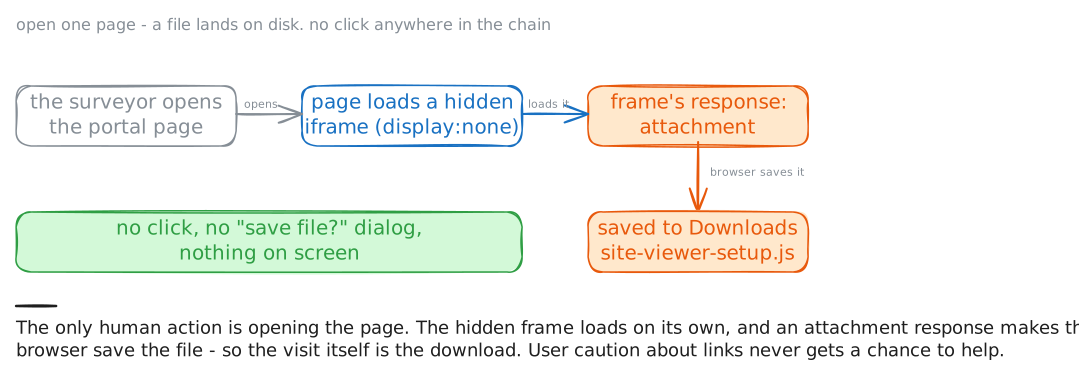
A surveyor at Deepwell opened a project portal in their browser, clicked nothing, and found a file named
site-viewer-setup.js in their Downloads. That is a drive-by download: the page itself does the downloading, so
the visit is the attack. There is no link to click and no "Save file?" to approve, and often nothing on screen at all.
Caius reproduces it from his own laptop. Everything here is inert (marker DRIVEBY-LAB-INERT): the dropped file only
carries the marker, and the only browser that fetches it is the lab's own. A real dropper is a small file whose job
is to fetch and run the actual malware; that second stage is not in the lab. The case here is the silent download
itself: how a page lands a file on disk without the person choosing to.
Steps
-
The page the surveyor opened
Start where the surveyor started: load the portal page.
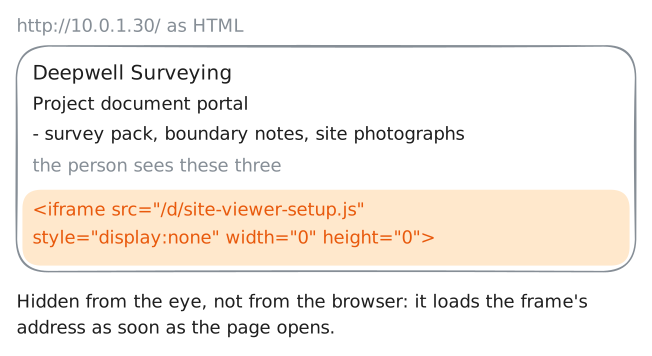
curlfetches the HTML and prints it, running nothing. It looks like an ordinary document portal, a heading and a list of files, with nothing to click. The person saw a normal page and clicked nothing.Read all the way to the bottom, where things hide. A drive-by needs the browser to fetch its file, and the quietest way is a frame the person never sees. A frame (
<iframe>) is a page loaded inside another page.laptop:~# curl -sS http://10.0.1.30/
-
What the hidden frame fetches
The frame points at
/d/site-viewer-setup.js. Fetch that address yourself and look at the response headers as well as the body. The headers are what turn a fetch into a download.curl -iprints the headers followed by the body, running nothing.The header that matters here is
Content-Disposition. A response markedinlineis shown. A response markedattachmentis saved instead. Watch for it.laptop:~# curl -sS -i http://10.0.1.30/d/site-viewer-setup.js
-
Watch the browser fetch it, unprompted
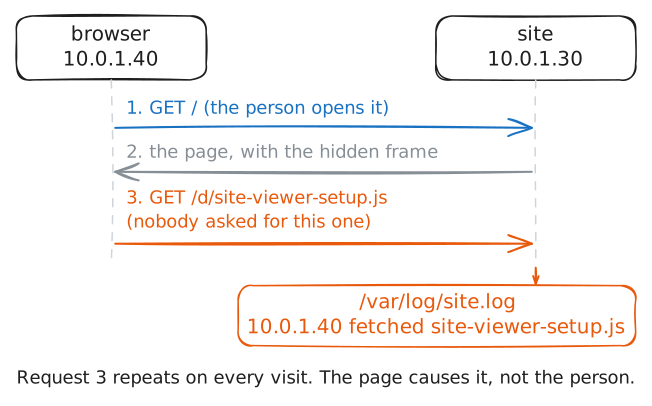
Reading the page proves the mechanism is there. Now prove it fires on its own. The surveyor's browser is open on this sealed network, reopening the portal as a member of staff would. Every time it does, it loads that hidden frame and fetches the dropper.
This is safe only because the network is isolated. Watching a browser you have not been authorised in writing to touch can break the law, even when you only meant to look.
The site keeps its own log of every fetch of the dropper. Read it while the lab records the wire on the site's web port. Each log line is the browser pulling
site-viewer-setup.js, and the capture shows the rawGETbehind it: a request made with nobody at the keyboard.site:~# cat /var/log/site.log
-
The file is already on the victim's disk
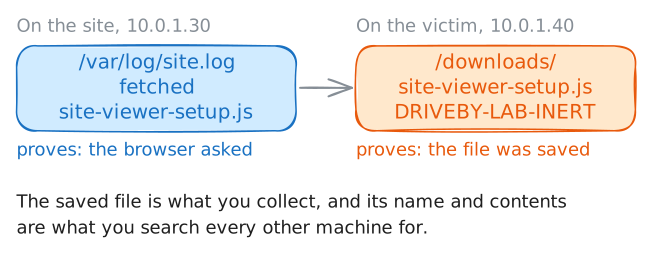
Now check the other end. The file the browser fetched is saved, because the response was an attachment. This browser writes its downloads to
/downloads. List that folder and read what landed there. These commands run on thebrowsermachine, the victim in this lab.Nobody on that machine clicked a download or approved a dialog. If the file is there, the visit alone put it there.
browser:~# ls -la /downloads
browser:~# cat /downloads/site-viewer-setup.js
-
The verdict, and closing it
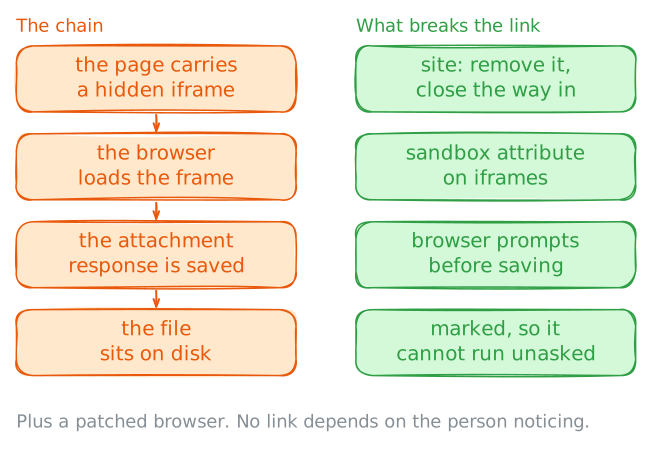
The verdict is a drive-by download. A portal page carried a hidden iframe to a file served as an attachment, so any browser that opened the page saved the dropper to disk with no click and no dialog. "I didn't click anything" is what a drive-by counts on being true.
Closing it has two halves. On the site, if it is yours: remove the injected iframe, and close the way it was written. Someone got write access, through a stolen login, a vulnerable plugin or a poisoned ad.
On every browser, the defences stack. Keep the browser patched, because real drive-bys also attack flaws in the browser itself. Let the browser prompt before saving. Mark downloaded files so they cannot run unasked (Windows calls this Mark of the Web). And put the
sandboxattribute on any iframe, so a framed response cannot start a download. The dropped file is an indicator too: its name and contents are what you search every machine for.Find the mechanism by what it is, and record the indicator.
laptop:~# curl -sS http://10.0.1.30/
Run these steps on real machines
Keep reading
- MITRE ATT&CK: Drive-by Compromise (T1189) article
- MDN: Content-Disposition article
- MDN: The sandbox attribute for iframes article