 Hack the Route Start learning Open app
The idea
Nuala looks after IT at Aldermoor Health Centre. A Phishing email went round with a link to "re-verify your patient-portal login". A nurse followed it, typed her NHS username and password into the page that opened, then felt uneasy and reported it. The page looked exactly like the real portal. Nuala has to work out what that page was and what it did with what the nurse typed, by reading it and never signing in to it.
A credential-harvesting page is a copy of a real login with one change: it sends what you type
to the attacker instead of to the service. Everything here is an inert lab stand-in (marker HARVEST-LAB-INERT), and
the login a browser submits on the sealed network is a lab token (PELICAN-LAB-INERT), never a real account. The one
visitor is the lab's own browser, reaching only the lab's own harvester.
Steps
-
The login page the link opened
Start where the nurse ended up: the page the link opened. Do not type anything into it. Read its source instead: the exact HTML text the browser received.
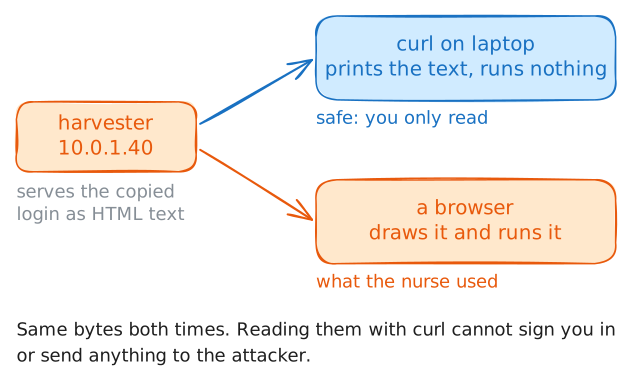
curlfetches a page and prints it. It runs nothing, because a web page is only text until a browser acts on it.The page is served from the attacker's box at
10.0.1.40. Read it and notice how little there is to notice. It is a faithful copy of Aldermoor's patient-portal login: same heading, same two fields, same Sign in button. That is the point of a harvesting page. The look is copied from the real site, so nothing you can see tells you it is fake.Read the page now.
laptop:~# curl -sS http://10.0.1.40/
-
Read where the form sends the password
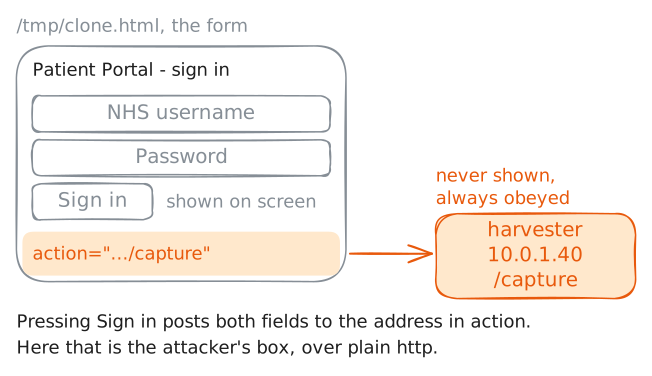
A login form has one line that decides everything: its
action. That is the address the browser sends the typed-in fields to when you press the button. It is in the page's source and never on the screen, yet it is where the username and password go. On the real portal, that address is the portal itself. On a harvesting page, it is the attacker.So pull the
actionout of the page you saved.grep -oiE 'action="[^"]+"'prints only the form's destination, without the copied branding around it. You read where the password goes without trusting how the page looks.Extract the form's destination now.
laptop:~# grep -oiE 'action="[^"]+"' /tmp/clone.html
-
Compare it with the real portal
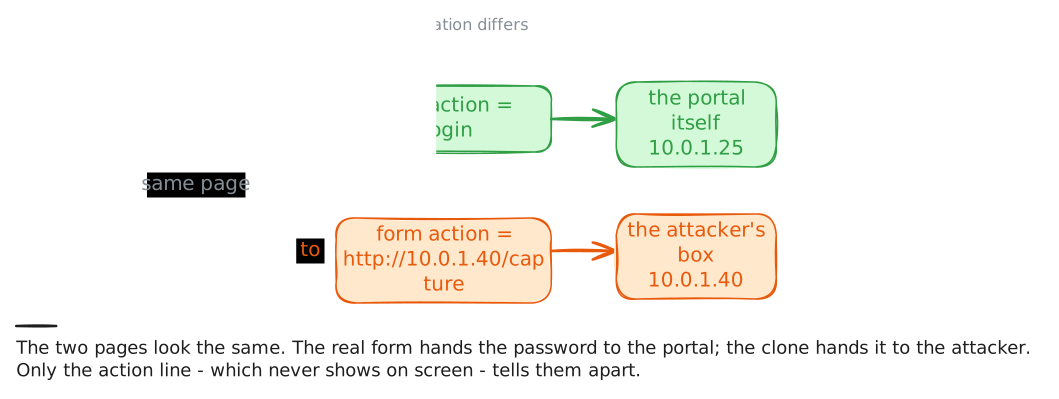
To be sure the clone's destination is wrong, read the real thing beside it. Aldermoor's patient portal lives at
10.0.1.25. Fetch its login the same safe way and pull out its formaction. A genuine login posts back to its own origin: the scheme, host and port that served the page. So you are looking for a destination that stays on the portal.The two pages look identical on screen, and they differ in this one line. Read the real portal's form destination and set it against the clone's.
laptop:~# curl -sS http://10.0.1.25/
laptop:~# grep -oiE 'action="[^"]+"' /tmp/portal.html
-
Watch the password cross the wire
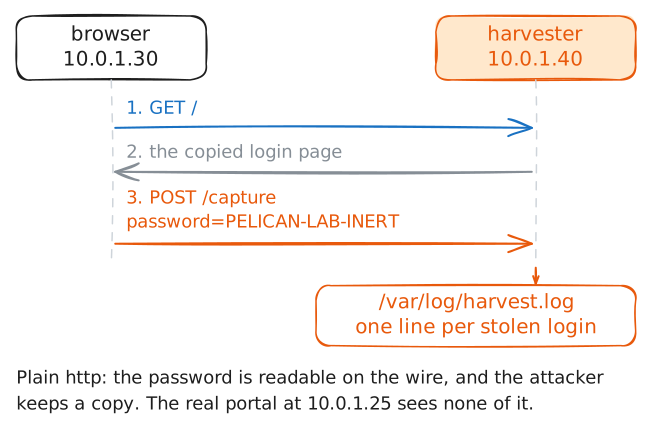
You have read that the clone ships the password to the attacker. Now watch a browser do it. A staff browser on this sealed network loads the clone, fills in the login and presses Sign in, as the nurse did. A script in the page does the typing, because the lab's browser has no person at the keyboard. The login it submits is the lab token
PELICAN-LAB-INERT.This is safe only because the network is isolated. Watching real traffic on a system whose owner has not authorised you in writing can break the law, even when you only meant to check.
A real harvester keeps what it catches, and this one writes every submitted login to its own capture log. Read that log to see what was stolen. The lab also records the wire at the harvester while you do: the network traffic arriving on its web port. There the same password crosses in clear text.
harvester:~# cat /var/log/harvest.log
-
The verdict, and what stops it
Put it together. A copy of Aldermoor's login, served from the attacker's box. A form that posts the username and password to that same box over plain
http. A browser that sent a login there. That is credential harvesting: a fake login built to collect what people type, reached through a Phishing link.Now the defender's seat, because "spot the fake page" is not a plan to hand every nurse. The one thing the clone cannot copy is the address of the page. So reach the real portal by going to it yourself, and distrust any login you arrive at from a link in a message.
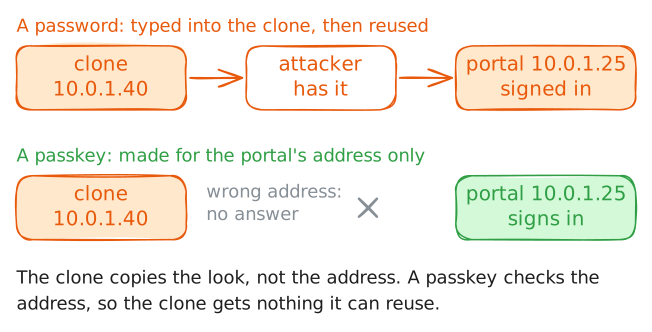
The fix that holds even when someone is fooled is phishing-resistant MFA: a second sign-in step, such as a passkey or security key, that is tied to the real site's origin. It will not sign in on
10.0.1.40, so a password typed into the clone is no longer enough to get in. Then report the page and block its host.Reach the real portal directly, to see the difference in one line.
laptop:~# curl -sS http://10.0.1.25/login
Run these steps on real machines