 Hack the Route Start learning Open app
The idea
Linnea runs the small IT desk at Brampton Housing Trust, a housing charity. On Monday morning a caseworker forwards a message with the subject "Your mailbox will be deactivated within 24 hours" and asks: is this real?
Linnea has to decide without clicking anything. She reads the message where it sits, takes its link apart, and proves where it really goes.
The message is a harmless lab stand-in (marker PHISH-LAB-INERT). The link's host exists only on the lab's closed
network, and you never visit it.
Steps
-
The message the staff flagged
A phishing email is an argument aimed at a person. Its parts are chosen to make you act before you think. It borrows authority (the IT helpdesk), creates urgency and fear (deactivated in 24 hours), and ends with one call to action (verify now).
None of that is a bug in email. It is persuasion riding on a message that carries whatever the sender typed in its headers: the
emaillab shows that the From line is only text.Linnea reads the message where it sits, in the mailbox, over IMAP. Printing a message is not running it.
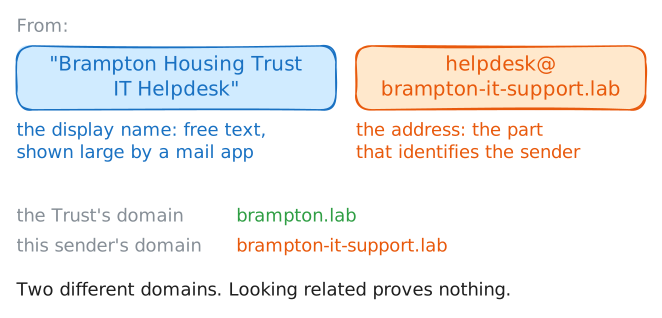
Look first at who it claims to be from. A From line has two parts: the display name, the friendly part a mail app shows in large letters, and the address beside it, which identifies the sender. A trusted name wrapped around an address on a domain that only looks related is a common warning sign, and the one a hurried reader skips.
Read the reported message's headers.
laptop:~# curl -sS "imap://10.0.1.25/INBOX;UID=*;SECTION=HEADER" -u linnea:harbour-wren-6
-
The link is not where it says it goes
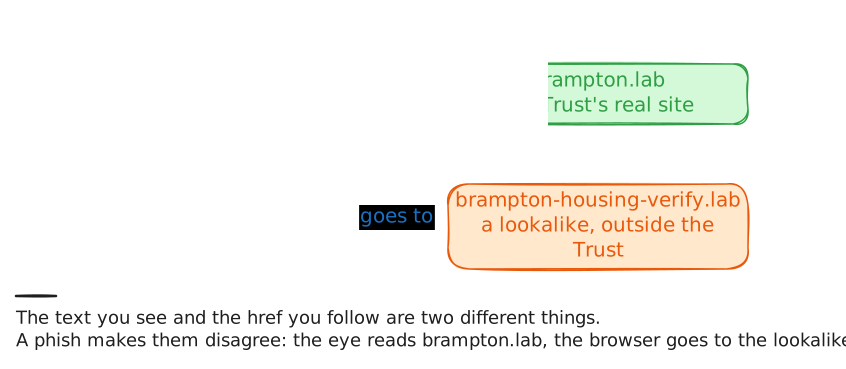
The whole message leads to one link. A link in a web page or an HTML email has two separate pieces: the text you see, and the
href, the address the browser goes to when you click. Nothing makes them match: a link can readhttps://mail.brampton.lab/verifyand carry anhrefthat points anywhere its author likes.Clicking to find out means doing what the message wants. Linnea reads the message's source instead, where both pieces sit side by side. The lab saved the raw message to
/tmp/reported.eml, andcatprints it without running anything.Then pull out every
hrefwithgrep, so you compare where the link says it goes with where it really points, without trusting your eye. Read the body, then extract the link.laptop:~# cat /tmp/reported.eml laptop:~# grep -oiE 'href="[^"]+"' /tmp/reported.eml
-
Prove where it really goes
A lookalike name is only a suspicion until you see where it lands. Ask DNS where
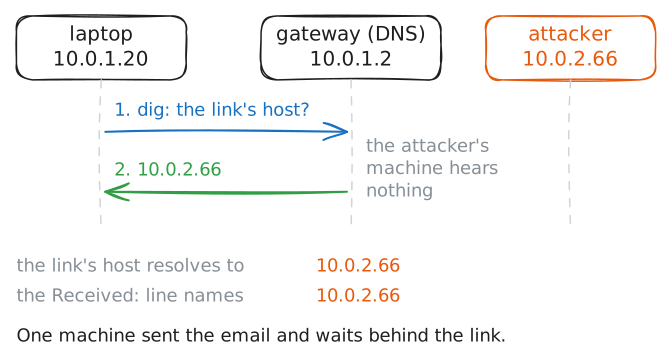
brampton-housing-verify.labpoints: a name lookup is a question to a name server, not a visit to the web server, so the host itself never hears from you.dig +shortprints only the address a name resolves to.Two checks settle it. The Trust's real services live on
brampton.lab, inside the office network (10.0.1.0/24), so a host that resolves anywhere else is not the Trust's, whatever it calls itself. Then compare that address with theReceived:line from step 1, the machine that delivered the email.Resolve the lookalike host, then read the delivery line again to compare.
laptop:~# dig +short brampton-housing-verify.lab
laptop:~# grep -E '^Received:|^From:' /tmp/reported.eml
-
The verdict, and the indicators to keep
Put the warning signs in a row:
- a borrowed authority and a 24-hour deadline
- a display name over an address on a domain that is not the Trust's
- a link whose text shows the Trust's site while its
hrefpoints at a lookalike host on plainhttp - that host resolving to the machine that sent the mail
Any one is suspicious. Together they are a verdict: phishing, a message built to get a person to hand something over, here a login, by pretending to be someone they trust.
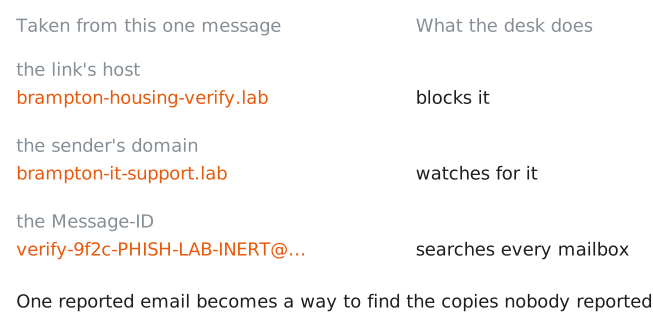
A phish is rarely sent to one person, so Linnea also records indicators: strings the rest of the desk can block and search the other mailboxes for. The useful ones here are the lookalike host, the sender's domain, and the message's own
Message-ID, a unique label every email carries.greppulls them out of the saved copy.laptop:~# grep -iE 'Message-ID|href=' /tmp/reported.eml
-
What actually stops it
No patch fixes persuasion, so stopping phishing takes layers, each catching what the last one missed. The habit the caseworker showed is one: report, don't click. A desk that makes reporting one button learns about a campaign from its first target instead of its last victim.
Blocking the lookalike host and domain at the gateway is another layer, so a click that does happen goes nowhere.
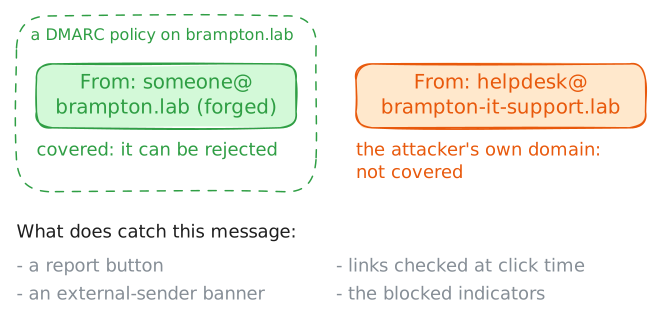
The automatic checks matter too, within limits. SPF, DKIM and DMARC (the spoofing lab) stop someone forging the Trust's own
brampton.labaddress. They do nothing about a lookalike domain likebrampton-it-support.lab, which is a real domain the attacker controls.That gap is why mail gateways add an external-sender banner to mail from outside, and rewrite links to go through a checker that looks up the destination again at the moment of the click. Read the one automatic check this message got: the server's verdict on the sender.
laptop:~# curl -sS "imap://10.0.1.25/INBOX;UID=*;SECTION=HEADER" -u linnea:harbour-wren-6
Run these steps on real machines