 Hack the Route Start learning Open app
The idea
Hana, who runs IT at Fenwick Logistics, pulled a USB drive from the dispatch laptop lp03. Its data folder is empty, yet last week it held the route list. Get the deleted files back for her, two different ways.
Steps
-
What "delete" actually does
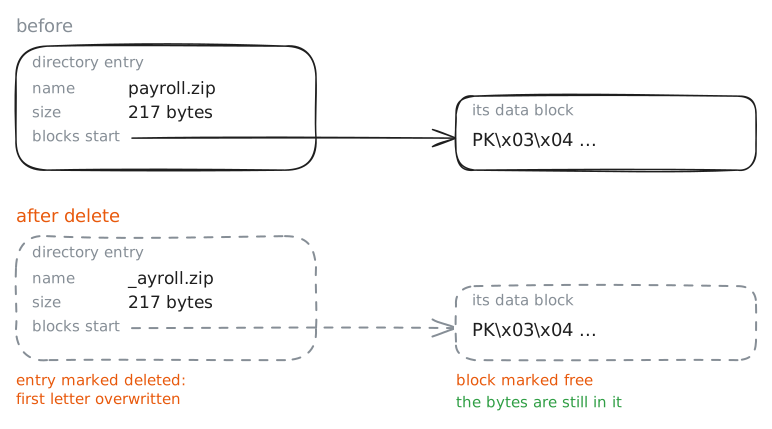
When you delete a file, almost nothing happens to the file's data. The file system keeps a directory of names, each pointing at the blocks that hold the content. Deleting marks the directory entry as deleted and frees those blocks for reuse, but it does not scrub them.
The content stays on the drive, untouched, until some new file is written over the top of it. Until then it can be recovered in full.
That is why an investigator never trusts an empty folder. Hana's drive was copied byte for byte into one file,
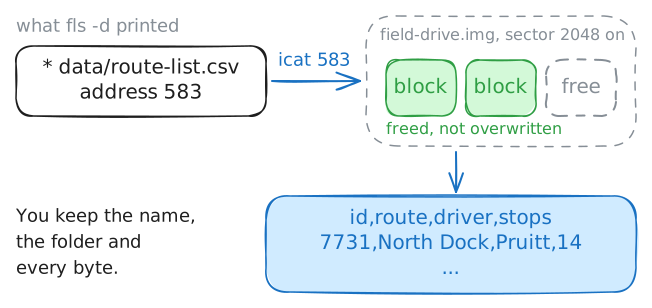
/evidence/field-drive.img, called an image, so the drive itself stays untouched. The Sleuth Kit'sflslists a file system's directory entries straight from the image, and-dshows the deleted ones, which an ordinarylshides. Each gets a*and an address: the number the file system used to find the file's content, which you'll use next to read it back.So before you tell Hana her route list is gone, list the deleted entries on the drive's first partition (it starts at sector 2048).
analyst:~# fls -r -d -o 2048 /evidence/field-drive.img
-
Method one: recover by metadata
The fastest recovery uses what the file system left behind. A deleted entry still leads to the blocks that held the file, so
icatreads them straight back, as long as nothing has overwritten them. This is metadata recovery: giveicatthe addressflsprinted, and it prints the file's content.Its big advantage is that you keep the context the file system knew: the file's name, its folder, often its size and times. When the file system is intact, this is the method to reach for first.
Read Hana's missing route list back by its address, 583.
analyst:~# icat -o 2048 /evidence/field-drive.img 583
-
Method two: carve by header
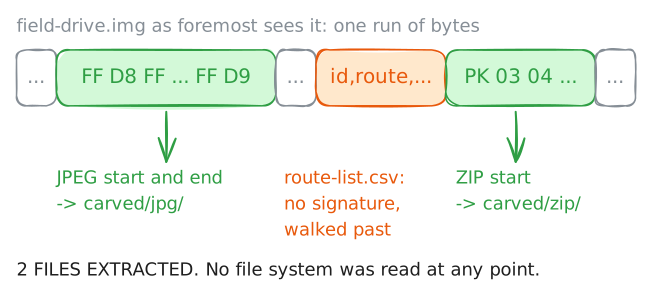
Sometimes the file system itself is gone: reformatted, corrupted, or a raw dump with no structure to read. Then you have no directory entries and no addresses to follow, and
icathas nothing to work with. You fall back to carving: ignore the file system entirely and scan every byte of the image for the signatures that mark where a file of a given type begins and ends.Most file types have them. A JPEG starts with the bytes
FF D8 FFand endsFF D9; a ZIP startsPK\x03\x04.A carver like
foremostfinds those markers and writes out whatever lies between as a recovered file. It needs no file system at all, only the raw bytes.Carve the JPEGs and ZIPs out of the image.
analyst:~# foremost -t jpg,zip -i /evidence/field-drive.img -o carved
analyst:~# cat carved/audit.txt
-
Two methods, two jobs
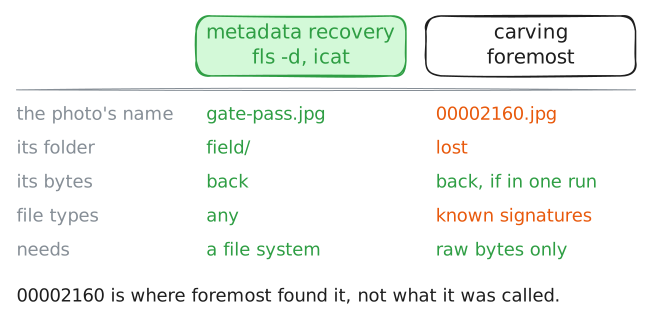
Put the two recoveries side by side and each one's job becomes clear. Start with what carving named its files.
lsthe carved output, then runfileon the carved JPEG to confirm it really is a valid image and not a false hit. A carver can be fooled: any stretch of bytes that happens to start withFF D8 FFlooks like a JPEG header to it.analyst:~# ls -R carved analyst:~# file carved/jpg/00002160.jpg
Run these steps on real machines