 Hack the Route Start learning Open app
The idea
Hana, who runs IT at Fenwick Logistics, saved the memory of a program on the dispatch laptop lp03 that was calling an address nobody knew, then switched the laptop off. Read what the program hid from the disk out of that memory.
Steps
-
What a memory capture even is
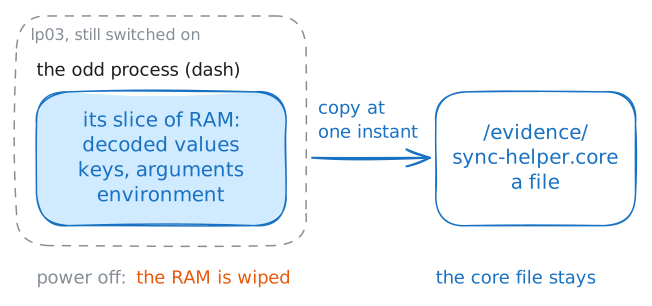
When a program runs, everything it is working with sits in its slice of RAM: the values it decoded, the keys it holds, the text it is about to send. A core file (or core dump) is a snapshot of that slice: a copy of a process's memory, frozen at one instant, written to a file you can study later. It is the same thing a program drops when it crashes, except here a responder made one deliberately, from a process that was running fine.
Hana captured the memory of the odd process on
lp03before she shut anything down, because switching the laptop off would have wiped it.That capture is
/evidence/sync-helper.core. Before you read it, confirm what kind of file it is.Ask
filewhat it is.analyst:~# file /evidence/sync-helper.core
-
The secret the disk never saw
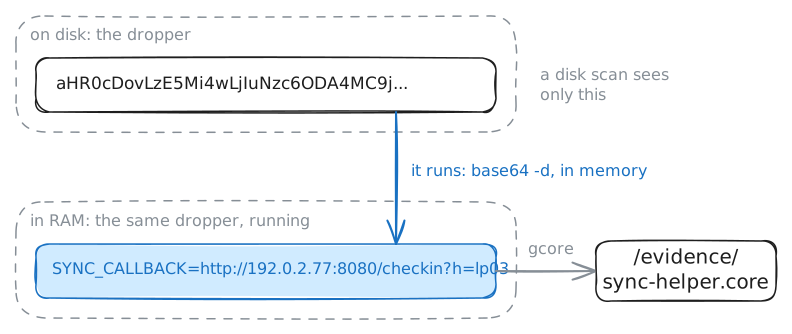
This process was a dropper: a small program whose job is to phone home and pull down the next stage of an attack. Its author knew that an address sitting in a file on disk is simple to spot, so the dropper carried its call-home address scrambled (base64), and decoded it to readable text (plaintext) only once it was running. On disk: gibberish. In memory: the real address. The core caught it in memory.
Your reading tool is
strings, which walks a binary file and prints every run of readable text it finds: perfect for a core full of raw bytes with words hidden in it. Rather than print thousands of strings and hunt by eye, usegrep -a, which does the same text scan but keeps only the line you ask for. (-atellsgrepto treat this binary file as text; without it,grepwould only say "binary file matches".)Pull the dropper's call-home address out of the core.
analyst:~# grep -a -o -m1 'SYNC_CALLBACK=http://[[:graph:]]*' /evidence/sync-helper.core
-
A dump holds the whole process, not a single string
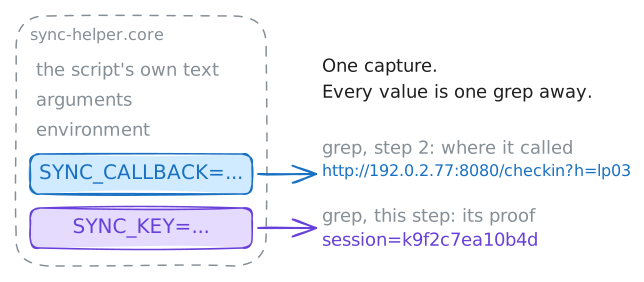
The address is rarely the only thing worth having. A core holds everything the process had in memory: every variable, the arguments it was launched with, the environment it ran in, buffers of data in flight. Once you have the capture, each of those is one more
grepaway: you are reading a frozen copy of the program's whole world, not fishing for a single value.This dropper also carried a key: the token it would have sent so the server on the far end knew the beacon was really from its malware and not from a researcher poking at it. Like the address, the key was scrambled on disk and decoded only in memory. Pull it the same way.
Read the dropper's key out of the core.
analyst:~# grep -a -o -m1 'SYNC_KEY=session=[[:graph:]]*' /evidence/sync-helper.core
-
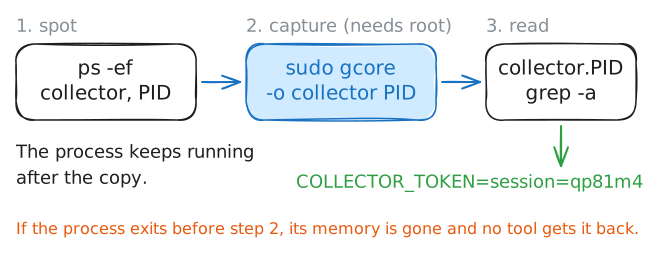
How a capture is taken
So far you have read the capture Hana took. Now see how the taking works. The tool is
gcore, which comes with the debuggergdb: give it the process ID of a running program and it writes that process's memory to a core file, without stopping the program for more than an instant. Dumping another process's memory is a privileged act (you are reaching into something you don't own), so it needs root, the all-powerful admin account. The lab grants this box that power.lp03is switched off and bagged, so the lab plays its part on your bench: it started a process disguised as a harmlesscollector, holding a token in its memory. A responder's instinct is to capture a process like that before touching anything, because the moment you spook it, it can exit and take its memory with it.So the lab grabbed it the instant it started, the way Hana grabbed the dropper on
lp03. You confirm it is running and read what the capture holds; the practice ticket has you rungcoreyourself.analyst:~# ps -ef analyst:~# grep -a -o -m1 'COLLECTOR_TOKEN=session=[[:graph:]]*' collector.*
Run these steps on real machines