 Hack the Route Start learning Open app
The idea
A page of 24 small pictures takes seconds across an ocean. Find the round trips each HTTP version saves.
Steps
-
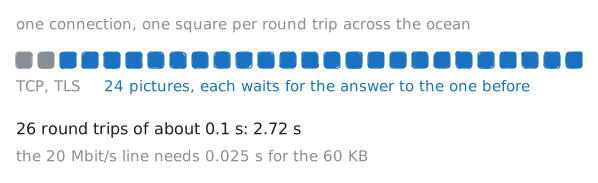
Twenty-four pictures, one at a time
A museum puts tonight's new exhibits on its website: one page with 24 small pictures of 2.5 KB each, 60 KB in all. A visitor opens it from a hotel on the other side of the ocean, on a line that carries 20 Mbit/s, and waits.
visitor(10.0.1.10) is on the hotel's network.hotelRoutersends its traffic over the ocean line tomuseumGateand on togallery(10.0.3.10), the museum's web server, which answers asgallery.lab. The ocean adds 50 ms each way, so a round trip, a message out and its answer back, takes 0.1 s.Fetch the pictures the plainest HTTP/1.1 way, one connection and one picture after another, and see what each one cost.
visitor:~# time curl -s --http1.1 -o /dev/null -w '%{num_connects} %{local_port} %{time_total}\n' 'https://gallery.lab/thumbs/[1-24].jpg' -
Six connections, like a browser
HTTP/1.1 was written in 1997, when a page was some text and a few pictures. It already kept the connection open between requests, so a page paid for the handshakes once, not once a picture. It also allowed pipelining: send the next requests without waiting, and get the answers back in the order asked. That would have cut the round trips, but one slow answer held up every answer behind it, and enough servers and proxies along the way got it wrong that most browsers left it switched off.
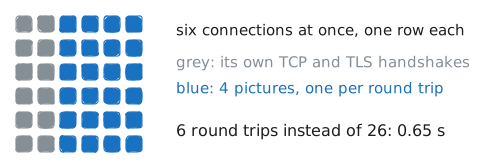
So browsers did what worked: they open several connections to the same site and fetch over all of them at once. The standard asked for no more than two; browsers settled on six per site.
Do what a browser does: six connections at once, each fetching its share of the 24.
visitor:~# time curl -s --http1.1 --parallel --parallel-immediate --parallel-max 6 -o /dev/null -w '%{num_connects} %{local_port} %{time_total}\n' 'https://gallery.lab/thumbs/[1-24].jpg' -
HTTP/2: every request at once
In 2009 Google tried a fix of its own in Chrome and on its servers, a protocol called SPDY, and it became HTTP/2 in 2015. HTTP/2 keeps everything HTTP means (methods, paths, headers, the 200s and 404s) and changes how it travels.
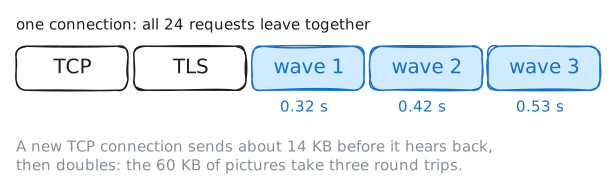
Every message is cut into small binary frames, and each frame carries a stream number, one stream per request. Frames of different streams take turns on one connection, so the client sends all 24 requests at once and the server sends the pictures back interleaved, each as it's ready. That's multiplexing: no request waits for another's answer, and one connection does the work of six.
HTTP/1.1 travels as readable text, lines like
GET /thumbs/1.jpg HTTP/1.1, so a server can't start sending binary frames to a client that expects that. The two agree first, inside the TLS handshake they already do: the client lists the protocols it speaks and the server picks one it's set to speak. That's ALPN, Application-Layer Protocol Negotiation, and it costs no extra round trip. The gallery runs Caddy, a web server, and one line of its settings in/etc/caddy/Caddyfile,protocols h1 h2 h3, lists the versions it speaks.Watch the choice being made, then fetch the pictures over HTTP/2.
visitor:~# curl -sv -o /dev/null https://gallery.lab/ visitor:~# time curl -s --http2 --parallel -o /dev/null -w '%{num_connects} %{local_port} %{time_total}\n' 'https://gallery.lab/thumbs/[1-24].jpg' -
HTTP/3: a round trip less
TCP lives in the kernel, the core of the operating system, of every computer, and in every router and firewall that looks inside it, so changing it takes a decade. So Google built a new transport on top of UDP, which carries single messages called datagrams and promises nothing else, and put the rest in the browser and the server themselves: QUIC, a name rather than an abbreviation. The IETF, the body that writes the internet's standards, made QUIC a standard in 2021, and HTTP over QUIC became HTTP/3 in 2022. It runs on UDP port 443.
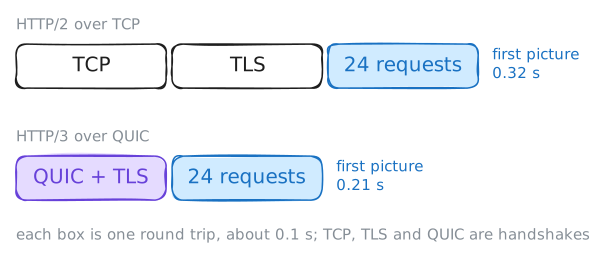
QUIC does two things TCP can't. Each stream keeps its own order, so a lost packet holds up only the stream it belongs to. And there's one handshake instead of two: TLS 1.3 is built into QUIC, so the first packets set up the connection and the keys together, where TCP has to finish its handshake before TLS can start. That's a round trip less on every new connection.
Fetch the pictures over HTTP/3. Then read the headers of the page: they answer a question you may not have asked yet. How does a browser know a site speaks HTTP/3 at all?
visitor:~# time curl -s --http3-only --parallel -o /dev/null -w '%{num_connects} %{local_port} %{time_total}\n' 'https://gallery.lab/thumbs/[1-24].jpg' visitor:~# curl -sI https://gallery.lab/ -
UDP blocked, and nobody notices
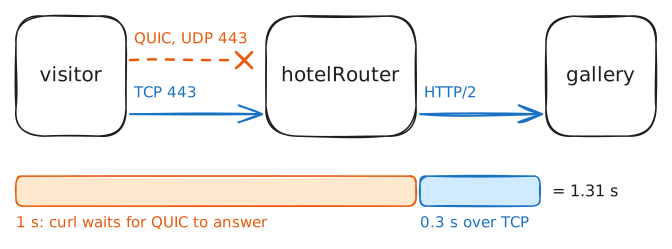
Plenty of networks block UDP to port 443: office and hotel firewalls built to let the web through on TCP 443 and little else. Others break QUIC without meaning to. A QUIC client pads the datagrams that carry its first packets to 1,200 bytes, and QUIC won't run over a path whose MTU is too small to carry them. A client that only spoke HTTP/3 would find nothing on those networks, so browsers keep TCP ready, and a site that turns HTTP/3 on keeps HTTP/2 running beside it.
Fetch the page the way a browser does: curl's
--http3tries QUIC first, and starts TCP only if QUIC hasn't answered after a short wait. Then be the hotel: drop UDP 443 onhotelRouter, and fetch the page the same way again.visitor:~# curl -s -o /dev/null --http3 -w 'HTTP/%{http_version} after %{time_total} s\n' https://gallery.lab/ hotelRouter:~# iptables -I FORWARD -p udp --dport 443 -j DROP visitor:~# curl -s -o /dev/null --http3 -w 'HTTP/%{http_version} after %{time_total} s\n' https://gallery.lab/
Run these steps on real machines