 Hack the Route Start learning Open app
The idea
A 50 Mbit/s line copies at a crawl. Find out why.
Steps
-
A fast line, a slow copy
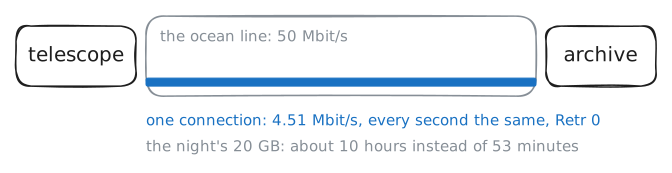
Every night an observatory high on a mountain fills about 20 GB with pictures of the sky, and every morning it copies them to its archive across the ocean. The line between them carries 50 Mbit/s, so the copy should take under an hour. It takes most of the day.
telescope(10.0.1.10) sends throughdomeFirewall, the observatory's firewall, over the ocean line toarchiveGateand on toarchive(10.0.3.10).archiveruns the server half of iperf3, a tool that measures a path: the client sends as fast as it can for a few seconds, and the server counts what arrives. Measure what one connection gets.telescope:~# iperf3 -c 10.0.3.10 -t 5
-
One window per round trip
TCP promises that every byte arrives, so the sender keeps a copy of each byte it sends until the receiver confirms it with an acknowledgment, an ACK. The receiver also says, in every packet it sends back, how much more it has room for: its window. The sender may have at most one window of unacknowledged data on the way. Once that much is out, it stops and waits for ACKs.
The sender keeps a limit of its own as well, its congestion window: its guess at how much the path can take before a queue on the way overflows. Of the two windows, the smaller one is the one that counts.
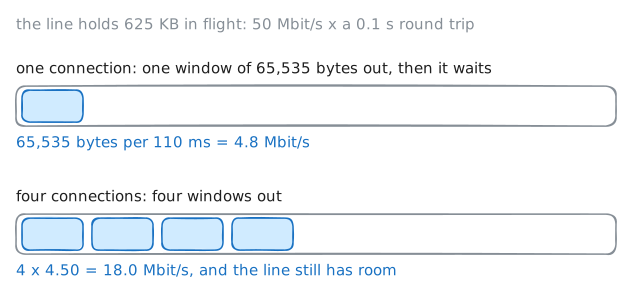
So a connection moves at most one window per round trip, the time a packet takes to reach the far end plus the time its ACK takes to come back: rate ≤ window ÷ round trip. Picture the line as a pipe. It holds bandwidth × round trip of data in flight, the bandwidth-delay product, and only a window that big keeps it full. The ocean adds about 50 ms each way, so a round trip here takes about 0.1 s (
pingwill show it), and this line holds 50 Mbit/s × 0.1 s = 5,000,000 bits, 625 KB.The window is a 16-bit field in TCP's header, laid down in 1981, so it says 65,535 bytes at most. In 1981 that was plenty: a 56 kbit/s line with a 100 ms round trip holds 700 bytes.
Time the round trip with
ping, look at the window of a running transfer withss, then try four connections at once.telescope:~# ping -c 3 10.0.3.10 telescope:~# ss -tin dst 10.0.3.10 telescope:~# iperf3 -c 10.0.3.10 -t 5 -P 4
-
Where the scale went
By the late 1980s lines were getting faster and longer, and 64 KB stopped being plenty: a satellite hop has a round trip of half a second. The fix, proposed in 1988 in RFC 1072 and settled in RFC 1323 in 1992, left the header alone and added an option: an extra field after TCP's fixed header, which a TCP that doesn't know the option skips. The window scale option carries one number, a shift count from 0 to 14, and from then on every window that side announces is multiplied by 2 to that power. With 14, the 16-bit field reaches about 1 GB.
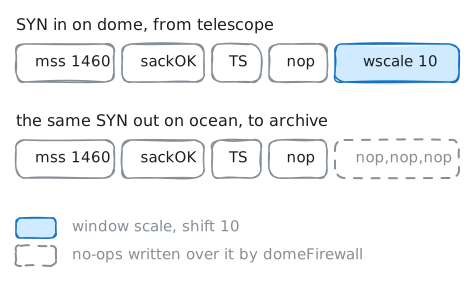
The catch is when it's agreed. During the three-way handshake, each side puts the option in its first packet, the SYN, and scaling is on only if both sides sent it. An old TCP that doesn't know the option sends none back, and both quietly keep plain 64 KB windows. That made the option safe to roll out, and it makes it fragile today: anything that takes it out of one SYN turns scaling off for the whole connection, with no error anywhere.
Every current operating system sends it. Firewalls are another matter: they can rewrite headers, and some tidy up TCP options. Cisco's ASA firewalls, for one, can be set to clear the window scale option from every packet.
Watch
telescope's SYNs enter and leavedomeFirewallwith tcpdump, which prints packets as a card sees them. The lab keepstelescopeopening new connections toarchivein the background.domeFirewall:~# tcpdump -n -i any -c 2 'tcp[tcpflags] == tcp-syn' domeFirewall:~# iptables -t mangle -L FORWARD -v -n
-
Let the window grow
Delete the rule and both SYNs carry the option again. How big does the window get then? The receiver decides. Each window it announces is the free room in its receive buffer, the memory where arriving data waits for the program to read it, so a bigger window needs a bigger buffer.
A buffer big enough for any path, kept for every connection, would waste memory on the many that never need it. So since the mid-2000s Linux, like Windows and macOS, starts each connection with a small buffer and grows it as the connection shows it needs more, which is called receive autotuning. Linux lets it grow to 32 MB, a limit set in
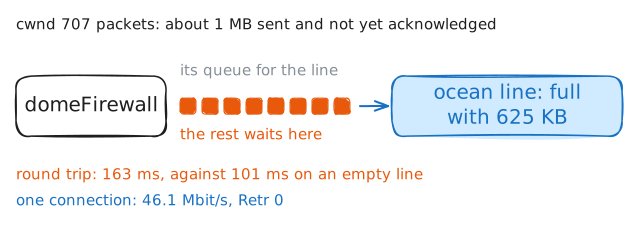
net.ipv4.tcp_rmem, far above the 625 KB this line holds.The sender's congestion window, from the last step, has to grow too. It starts small and grows while every packet gets through. When a queue on the way overflows and a packet is lost, it cuts back, then grows again. iperf3's Retr column counts the packets it had to send again.
Delete the rule, measure one connection again, for longer this time, then look at a running transfer with
ssonce more.domeFirewall:~# iptables -t mangle -D FORWARD -p tcp -j TCPOPTSTRIP --strip-options wscale telescope:~# iperf3 -c 10.0.3.10 -t 15 telescope:~# ss -tin dst 10.0.3.10
-
The first round trips
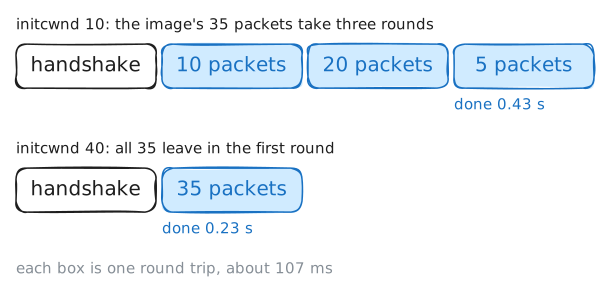
The night's copy now runs at line speed. The observatory's staff also browse the archive's quick-look images, one 50 KB file per night, and each takes almost half a second to open. At 50 Mbit/s, 50 KB is 8 ms of line time.
A long transfer hides what a short one can't: how a connection starts. A new connection knows nothing about its path, and if it sent a whole big window at once it could swamp a slow link. In October 1986 the early internet did exactly that: so many senders resent so much that throughput between Lawrence Berkeley Laboratory and the University of California, 400 yards apart, fell from 32 kbit/s to 40 bit/s.
The fix, from 1988, is slow start, the doubling you saw at the start of the fast copy: a connection begins with a small congestion window and doubles it every round trip, so it finds the path's limit in a few round trips without flooding it. How small a start? For years, a few packets. Since 2013, RFC 6928 suggests 10, about 14 KB, after Google showed web pages loaded faster with it.
Fetch a quick-look with
curland time each part. The image is 35 packets, and the handshake takes one round trip before any data moves. Then raisearchive's starting window on its way totelescope:archiveis the one sending the image, so its start is the one that counts. Linux keeps it on routes, asinitcwnd, andarchivereachestelescopeby its default route.telescope:~# curl -s -o /dev/null -w 'connected %{time_connect} s, first byte %{time_starttransfer} s, done %{time_total} s\n' http://10.0.3.10/night1.jpg archive:~# ip route change default via 10.0.3.254 initcwnd 40 archive:~# ip route show default telescope:~# curl -s -o /dev/null -w 'connected %{time_connect} s, first byte %{time_starttransfer} s, done %{time_total} s\n' http://10.0.3.10/night1.jpg
Run these steps on real machines