 Hack the Route Start learning Open app
The idea
Small files from the office ashore reach the ship, and big ones hang. Find out why.
Steps
-
A chart that never comes ashore
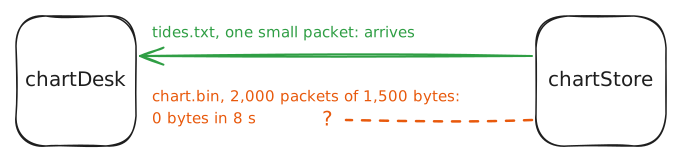
A survey ship spends weeks at sea mapping the seabed, and its crew gets tide tables and charts from the office ashore over a radio link. This morning the tide table came through. The chart never did.
chartDesk(10.0.1.10) is the crew's computer. Its traffic goes throughshipRouter, across the radio toshoreRelayon the quay, then throughofficeWall, the office's firewall, tochartStore(10.0.4.10), the office's file server.Both are plain files on the same web server, so if one arrives, the other should too. Ask
chartStorefor both withcurl, a tool that fetches web addresses: first the tide table, one line of text, then the chart, three megabytes.chartDesk:~# curl -sS -m 8 http://10.0.4.10/tides.txt chartDesk:~# curl -sS -m 8 -o chart.bin -w '%{size_download} bytes in %{time_total} s\n' http://10.0.4.10/chart.bin -
How big a packet the radio takes
No link carries packets of unlimited size. Each has a largest packet it takes in one go, its MTU, for maximum transmission unit. The MTU counts the whole IP packet, headers and all, but not the link's own frame around it. A header is the label a protocol puts in front of what it carries: addresses, lengths, flags.
Ethernet's MTU is 1,500 bytes, a size settled around 1980, when memory was dear and one long frame held up everyone else on a shared cable. Many links carry less, because they fit headers of their own inside those 1,500: home broadband over PPPoE spends 8 bytes on its own, leaving 1,492 for the IP packet, and VPN tunnels often leave about 1,400. Data centers go the other way, with jumbo frames of up to 9,000 bytes, set on every card along the path. A card is a machine's network interface; in this lab each one is named after its network. A switch can't report a frame too big for it: it drops it without a word. This ship's radio takes 1,400.
So what does a router do with a 1,500-byte packet for a 1,400-byte link? IPv4 gives it two choices. It can cut the packet into fragments that fit, which the destination puts back together. Or, if the sender set the packet's Don't Fragment flag, DF for short, the router must drop the packet and send the sender an ICMP message called fragmentation needed, naming the MTU that fits.
Fragments are fragile: lose one and the whole packet is lost, and many firewalls drop them. So TCP sets DF on its packets and learns the size from those fragmentation-needed messages instead, a scheme written down in 1990: path MTU discovery.
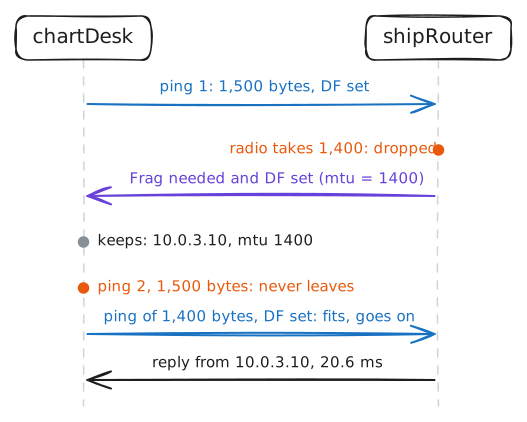
pingcan set DF too. SendshoreRelay, at the far end of the radio, two packets of 1,500 bytes a second apart, then two of 1,400, and askchartDeskwhat it learned.chartDesk:~# ping -c 2 -M do -s 1472 10.0.3.10 chartDesk:~# ping -c 2 -M do -s 1372 10.0.3.10 chartDesk:~# ip route get 10.0.3.10
-
Follow the message
The chart flows from
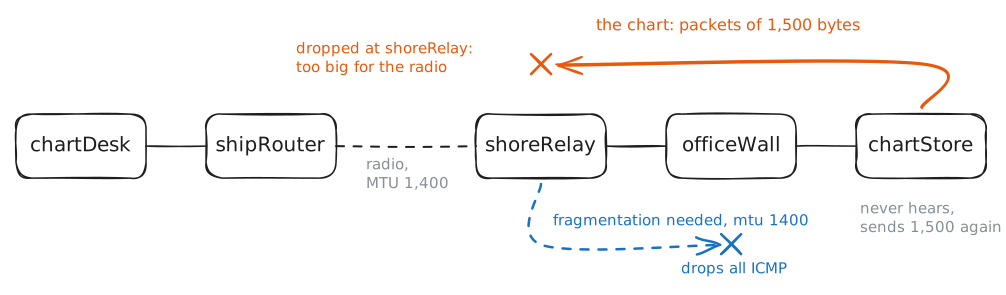
chartStoretochartDesk, so it'schartStorethat sends the big packets: 1,500 bytes each, as big as its own Ethernet allows, DF set on every one. They crossofficeWall, reachshoreRelay, and don't fit on the radio. By the rules you've seen,shoreRelaydrops each one and sendschartStorea fragmentation-needed message naming 1,400, andchartStoresends again, smaller.The chart never came, so that chain breaks somewhere, and there are three suspects.
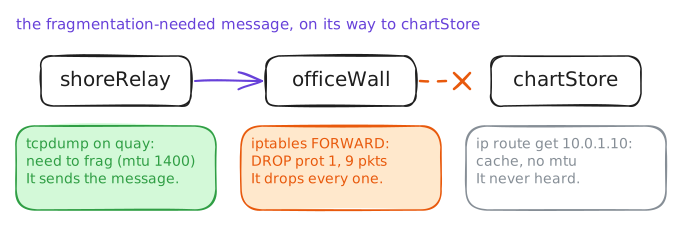
shoreRelaymight never send the message. Something on the way back might drop it. OrchartStoremight get it and pay no attention.Check each one. On
shoreRelay, watch for ICMP withtcpdump, which prints the packets a card sends and receives, on its cardquay, the side facing the office. OnofficeWall, list the firewall's rules for packets passing through withiptables, the command that sets Linux's firewall, and read how many packets each rule has caught. OnchartStore, ask what it knows about the way tochartDesk.shoreRelay:~# tcpdump -n -c 2 -i quay icmp officeWall:~# iptables -L FORWARD -v -n chartStore:~# ip route get 10.0.1.10
-
Let one message through
Why would anyone drop every ICMP message? ICMP had a bad decade in the 1990s. The ping of death, one ping too big to be legal, sent in fragments, crashed the machines that put it back together. Smurf attacks sent one ping to every machine on a network at once, in a victim's name, so hundreds of machines answered the victim together. Firewall guides learned "block ICMP", and the advice outlived the bugs.
But ICMP is far more than ping. Each ICMP message carries a type, a number that says what kind of message it is, and a code, a second number that narrows it down. Ping's request and reply are types 8 and 0. Destination unreachable is 3, and its code 4 is fragmentation needed. That message isn't a stranger knocking. It's the network telling the office's server how to reach someone it's already talking to, and dropping it blinds the server to every smaller link beyond the office.
So let that one message through, ahead of the ban.
iptableschecks a list's rules from the top and acts on the first that matches, so where a rule sits matters.-Aadds a rule at the bottom, under the drop, where no ICMP message would ever reach it.-Iinserts it at the top. Then fetch the chart, check that pings are still blocked, and askchartStorewhat it learned.officeWall:~# iptables -I FORWARD -p icmp --icmp-type fragmentation-needed -j ACCEPT chartDesk:~# curl -sS -m 8 -o chart.bin -w '%{size_download} bytes in %{time_total} s\n' http://10.0.4.10/chart.bin chartDesk:~# ping -c 2 -W 2 10.0.4.10 chartStore:~# ip route get 10.0.1.10 -
Fix it from the ship
Say the office won't touch its firewall. The ship can still get its charts, with no message at all, by changing a number TCP trades when a connection opens.
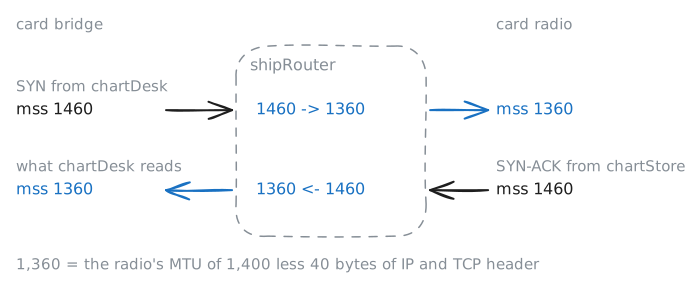
TCP opens every connection with a handshake of three packets, named for the flags they set: a SYN, for synchronize, from the side that calls, a SYN-ACK back, which also acknowledges it, and an ACK. (A packet with RST, reset, ends a connection on the spot.) TCP calls the data in one packet a segment, and in its SYN or SYN-ACK each end puts its MSS, maximum segment size: the most data it will take in one packet. Each end works it out from its own card's MTU, less 40 bytes for IP's 20-byte header and TCP's 20: 1,460 on Ethernet. Then each sends at most the other's MSS in a packet. Neither end can see the radio, so
chartStoresends packets of 1,500.shipRoutercan see the radio, though, and every handshake to or from the ship crosses it. Suppose it rewrote the MSS in each SYN and SYN-ACK as it passed, to the smaller MTU of the two links the packet crosses on this router, less 40: 1,400 less 40, 1,360.chartStorewould never send a packet too big for the path, and no router would need to send a message at all. That's MSS clamping.Clamp the MSS on
shipRouterand fetch the chart again. The lab catches the download's handshake on both ofshipRouter's cards. Then read it, and askchartStorewhat it learned this time.shipRouter:~# iptables -t mangle -A FORWARD -p tcp --tcp-flags SYN,RST SYN -j TCPMSS --clamp-mss-to-pmtu chartDesk:~# curl -sS -m 8 -o chart.bin -w '%{size_download} bytes in %{time_total} s\n' http://10.0.4.10/chart.bin shipRouter:~# tcpdump -n -r /tmp/handshake.pcap chartStore:~# ip route get 10.0.1.10
Run these steps on real machines