 Hack the Route Start learning Open app
The idea
A gaming café's line has room for fifty players at once. What can one upload do to them?
Steps
-
Lag on tournament night
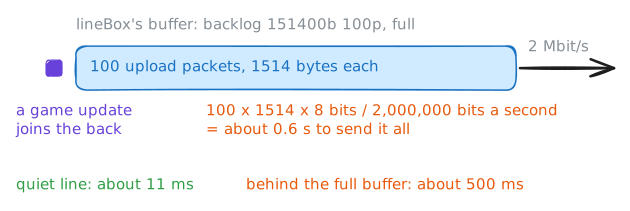
Friday is tournament night at the café, and every player's game talks to a server in town over one 2 Mbit/s line. A game sends very little, a few dozen small updates a second, about 35 kbit/s, so on paper the line has room for fifty players. Tonight the café is also uploading last night's matches to a video site, over the same line.
gamingPcis a player's machine anduploadBoxholds the recordings. Both go throughcafeRouter, the café's own router, tolineBox, the box the provider put in, and from there down the line. Play three seconds on a quiet line first, so you know what smooth looks like. Then start the upload and play again.gamingPc:~# gameping 3 uploadBox:~# start-upload gamingPc:~# gameping 5 lineBox:~# tc -s qdisc show dev town
-
A mark nobody reads
The game has been doing something all along: every update it sends carries a label asking for better treatment. Putting some traffic ahead of other traffic is called quality of service, or QoS, and the label is how a packet asks for it.
The label lives in the IP header. The header has had a byte for this since 1981, and for years most routers ignored it. In 1998 it was rewritten: its first six bits became a DSCP number, naming a class of traffic, and the last two were later given a separate job, warning of congestion, and are 0 here. The classes are agreements, collected in RFC 4594, a guide networks follow if they choose to: 46, called EF, for voice; 32, called CS4, for real-time interactive traffic such as games; and 0 for everything else.
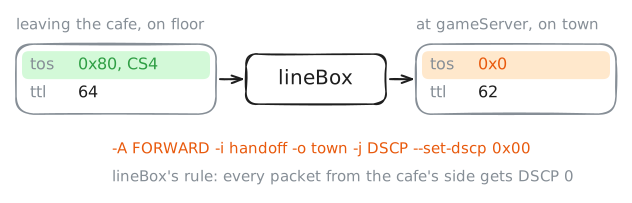
The game marks its updates CS4. tcpdump prints the whole byte as
tos, short for type of service, its 1981 name. 32 in binary is100000, CS4's six bits. Add the two bits after them, both 0, and the byte is1000 0000, which tcpdump writes in hex, base 16, as0x80. The updates are UDP packets to the game server's port 27015. Catch two as they leave the café, then two more as they reach the game server.cafeRouter:~# tcpdump -n -v -c 2 -i floor udp dst port 27015 gameServer:~# tcpdump -n -v -c 2 -i town udp dst port 27015 lineBox:~# iptables -t mangle -S FORWARD
-
Slower on purpose
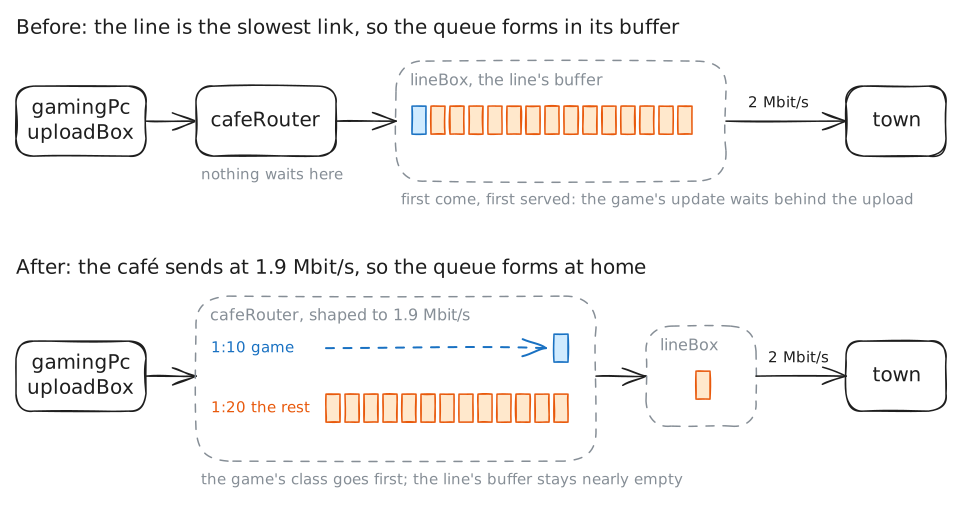
cafeRoutercan't put the game first yet, and the reason is simple: it never has more than one packet to choose from. Its card tolineBox,handoff, runs far faster than the line, so every packet leaves the moment it arrives, and the waiting happens one box later, in a queue the café doesn't control. Putting the game first takes a queue to put it first in. The classic Linux guide in the references puts it plainly: you have to own the queue, which means being the slowest link in the chain.So the café makes itself the slowest link:
cafeRoutersends at 1.9 Mbit/s, a little under the line's 2. Holding traffic to a rate like that is called shaping. The mark is only wiped atlineBox, one box later, socafeRouterstill sees it. The plan in/etc/queues/cafe.tcuses HTB, Linux's hierarchical token bucket, which shapes and also splits the rate into classes:1:1is the whole café, at 1900 kbit/s.1:10is the game: 300 kbit/s guaranteed, more when the rest of the café isn't using it, andprio 0, so while it stays within its 300 kbit/s it goes ahead of1:20, and it gets first pick of any spare.1:20is everything else, thedefault 20on the first line, with 1600 kbit/s guaranteed.- The
filtersends a packet to1:10when its mark's byte, the one tcpdump prints astos, is0x80. The mask0xfcis1111 1100, so it compares the six DSCP bits and ignores the last two.
cafeRouter:~# cat /etc/queues/cafe.tc
cafeRouter:~# tc -batch /etc/queues/cafe.tc
gamingPc:~# gameping 5
cafeRouter:~# tc -s class show dev handoff
lineBox:~# tc -s qdisc show dev town
-
Everyone else waits
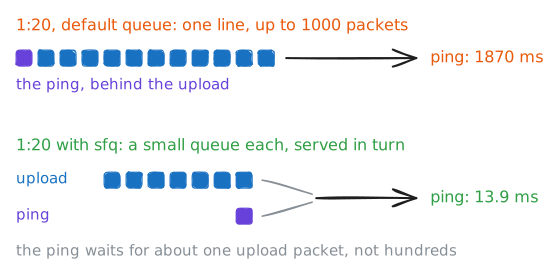
The game is fixed, and it was never the only small thing on the line. A café also has a customer loading a web page, the payment terminal at the bar asking the bank to approve a coffee, and every phone looking up names. None of it is marked, so all of it lands in
1:20with the upload.Each class holds a queue of its own, and you didn't choose one, so each got the default: a plain line of up to 1000 packets, first in, first out. The 1000 is the card's default queue length, and it's ten times the line's whole buffer. Try a ping during the upload.
The fix is a different kind of queue inside
1:20. SFQ, stochastic fairness queueing, tells conversations apart by their addresses and ports, gives each busy one a small queue of its own, and takes a packet's worth from each in turn. A heavy conversation then fills only its own little queue. Stochastic, here, means the sorting is a scramble of addresses and ports into 1024 buckets, so now and then two conversations land in the same bucket and share a queue.gamingPc:~# ping -c 4 10.0.3.10 cafeRouter:~# tc qdisc add dev handoff parent 1:20 sfq gamingPc:~# ping -c 4 10.0.3.10 cafeRouter:~# tc -s qdisc show dev handoff
-
Everybody's a gamer
A mark is a request, and anyone can make one. Say the upload tool on
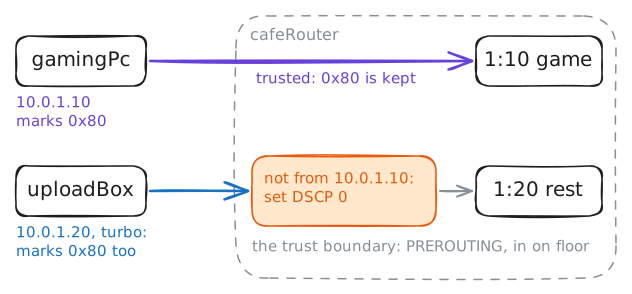
uploadBoxhas a turbo mode, and what turbo does is put the game's mark, CS4, on the upload's own packets.cafeRouter's filter reads the mark and nothing else, so it can't tell a game update from an upload packet wearing the same one.Networks deal with this by deciding where marks are believed. That place is called the trust boundary: past it a mark counts, and at it a mark from anyone the network doesn't trust is reset. In an office it's usually the switch port, which trusts the desk phone and not the laptop plugged in beside it. In the café it's
cafeRouter, on the way in from the floor.iptablescan rewrite a packet as it arrives. Itsmangletable is for rules that change packets, and itsPREROUTINGchain sees each packet as it arrives, before the router decides where it goes or queues it to go out. Turn turbo on, play, and catch an upload packet to see its mark. Then set the boundary: every packet from the floor that isn't fromgamingPcgets its mark reset to 0.uploadBox:~# start-upload turbo gamingPc:~# gameping 5 cafeRouter:~# tcpdump -n -v -c 2 -i floor src 10.0.1.20 cafeRouter:~# iptables -t mangle -A PREROUTING -i floor ! -s 10.0.1.10 -j DSCP --set-dscp 0 gamingPc:~# gameping 5
Run these steps on real machines