 Hack the Route Start learning Open app
The idea
Mira orders rye from Noor's bakery on a café's Wi-Fi, and the café's owner can read every word. Noor locks the site, the words vanish from the wire, and then she finds that one request still crosses in the open.
Steps
-
Plain HTTP: read an order off the wire
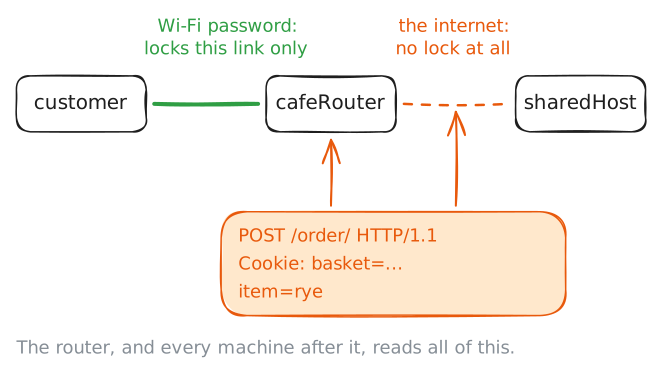
Mira sits in a café and orders a loaf from Noor's bakery. Her laptop,
customer, sends the order to the café's router,cafeRouter, which passes it across the internet tosharedHost, the server that holds the bakery. Every machine on that road handles her packets, and any of them can keep a copy.HTTP has no lock of any kind. It was built for researchers sharing documents, so a request crosses the network as the same text you read in the HTTP lab. That was fine for papers on physics, and it's a problem for a password, a card number or a cookie that proves who you are.
Find out what the café sees. From
customer, place an order, then ask for the basket with the cookie that comes back. While you do, the lab records every packet on the café side ofcafeRouter, a copy anyone who runs that router gets for free.customer:~# curl -si -c jar.txt -d item=rye http://bakery.lab/order/ customer:~# curl -s -b jar.txt http://bakery.lab/order/
-
Certificates: a signed claim about a name
Scrambling the words doesn't solve Mira's problem on its own. If a stranger at the café answers in the bakery's name, her laptop would set up a perfectly private conversation with the wrong party and hand over the order. So before any secret comes a harder question: how does a machine that has never met this server know it's the bakery?
The answer starts with a key pair, two linked numbers made together. The private key stays on the server and can sign a message. The public key goes to anyone and can check that signature.
A key pair alone proves nothing, though, because anyone can make one and claim any name. So someone vouches.
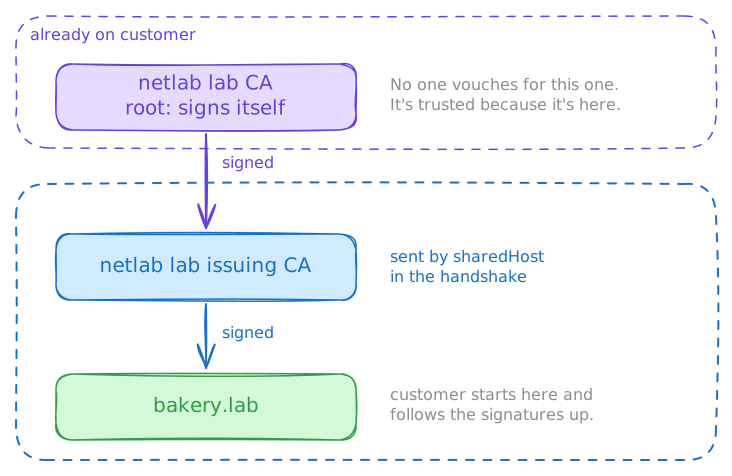
A certificate is a small file that says "this public key belongs to this name until this date", signed by a certificate authority. An authority is an organization whose job is to check that claim, and every operating system ships with a list of authorities it already trusts.
Read the bakery's certificate on
sharedHost, then the one that signed it, then the one oncustomerthat signed that. No public authority signs names that end in.lab, so this lab runs its own, and every device here already trusts it. The rest works the way it does for a real site.sharedHost:~# openssl x509 -in /etc/ssl/lab/bakery/certificate.pem -noout -subject -issuer -dates -ext subjectAltName sharedHost:~# openssl x509 -in /etc/ssl/lab/bakery/chain.pem -noout -subject -issuer customer:~# openssl x509 -in /usr/local/share/ca-certificates/lab-ca.crt -noout -subject -issuer
-
HTTPS: turn it on and watch the words vanish
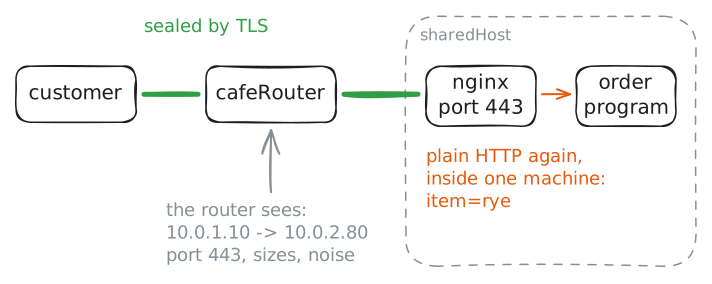
HTTPS is plain HTTP inside a sealed envelope. The requests, headers and cookies stay exactly as they were, and a layer called TLS, Transport Layer Security, sits between them and TCP.
TLS encrypts everything going out, which means it scrambles the bytes so that only the other end can read them. On arrival it checks that nothing changed. The usual port is 443 in place of 80.
The name comes with some history. Netscape released SSL in 1995 so that people could shop on the web, and in 1999 a standards group took it over and renamed it TLS.
The version in use here, 1.3, dates from 2018. Every SSL version has been retired, but the word stuck, so people still say "SSL certificate" and nginx's settings still say
ssl.Turning it on takes three things on the server: a port that speaks TLS, the certificate and its private key. The web server program here, nginx, keeps each site's settings in a file of its own, so open Noor's file and add all three. Then place the order again and look at what the router gets.
customer:~# curl -si -c jar.txt -d item=rye https://bakery.lab/order/
-
TLS handshake: agree on a secret in the open
Here's the puzzle behind HTTPS. Two machines that have never met need a secret they both know, and every word they say passes through a router that's taking notes. In 1976 Whitfield Diffie and Martin Hellman published a way out, known as key exchange.
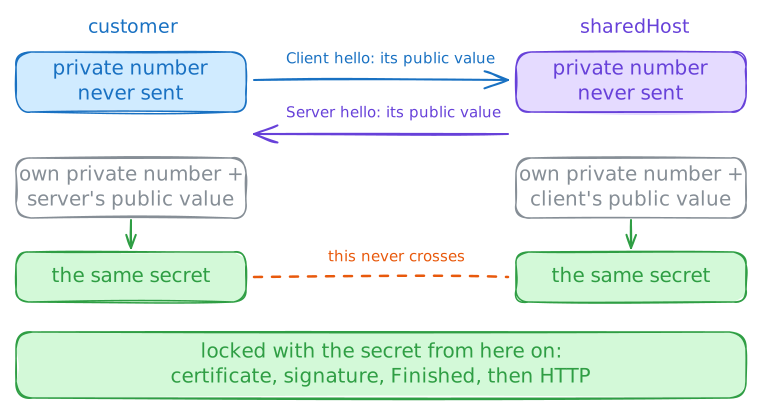
Each side picks a private number and never sends it. From that number it works out a public value, and that's what crosses the network. Then each side combines its own private number with the other side's public value, and the math brings both to the same result.
That result is the secret: both sides hold it, and it never crossed the network. Someone who copied both public values can't get there, because undoing that math would take longer than anyone has.
The TLS handshake wraps this in a short exchange. The client sends a hello with its public value and the site's name. The server answers with its own public value, and from that moment both sides hold the secret, so the rest is encrypted, the certificate included.
Then the server signs the conversation so far with the private key that matches its certificate. Only the holder of that key can make that signature, so it proves who answered.
After that, a cipher, a method for scrambling data, uses the secret to lock everything. AES is the one here, and it's fast.
Watch it all in
curl -v, then askopenssl s_client, a plain TLS client, for a summary.customer:~# curl -sv -o /dev/null https://bakery.lab/ customer:~# openssl s_client -brief -connect bakery.lab:443
-
Certificate checks: name, date and signer
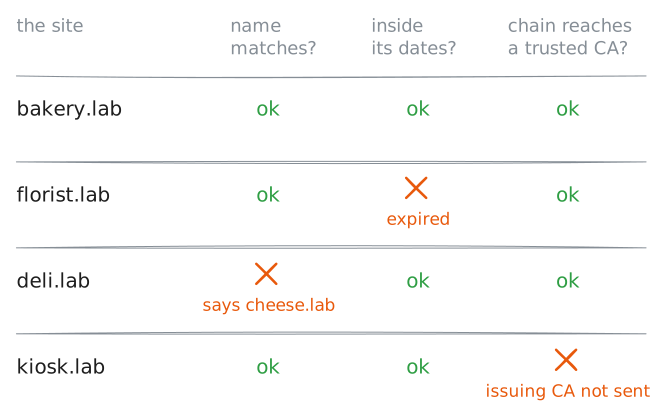
A certificate helps only if the client checks it, and every client checks the same three things:
- Does a name on it match the name I asked for?
- Is today inside its dates?
- Do its signatures lead to a root on my list?
One "no" stops everything, before a single HTTP request goes out.
You'll meet these errors on real sites, in scripts and on servers you set up. They look alike to a person in a hurry, and each has a different cause and a different owner, so telling them apart saves a lot of guessing.
Three of Noor's neighbors on
sharedHosteach have one fault: the florist, the deli and the harbor kiosk. Ask each for its home page.customer:~# curl -sS https://florist.lab/ customer:~# curl -sS https://deli.lab/ customer:~# curl -sS https://kiosk.lab/
-
HSTS: stop the first request leaking
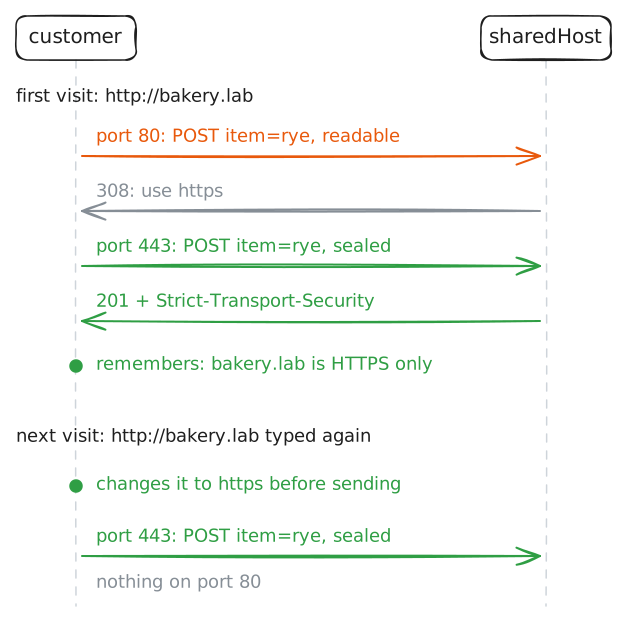
Noor wants nobody on plain HTTP, so she sends port 80 to HTTPS with a redirect: the
308from the HTTP lab, which keeps aPOSTaPOST. That feels like the end of the story.But Mira has an old saved link,
http://bakery.lab/order/, and a redirect is a reply. Think about what has to happen before a server can reply.A plain request is also where an attack fits. A machine on the path can catch it and talk HTTPS to the bakery on Mira's behalf, so she stays on plain HTTP and sees no warning. Moxie Marlinspike showed this in 2009 with a tool called sslstrip, and it's a kind of downgrade attack.
The fix is a header,
Strict-Transport-Security, known as HSTS, HTTP Strict Transport Security. Over HTTPS, a site tells the client: for this many seconds, never use plain HTTP for this name.The client then rewrites
http://tohttps://itself, before anything leaves the machine. Browsers do this on their own, and curl does it with--hstsand a file to keep the list in.Edit Noor's site so that port 80 only redirects and the HTTPS side sends the header. One more line,
proxy_cookie_flags ~ secure;, marks the order program's cookiesSecure, which tells clients to keep them off plain HTTP. The~is a pattern that matches every cookie.Then follow Mira's old link twice.
customer:~# curl -siL --hsts hsts.txt -d item=rye http://bakery.lab/order/
customer:~# cat hsts.txt
customer:~# curl -sv -o /dev/null --hsts hsts.txt -d item=rye http://bakery.lab/order/
-
SNI: what HTTPS still shows
Noor's site is locked. Now look at what the café still learns, because HTTPS hides less than people assume.
Start with a puzzle.
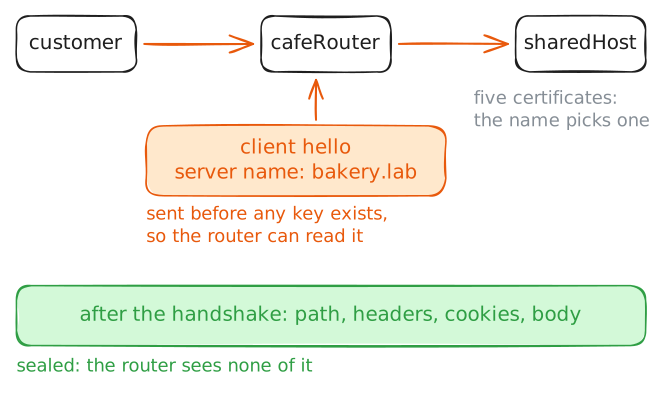
sharedHostholds five sites on one address,10.0.2.80, each with its own certificate, and the server has to choose the right one from the client's first message, before any request arrives. In the HTTP lab theHostheader said which site you wanted, butHosttravels in the encrypted part, which doesn't exist yet.So TLS had to carry the name earlier. An addition to TLS in 2003, Server Name Indication or SNI, puts the site's name in the client hello. Without it, sites on one address would have to share one certificate that lists them all, or take an address each.
The client hello isn't encrypted, so the site's name crosses the network in plain text.
Capture one more visit. Then choose a certificate by hand:
-servernameletsopensslsend any name to the same address. Last, ask by address alone, with no name to send.customer:~# curl -s https://bakery.lab/ customer:~# openssl s_client -brief -connect 10.0.2.80:443 -servername boatyard.lab customer:~# curl -sS https://10.0.2.80/
Run these steps on real machines