 Hack the Route Start learning Open app
The idea
Noor's bakery shares a web server with a boatyard. Her browser opens the bakery every time, but the small order script she wrote gets the boatyard's page, and once she fixes that, orders vanish with no error at all.
Steps
-
Read one request and its reply
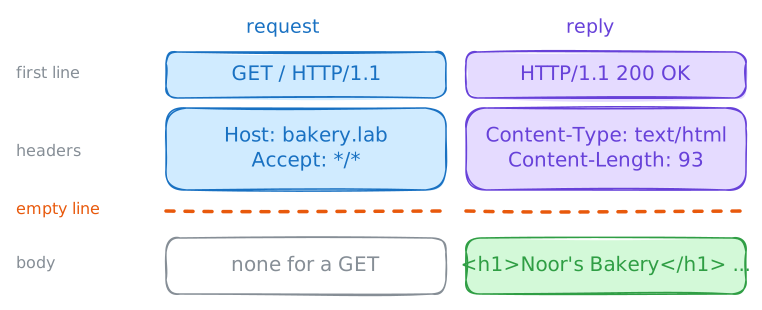
A browser hides a conversation behind every page. Underneath, it sends a text message to a server and gets a text message back, over a TCP connection, usually on port 80 or 443. The rules for those two messages are HTTP, the Hypertext Transfer Protocol.
Tim Berners-Lee wrote the first version around 1990 so that researchers could fetch each other's documents, and up to version 1.1 it stayed plain text anyone could read. Later versions pack the same lines into binary, and tools print them back in this shape. That helps you, because a problem on a website usually shows up in these lines.
curlis a command-line web client: it asks for a page the way a browser does, and prints what it gets. With-vit prints the conversation too, and-shides a progress meter that would get in the way. Lines that start with>went out, lines that start with<came back, and lines that start with*are curl's own notes.laptop:~# curl -sv http://bakery.lab/
-
Host: one address, many sites
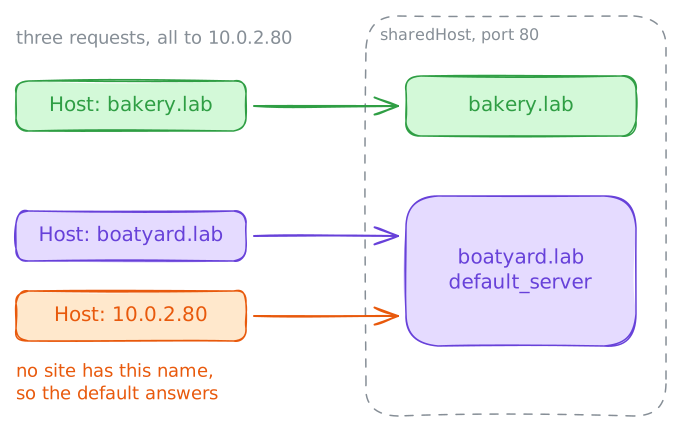
Noor's script doesn't use the name. She wrote the server's address into it,
10.0.2.80, to skip the name lookup. Bothbakery.labandboatyard.labpoint at that address, a machine calledsharedHost, and they share one server program on port 80.Think about what the server knows when a connection arrives. DNS turned the name into an address and stopped there, and a TCP connection carries addresses and ports, with no names. So the only place a name can travel is inside the request, in the
Hostheader.That header exists for exactly this reason. Early web servers ran one site per address, and the header let a single address hold many sites, which is called virtual hosting. From version 1.1 of HTTP every request must carry it, and today a small site often shares its address with strangers.
First run Noor's script's request. Then type a request by hand:
ncopens a plain TCP connection and sends what you type, so theHostline is yours to write.laptop:~# curl -si http://10.0.2.80/ laptop:~# nc bakery.lab 80 sharedHost:~# grep -n -e server_name -e listen /etc/nginx/nginx.conf
-
Status codes: what the first digit tells you
Noor's script now uses the name, and it asks for the menu at
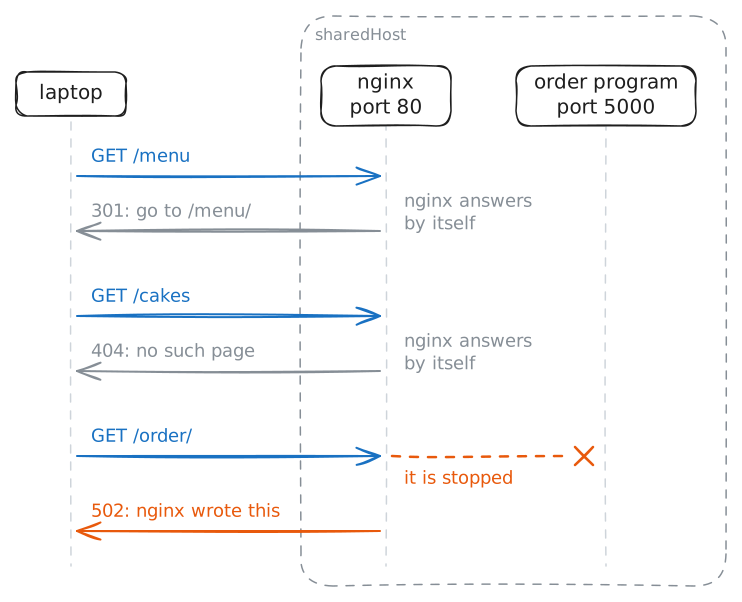
/menu. A person reading a browser sees a page or an error page. A script sees neither: it gets a three-digit status code, and it has to read it.The designers gave the first digit a meaning, so even a code you've never seen tells you what to do:
2xx: it worked.3xx: look somewhere else.4xx: the server thinks the request is at fault.5xx: the server failed.
The first digit tells you whose problem it is. A
4xxusually fails the same way until the request changes, and a5xxmay pass on a retry, because the request was fine. That holds for fetching a page: repeating an order is riskier, since the first try may have gone through.The standard also has
1xx, a note sent while the real reply is on its way, and the WebSockets lab uses one.Try three requests. In the third one, the program behind the order page has been stopped, the way it would stop in a crash.
laptop:~# curl -siL http://bakery.lab/menu
laptop:~# curl -si http://bakery.lab/cakes
laptop:~# curl -si http://bakery.lab/order/
-
POST: hand data to the server
GETasks for something. Noor's script has to deliver something, an order, and that takes another method.The method is the first word of the request, and it tells the server what you want done.
POSThands over data for the server to act on.PUTreplaces a thing,DELETEremoves it, andHEADasks for the headers of aGETwithout its body.A method is a meaning both sides agree on, and nothing enforces it. A server could delete something on
GET. People who build sites take care that it doesn't, because browsers and search engines repeatGETrequests freely.A
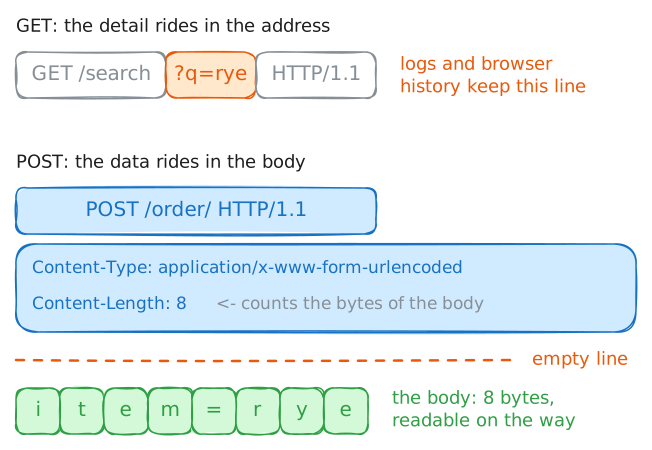
GETcan carry small details in the address, as in/search?q=rye, and those end up in logs and browser history. APOSTcarries its data in the body, the part after the empty line. So a request now has the same three parts as a reply, and the headers have to describe the body:Content-Typesays what kind of data it is, andContent-Lengthsays how many bytes.curl -dsends aPOSTwith the data you give it. The order program on/order/takes a form field calleditem.laptop:~# curl -sv -d item=rye http://bakery.lab/order/ laptop:~# curl -si -X DELETE http://bakery.lab/order/
-
Redirects: how an order gets lost
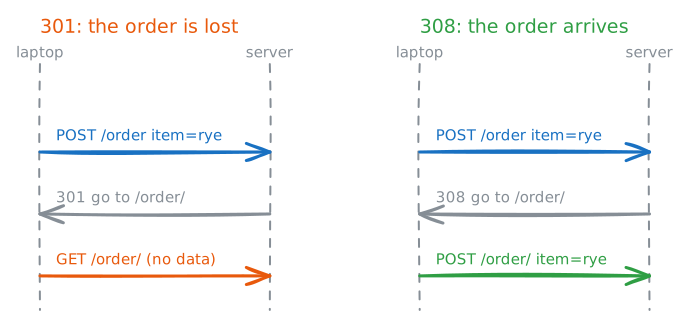
Noor's script worked once, then a customer's order disappeared. Her script posts to
/order, with no slash, and she added-Lso that it follows redirects, as a good script should. She sees200 OKevery time.You've seen a redirect work on a
GET. A client that follows one sends a second request to the new address. What should that second request be when the first was aPOST?The first HTTP specification said to keep the method and ask the user first. Browsers of the time didn't: they turned the
POSTinto aGETand dropped the body, and sites came to depend on that.The later standards gave up on the question. To this day, a client that follows a
301or302is allowed to turn aPOSTinto aGETand drop the body.Two newer codes say what they mean:
307and308keep the method and the body.308only became a standard in 2015, so plenty of servers and programs still use301from habit.Send the order the way Noor's script does, and read the server's log. Then add a rule to the settings that stops the loss.
laptop:~# curl -siL -d item=rye http://bakery.lab/order
sharedHost:~# tail -n 2 /var/log/nginx/access.log
-
Cookies: how a server remembers you
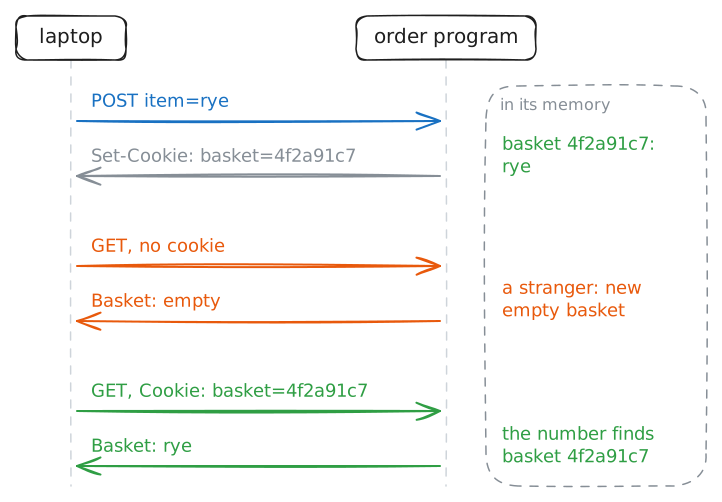
Noor's orders arrive now, one at a time. Her script adds rye, then adds seeded, and the basket shows only
seeded.The cause is in how HTTP was designed. Each request stands alone, and nothing in the protocol links it to the one before, even on the same connection.
This is called being stateless, and it keeps servers simple: a server can answer anyone at any moment, with no memory of them. It makes a shopping basket impossible, though.
In 1994 Lou Montulli, at Netscape, solved this with a small addition. The server sends a short piece of text in a
Set-Cookieheader, the browser stores it, and the browser sends it back in aCookieheader on every later request to that site.An HTTP cookie is that piece of text. HTTP stays stateless, and the client carries the memory.
curlkeeps no cookies unless you ask.-c jar.txtwrites them to a file, and-b jar.txtsends them back.laptop:~# curl -si -c jar.txt -d item=rye http://bakery.lab/order/ laptop:~# curl -s http://bakery.lab/order/ laptop:~# curl -sv -b jar.txt http://bakery.lab/order/
-
Caching: ask whether it changed
A bakery's menu changes rarely, and a customer's browser may ask for it a hundred times. Fetching it each time wastes bandwidth and makes the page slower, and the fix is an HTTP cache: the client keeps a copy and reuses it.
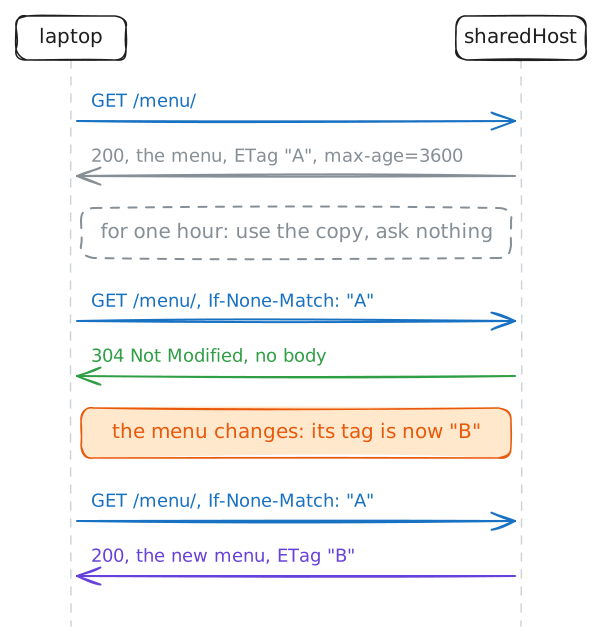
The hard part is knowing when the copy has gone out of date, and HTTP gives the server two tools. An expiry time says how long to reuse the copy without asking, and a tag makes the question afterwards cheap.
The expiry time is
Cache-Control: max-age=3600. It says the copy is good for an hour, and during that hour a browser doesn't even ask.The tag is an
ETag, a short label the server puts on each version of a file, and it changes when the file does. When the hour is up, the browser sends the tag back in anIf-None-Matchheader, which asks "has it changed from this one?"curlkeeps no cache of its own, but it can do that check by hand:--etag-savewrites the tag to a file, and--etag-comparesends it back.laptop:~# curl -si --etag-save tag.txt http://bakery.lab/menu/ laptop:~# curl -si --etag-compare tag.txt http://bakery.lab/menu/
Run these steps on real machines