 Hack the Route Start learning Open app
The idea
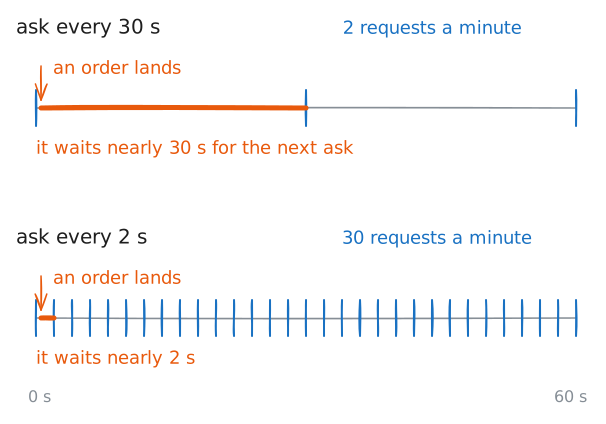
Noor's kitchen screen asks the server for new orders every few seconds, so bread starts late and the server spends its day saying "nothing yet". She wants an order to appear the moment the till takes it, and to keep appearing through the quiet hours.
Steps
-
Polling: ask again and again
Noor's kitchen screen has one job: show a new order as soon as the till, the shop's cash register, takes it. HTTP makes that awkward, because in HTTP only the client starts. A server answers requests, and it has no way to tap a client on the shoulder and say that something changed.
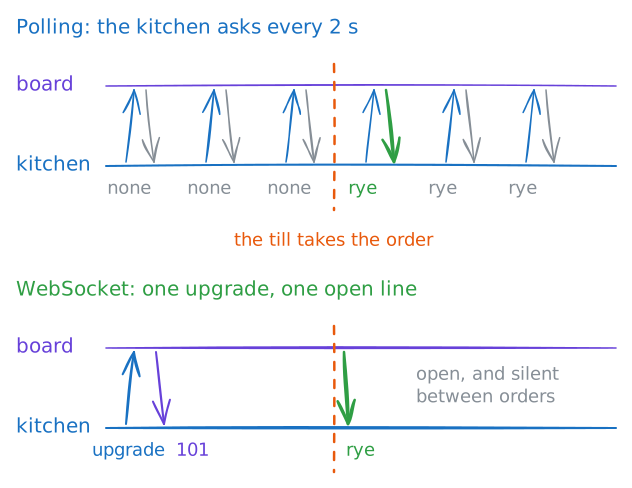
So the screen keeps asking. Asking over and over on a timer is called polling, and it's how live pages worked for years. It's simple, it passes through any web server, and for data that changes slowly it's still a good choice.
The board program on
bakery.labholds the orders, and each reply starts with the time on the board's own clock. An order for rye is due from the till five seconds from now.Ask six times, two seconds apart, the way the screen does.
[1-6]makes curl repeat the request six times, and--rate 30/mholds it to 30 requests a minute.kitchen:~# curl -s --rate 30/m "http://bakery.lab:8000/orders/?ask=[1-6]"
-
Upgrade: turn a request into a WebSocket
What Noor needs is a connection that stays open, where either side can speak at any moment. A WebSocket is that: one TCP connection, kept open, carrying messages both ways.
Its designers could have put a new protocol on a new port, and for many people it would have failed. When the standard came out in 2011, as RFC 6455, many firewalls let web traffic through and stopped much of the rest. So did web proxies, the machines that relay web traffic for a whole company.
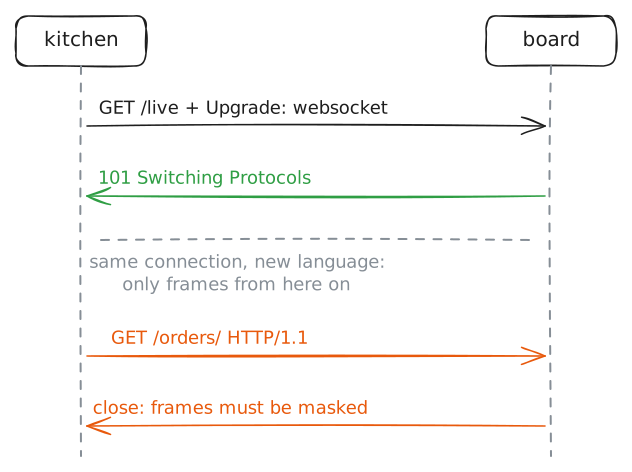
So a WebSocket starts life as an ordinary HTTP request on an ordinary web port, and that request asks the server to change protocols. This is the upgrade.
Type one by hand.
ncopens a plain TCP connection and sends what you type, so nothing stays hidden. The board's live address is/live.After the usual request line and
Host, the upgrade adds four headers:Upgrade: websocketnames what you want.Connection: Upgradesays the request is about this connection itself.Sec-WebSocket-Keyis a random value, here the standard's sample,dGhlIHNhbXBsZSBub25jZQ==.Sec-WebSocket-Version: 13is the version from the standard.
When the server has answered, type one more line, a normal HTTP request line, and see what happens to it.
The second command asks a different question: who may connect at all? In it, curl makes the same upgrade request the way a page on another site,
florist.lab, would.kitchen:~# nc bakery.lab 8000 kitchen:~# curl -sv -N -m 2 -H "Origin: http://florist.lab" ws://bakery.lab:8000/live
-
Push: orders arrive by themselves
An open WebSocket lets the board do what HTTP never allowed: send an order the moment it has one, with no request in front of it. A server sending without being asked is called push, and it's what polling could never do.
This time curl does the upgrade for you. It takes a
ws://address, the form a WebSocket address has, then connects and prints each message it gets. That stands in for Noor's screen: it connects once and then waits.While it waits, the till sends two orders over plain HTTP, the same way it always has. The board takes each one and writes it down the open connection to the kitchen.
The capture on
shopRouteris the part to watch. Keep the first step's six requests in mind.kitchen:~# curl -sN ws://bakery.lab:8000/live till:~# curl -s -d item=rye http://bakery.lab:8000/orders/ till:~# curl -s -d item=sourdough http://bakery.lab:8000/orders/
-
Frames: small, and scrambled on purpose
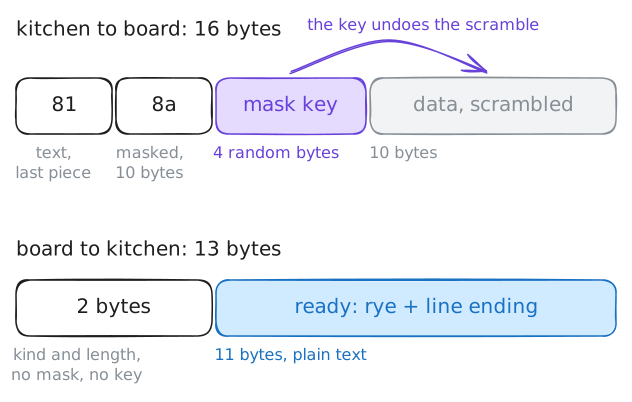
After the upgrade, messages travel as frames. TCP hands the program a stream of bytes with no edges, so something has to say where one message ends and the next begins. A frame is that small wrapper: one byte for the kind of message, then its length, then the data.
The two directions follow different rules. A frame from the server goes as it is. Every frame from a client has to be masked, which means its data gets scrambled with four random bytes, fresh for every frame.
curl here only listens, so the kitchen needs another way to send.
ready.pyis a short program on the kitchen that tells the board a loaf is ready, and it prints every byte of the frame it sends. Watch what crossesshopRouter, in both directions.kitchen:~# python3 /root/ready.py rye
-
Proxies: pass the upgrade along
So far the kitchen has talked to the board directly on port 8000. On Noor's real site, everything comes in through one front door: nginx, a web server that listens on port 80 and passes each request to the program behind it. That's called a reverse proxy, and nearly every real site has one, or several.
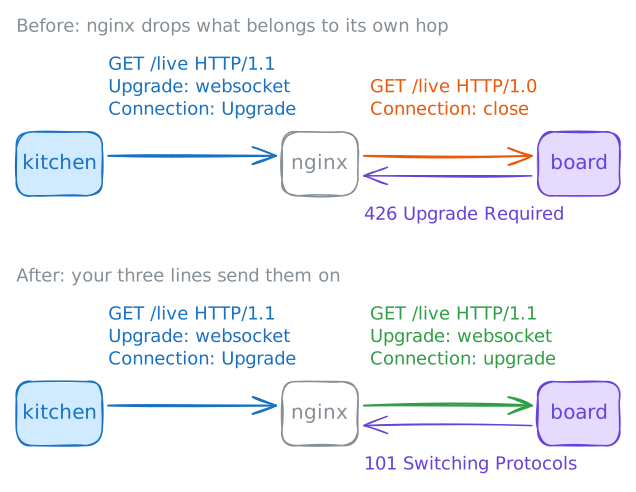
Plain requests pass through it without trouble. An upgrade is different, because of two kinds of header.
Most headers describe the message, so a proxy passes them on.
UpgradeandConnectiondescribe one connection between two machines. A proxy has two connections: one to the kitchen, and one of its own to the board.Connect to the live address through nginx. nginx and the board run on the same machine,
boardServer, and talk over that machine's internal link, calledlo. The capture there shows what reaches the board.kitchen:~# curl -sv -N -m 3 ws://bakery.lab/live kitchen:~# curl -sv -N -m 3 ws://bakery.lab/live
-
Ping and pong: keep a quiet line open
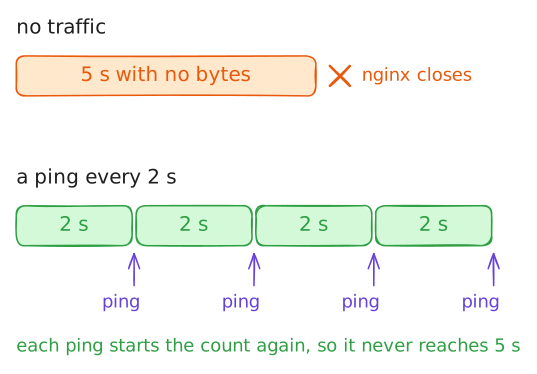
Noor's screen works now, and overnight it dies. A connection with no traffic looks exactly like a dead one, so the machines along the way give up on it.
nginx closes a proxied connection when nothing crosses it for 60 seconds. Home routers and firewalls forget quiet connections too, some after minutes and some after hours, and those often give no sign at all.
The cure is to stop being quiet. WebSocket has two tiny control frames for this, frames that carry no message of their own: a ping, which says "still there?", and a pong, the answer the other side has to send. Each one counts as traffic, so idle limits reset.
To spare you the wait, the lab has set nginx's limit to 5 seconds. Connect and say nothing. Then turn on the board's pings, in
/etc/board.conf, and connect again.kitchen:~# curl -sv -N -m 12 ws://bakery.lab/live kitchen:~# curl -sv -N -m 9 ws://bakery.lab/live
-
Server-sent events: do you need a WebSocket at all?
Before Noor ships this, one question is worth asking: her screen mostly listens, so does it need a WebSocket at all? A WebSocket pays for two-way talk with an upgrade, frames, masks and proxy settings. If the data only flows from server to client, ordinary HTTP has an answer.
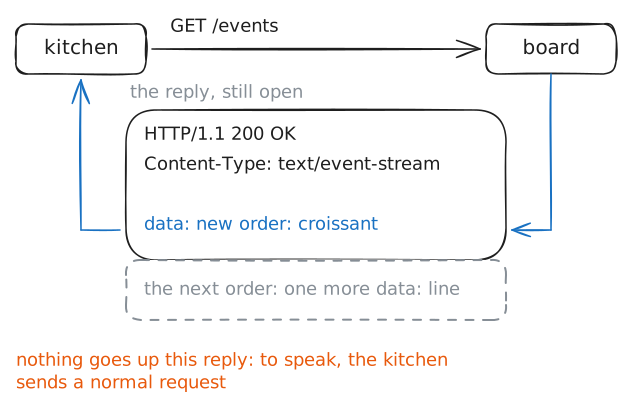
Server-sent events, or SSE, is a normal
GETwhose reply never ends. The server keeps the reply open and writes a few text lines each time it has news, and the client reads them as they come. There's no upgrade, so it's plain HTTP from start to finish.The board offers one at
/events. Connect to it from the kitchen, with-iso you see the reply's headers, and send another order from the till.kitchen:~# curl -si -N http://bakery.lab:8000/events till:~# curl -s -d item=croissant http://bakery.lab:8000/orders/
Run these steps on real machines