 Hack the Route Start learning Open app
The idea
Ines looks after Radio Tide's two servers from her kitchen table. One morning her login stops with a warning in capital letters that the server may be an impostor, and she has to work out what to believe before she types her password.
Steps
-
SSH: a private shell on a far machine
Ines looks after two servers at Radio Tide, a small local station.
gatefaces the internet andstudiosits behind it. She works from home, so she needs to type commands on machines she can't touch.A shell is the program that reads your commands and runs them, the one you get in any terminal. SSH, short for Secure Shell, gives you a shell on another machine over an encrypted TCP connection. It comes in two halves:
sshis the client you run, andsshdis the server program, waiting on port 22 of the far machine.Tatu Ylönen wrote the first version in 1995 at Helsinki University of Technology, after someone captured passwords on the university's network. The tools people used back then sent everything as plain text, and SSH was built to replace them.
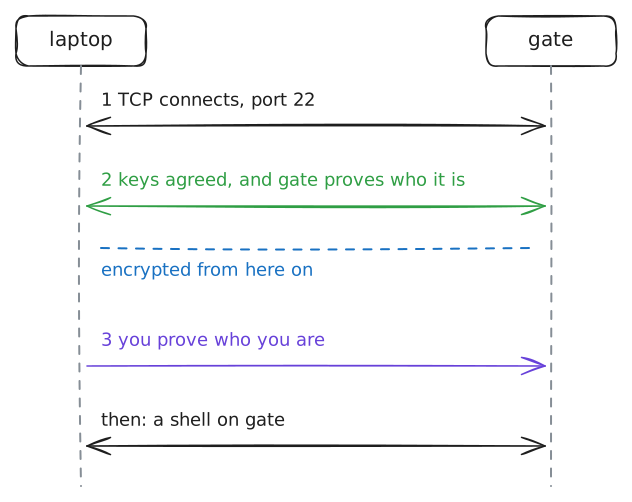
A connection goes through three stages, always in this order:
- TCP connects.
- The two sides agree on encryption keys nobody else can work out, and in that same exchange the server proves who it is.
- With encryption on, you prove who you are, and only then do you get a shell.
The server proves who it is first, and you say nothing about yourself until the encryption is on. The second stage has a gap on a first visit: the laptop has never met this server, so it has nothing to check the server's proof against.
Log in as
inestotide.lab, the name the world knowsgateby.laptop:~# ssh ines@tide.lab
-
Encryption: what a stranger on the path can read
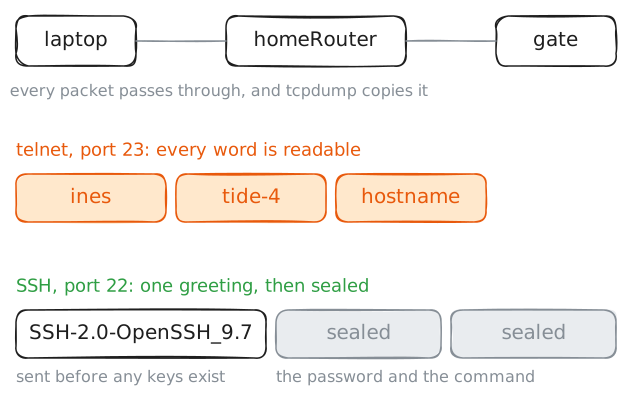
Before SSH, the usual way to reach a far shell was telnet. It does the same job with one difference: everything crosses the network as plain text.
gatestill answers telnet on port 23, so compare the two side by side.Every packet between the laptop and
gatepasses throughhomeRouter. On a real network that spot belongs to whoever runs the router: your internet provider, a cafe's owner, or someone who has broken in.Nobody has to break any code to read a passing packet. They only need to be on the path and run a capture, the same one you'll run here.
Start
tcpdumponhomeRouter, log in over telnet, and stop the capture. Then log in over SSH, with a command that starts a capture of its own on port 22, shown under its output.The SSH command uses
sshpass, a helper that types the password for you, so one command does the whole login. It's a lab convenience, and it leaves the password in your command history, so keep it off real machines.homeRouter:~# tcpdump -l -nn -i home -A 'dst port 23 and tcp[tcpflags] & tcp-push > 0' laptop:~# telnet tide.lab laptop:~# sshpass -p tide-4 ssh ines@tide.lab hostname
-
Host keys: the server proves who it is
Encryption alone doesn't help if you're talking to the wrong machine. Someone on the path could answer in
gate's place, encrypt everything with you, and read your password on arrival. So the server has to prove who it is before you say anything.Each server has a host key: a pair of matching keys, one public and one private, made when SSH is installed and kept in
/etc/ssh. The public half goes out to anyone who connects. The private half never leaves the machine, and the server uses it to sign each connection.A signature is a value that only the holder of the private half can make, and that anyone with the public half can check. Your laptop checks the signature with that public half, then looks for the key in
known_hosts, the filesshwrote during your first login. Three things can happen:- The key is on the list: it's the same machine as last time, so
sshgoes on. - No entry for that name: it's a first visit, so
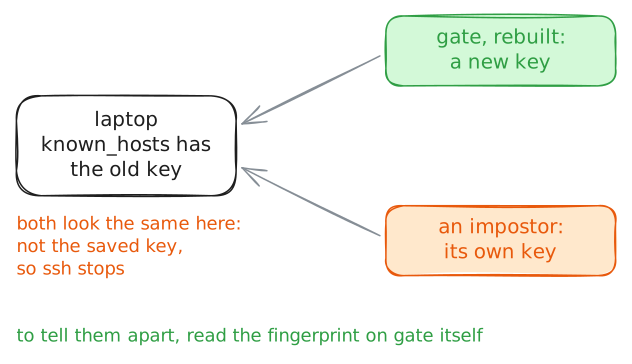
sshasks you. - A different key: that's the warning Ines got this morning.
Here's the catch: a rebuilt server has a new key, and an attacker in the middle has a key of its own, and to your laptop the two look identical. The warning says the key changed and can't say why, so the answer has to come from somewhere outside that connection.
laptop:~# ssh ines@tide.lab hostname
gate:~# ssh-keygen -lf /etc/ssh/ssh_host_ed25519_key.pub
laptop:~# ssh-keygen -R tide.lab
- The key is on the list: it's the same machine as last time, so
-
Key login: prove who you are without sending a secret
A password has one big weakness: to check it, the server has to receive it. It arrives encrypted, and then
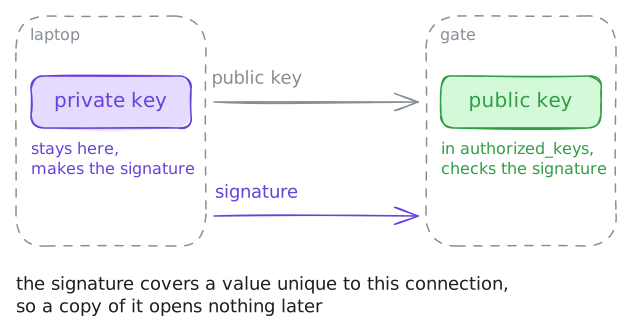
sshdholds it in plain form. A machine that has been taken over, or a wrong machine you saidyesto, gets the real thing.A key login never sends a secret. You make a pair of keys on your laptop, and they only work together: the private key stays on the laptop, and the public key goes on the server, as one line in
~/.ssh/authorized_keysof the account you log in to. The public half is safe to hand out, since it can check a signature and can't make one.At login the laptop names the public key, and the server says whether it knows it. The laptop then signs a block of data that includes a value unique to this connection, and the server checks the signature with the public key. Nothing reusable crosses the network, so a recorded login is worth nothing to anyone.
ssh-keygenmakes the pair, and-t ed25519picks Ed25519, a kind with short keys.ssh-copy-idlogs in once with your password and adds your public key to the right file with the right permissions. It will ask about the machine's key first, since you made the laptop forget it, so check that fingerprint against the one you read ongate.laptop:~# ssh-keygen -t ed25519 -N "" -f ~/.ssh/id_ed25519 laptop:~# ssh-copy-id ines@tide.lab laptop:~# ssh -v ines@tide.lab hostname
-
Passwords off: stop answering the guessers
A machine with port 22 open to the internet starts getting login attempts soon after it goes online. Programs walk through every address they can find, trying common names and common passwords, and they never get tired.
botplays that part here.Now that Ines has a key, a password on
gategives her nothing and gives the guessers something to try. The fix is to turn password logins off, and the order matters.Prove the key works first, as you did, and keep one logged-in session open while you change the settings. A reload leaves open sessions alone, so if the change goes wrong you still have a way in to undo it.
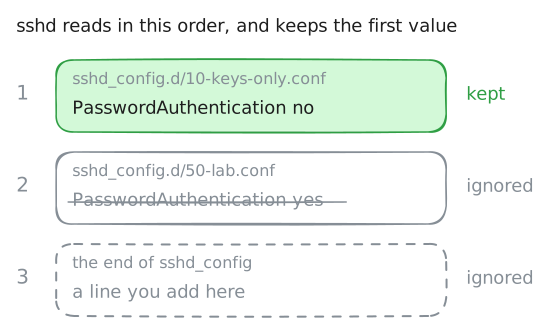
sshdreads its settings from/etc/ssh/sshd_config, and a line near the top of that file pulls in every.conffile in/etc/ssh/sshd_config.d/, in name order. For most settings,sshdkeeps the first value it finds and ignores the rest. That surprises people: a line added to the end of the main file can do nothing at all, because a file in that folder got there first.Some server images from cloud providers ship such a file with passwords on, and this lab has one called
50-lab.conf. So name your file10-keys-only.confand it wins.Two settings matter, since there are two ways to ask for a password.
PasswordAuthenticationis the direct one, andKbdInteractiveAuthenticationis a general question-and-answer login that usually ends up asking the same thing.gate:~# grep 'Failed password' /var/log/auth.log bot:~# ssh ines@tide.lab hostname laptop:~# ssh ines@tide.lab hostname
-
Jump host: reach a machine with no way in
studioruns the on-air system, so it has no address the internet can reach.gatehas one foot on each side: one address on theinternetnetwork and one onstation. A machine used this way, as the single guarded door to the private machines behind it, is called a jump host or SSH bastion.The obvious way through is two logins: SSH to
gate, then SSH again from there. That works, and it has a cost.The second login starts on
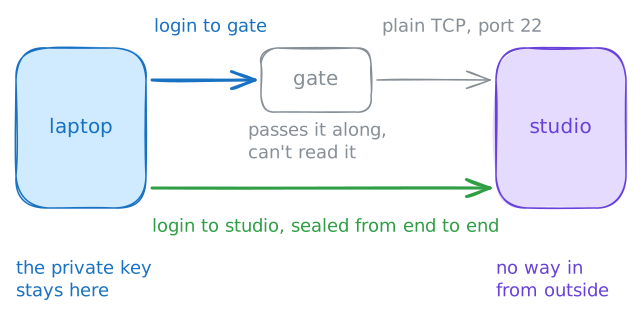
gate, so your private key has to be there too, orgatehas to borrow it. A machine facing the internet is the worst place to keep one, and whoever controls it can read that second session.ssh -Jdoes it differently. The laptop logs in togateand asks it for one thing: open a TCP connection to port 22 onstudio, and pass the bytes along. The laptop then runs a whole second SSH connection through that pipe, straight tostudio.Your private key signs both logins from the laptop, and the inner connection is encrypted from end to end, so
gatecarries bytes it can't read.The target's name is looked up on
gate, not on the laptop, and that's handy, since private names often mean nothing outside. The laptop's key has to be onstudioas well, so you'll see that copied for you.Typing
-Jevery time gets old, so you'll finish by saving the jump in~/.ssh/config, the file wheresshkeeps settings for each machine.laptop:~# ssh -o ConnectTimeout=3 ines@studio.lab hostname laptop:~# ssh -J ines@tide.lab ines@studio.lab hostname studio:~# grep Accepted /var/log/auth.log
-
Port forwarding: carry one port through SSH
studioruns a small status page for the people in the building. It shows the on-air state and the transmitter, and nothing protects it, so it listens only on127.0.0.1, port 9000.That address means "this same machine", so the page can't be reached from any network, and that keeps it safe. It also keeps Ines out, from her kitchen.
SSH can carry other connections inside its own, and this is called port forwarding, or a tunnel. With
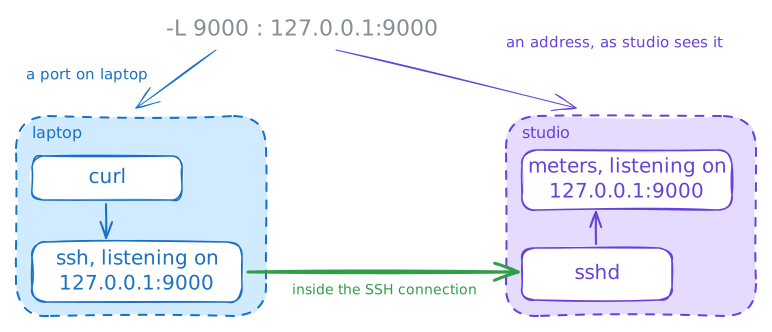
-L, the laptop'ssshstarts listening on a port of the laptop. Each connection to that port goes through the SSH connection, and at the far endsshdmakes the matching connection for you.The option has three parts:
-L 9000:127.0.0.1:9000. The first9000is the port to open on the laptop, and the127.0.0.1:9000after it is the address to connect to from the far end, so it meansstudio. That one catches everybody out, since the same127.0.0.1on the laptop would mean the laptop, and a name in that spot would be looked up onstudiotoo.First check the page really is closed, from
gate, the closest machine there is. Then open the tunnel, with-Nto say you want no shell, only the forwarding.The
ssh ines@studio.labpart uses the jump you saved, so this tunnel runs inside the two logins you already have. With the tunnel up, the page is at a local address on the laptop.gate:~# curl -sS -m 3 http://studio.lab:9000/ laptop:~# ssh -N -L 9000:127.0.0.1:9000 ines@studio.lab laptop:~# curl -s http://127.0.0.1:9000/
Run these steps on real machines