 Hack the Route Start learning Open app
The idea
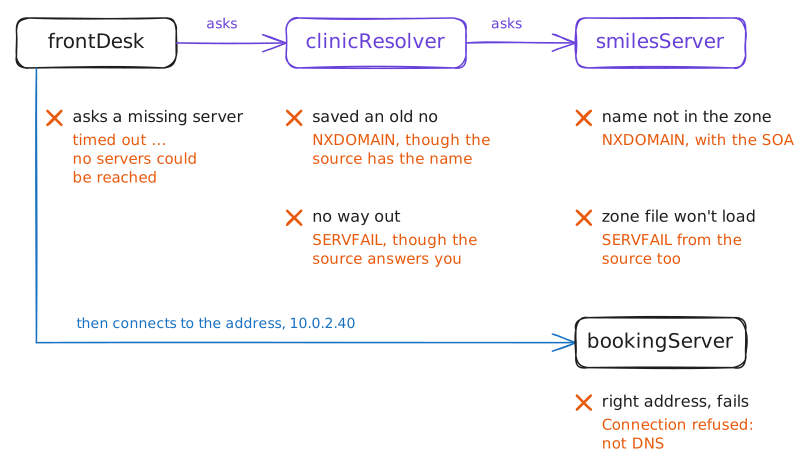
The front desk at Smiles Dental books every patient on a web page, and this morning the page won't load. Somebody mutters it's always DNS. Find out whether it is, which part of DNS broke, and the signs that say it isn't.
Steps
-
By name, then by number
Monday, 8:05. Priya at the front desk can't open the booking page, and patients are queuing.
A web address like
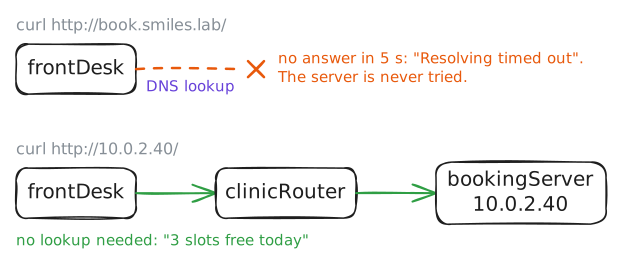
book.smiles.labis a name, and the network has no use for names: packets need an IP address. So before a browser sends anything, it asks DNS to turn the name into a number. If that question goes unanswered, nothing else even starts.That suggests the first test. Load the page by name, then by number, which skips DNS entirely. The vendor's setup sheet says the booking server is
10.0.2.40.The two results split the problem in half. If the number fails too, the trouble is in the network or the server, and DNS is innocent. If only the name fails, look at DNS.
Who runs what: the clinic has its own DNS Recursive resolver,
clinicResolver, next to the desks. Past the clinic's Router sit the name servers,smilesServeramong them, which Dana looks after, and the booking company'sbookingServer.frontDeskhas no browser, socurlstands in for one.frontDesk:~# curl -sS -m 5 http://book.smiles.lab/ frontDesk:~# curl -sS -m 5 http://10.0.2.40/
-
Find the server it asks
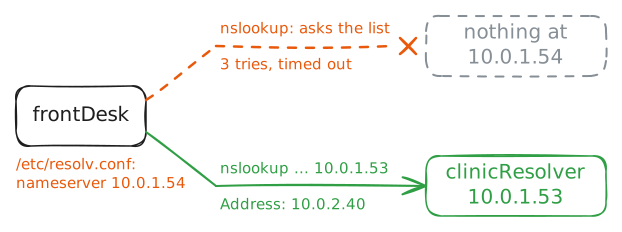
Every machine keeps a short list of DNS servers to ask: its resolvers. A resolver does the legwork. It finds the answer, hands it back and remembers it for a while.
On Linux the list lives in
/etc/resolv.conf. On Windows,ipconfig /allshows it as DNS Servers. Either way it usually arrives from DHCP along with the machine's address.So read the list first. Then look the name up by hand with
nslookup, which works the same on Linux, Mac and Windows. It asks the first server on the list, unless you put another server after the name.The clinic's own resolver is
clinicResolver, at10.0.1.53. Ask it directly, and you've tested the resolver apart from the PC's settings.One warning: a lookup nobody answers takes about fifteen seconds to give up, three tries of five seconds each. Let it finish.
frontDesk:~# cat /etc/resolv.conf
frontDesk:~# nslookup book.smiles.lab
frontDesk:~# nslookup book.smiles.lab 10.0.1.53
-
A no is an answer too
Patients will soon pay their bills at
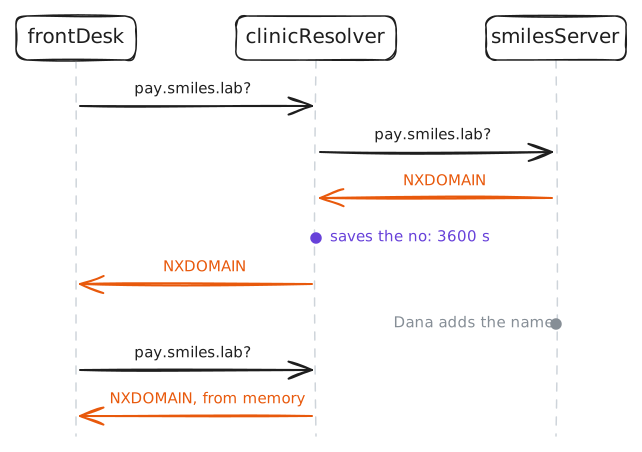
pay.smiles.lab. Dana, who runs the clinic's DNS, hasn't added that name yet. Look it up anyway, to see what a real no looks like.This time use
dig, the tool people reach for when the details matter. It prints the whole reply, and the first thing to read isstatus:in the header. That's the response code:NOERROR: the lookup worked.NXDOMAIN: the name doesn't exist. The server in charge of every name ending insmiles.lab, its zone, says so.SERVFAIL: the server you asked couldn't produce a usable answer. A resolver got nothing usable from anyone, or a zone's own server couldn't load its zone.
Then Dana adds the name, and you look again, through the same resolver that said no a moment ago.
frontDesk:~# dig pay.smiles.lab
frontDesk:~# dig pay.smiles.lab
frontDesk:~# dig @10.0.2.30 pay.smiles.lab
clinicResolver:~# unbound-control flush pay.smiles.lab
frontDesk:~# dig pay.smiles.lab
-
One typo takes down every name
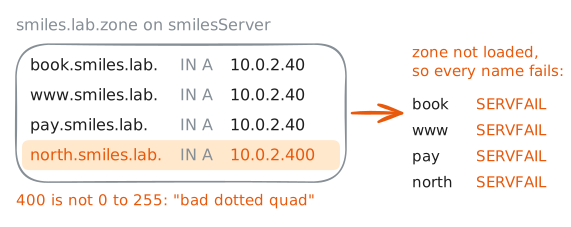
Next Monday, and this time everything is down: the booking page, the payment page, every name in
smiles.lab. On Friday Dana added one line to the zone file, for the new north branch's server at10.0.2.41. Thenrndc reload, which tells the name server to read its files again, reported nothing wrong.Start with the status, because each one points somewhere different. Then ask
smilesServerdirectly, as before, to split the resolver from the source.If the source is broken too, read the zone file. It's plain text, one record per line: a name, a type and a value. Every full name ends with a dot,
book.smiles.lab., which says the name is complete.named-checkzonereads it the way the name server will, and names the first line it can't understand. It's the check to run before every reload, and Dana skipped it.frontDesk:~# dig book.smiles.lab frontDesk:~# dig @10.0.2.30 book.smiles.lab smilesServer:~# named-checkzone smiles.lab /etc/bind/zones/smiles.lab.zone frontDesk:~# dig +short book.smiles.lab
-
When the answer is right, look elsewhere
Tuesday, 9:12. The booking page fails again, and Priya calls: is it DNS again?
It might be. But DNS gets blamed for plenty it didn't do, so test it before you touch it.
digasks DNS and nothing else. Programs likecurland browsers use the system's own lookup instead, which reads the hosts file before it asks DNS.getent hostslooks a name up that same way, so it shows the address programs actually get.If
getentanddigdisagree, something answers before DNS does, usually a stale line in the hosts file.If the address is right, DNS has done its job. Then
curl -v, for verbose, shows each stage of the fetch: the lookup, the connection, the request, the reply. The first stage that fails is where to look.frontDesk:~# getent hosts book.smiles.lab frontDesk:~# curl -sv -m 5 http://book.smiles.lab/ frontDesk:~# curl -sS -m 5 http://book.smiles.lab/
Run these steps on real machines