 Hack the Route Start learning Open app
The idea
Every evening at eight, the players at a gaming café start losing fights they should win. Something between the café and the game server is getting in the way. Make ping and traceroute point at the exact link.
Steps
-
Measure a good evening first
A fault report that says "slow" is useless without a number, and a number is useless without a normal one to compare it with. So before trouble starts, take a reading on a good evening.
pinggives you three numbers that matter. Latency is how long a packet takes to get there and back, the round trip, in milliseconds. Jitter is how much that time wobbles from one packet to the next.Packet loss is how many never come back at all. A video call or a game cares about all three, and players feel jitter more than a steady delay.
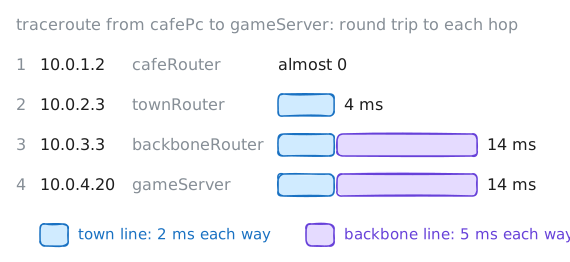
cafePcplays ongameServer, in a data centre in another city. On the way sit the café's own Router and two routers that belong to the café's internet provider. Ping the server twenty times, then trace the way there:tracerouteprints one line per router, called a hop.cafePc:~# ping -c 20 -i 0.2 10.0.4.20 cafePc:~# traceroute -n 10.0.4.20
-
Lag that starts at one hop
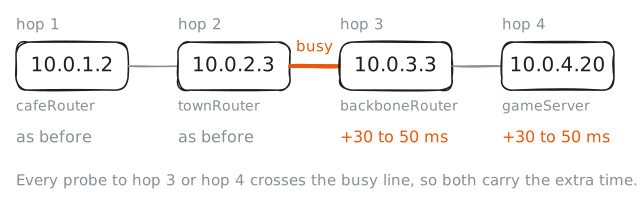
Eight in the evening. Everyone in town is streaming, and the players start to complain about lag. Your job is to say where it comes from, because "the internet is slow" gets nowhere with a provider, and "your link after
10.0.2.3adds 40 ms from 20:00" does.A packet's round trip is the sum of every link and queue it crosses, there and back. When a link gets busy, routers queue packets waiting their turn, and the queue changes length from moment to moment, so the delay wobbles too. That's why congestion shows up as latency and jitter together.
Ping the server again, then trace the path, and compare both with your good evening.
cafePc:~# ping -c 20 -i 0.2 10.0.4.20
cafePc:~# traceroute -n 10.0.4.20
-
Stars at one hop
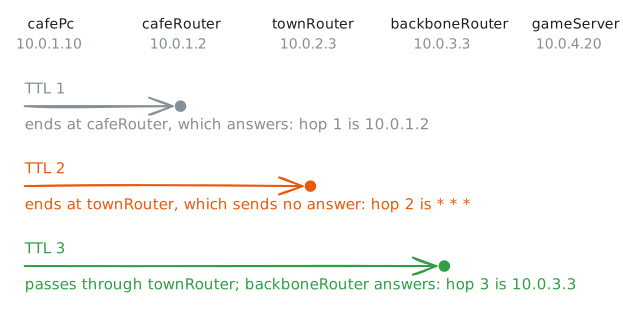
The rush is over and the lag is gone. Then a player runs a traceroute of their own and posts it in the café's chat: one hop is nothing but stars, and the thread fills up with people sure the provider is broken.
Each
*in a trace is a probe that got no answer within three seconds. A trace sends three probes to each hop, so* * *means that hop said nothing at all, and a star-filled hop takes about nine seconds to print.Trace the path, then ping the router behind the stars.
cafePc:~# traceroute -n 10.0.4.20
cafePc:~# ping -c 5 10.0.2.3
-
Loss that carries on to the end
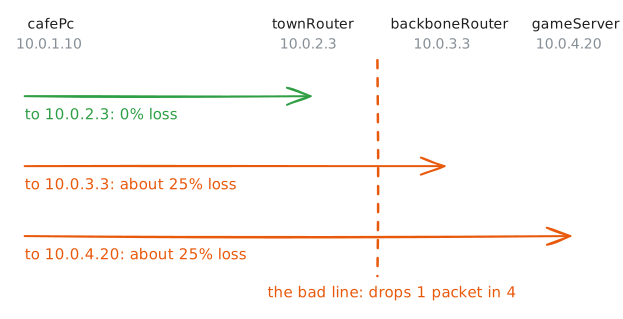
Now real trouble: a line starts dropping packets. A game feels it as players teleporting, and a call as words gone missing, and
pingcounts it as packet loss. The question is which line.traceroutemakes a poor loss meter, because it sends only three probes to each hop. A steadier method is to ping each hop in turn, many times. The nearest hop that loses packets sits right after the bad line, and every hop past it loses at least as many.mtr(WinMTR, orpathpingbuilt into Windows) automates the idea: it repeats traceroute's probes on a loop and keeps a loss count for each hop. Here, ping the server to measure the loss, then each provider router, nearest first, twenty times each.cafePc:~# ping -c 20 -i 0.2 10.0.4.20 cafePc:~# ping -c 20 -i 0.2 10.0.2.3 cafePc:~# ping -c 20 -i 0.2 10.0.3.3
-
A path that goes round in circles
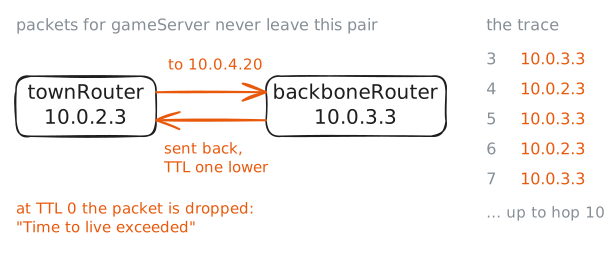
Late in the evening, the provider moves the game server to a new rack, and an engineer adds a route for the server's own address on one of their routers. The café's game drops on the spot.
Routers pass a packet on by their own tables, and nobody checks that the tables on different routers agree. When two of them disagree about the game server, its packets never arrive.
A packet can't wander forever, though. Each router takes one off its TTL, and when it reaches zero the packet is dropped and the sender hears time exceeded: the message traceroute leans on, now arriving when nobody asked for it. Ping the server, then trace it with
-m 10, which stops the trace after ten hops instead of thirty.cafePc:~# ping -c 3 10.0.4.20 cafePc:~# traceroute -n -m 10 10.0.4.20
-
Fix the loop, and compare with a good evening
On a router,
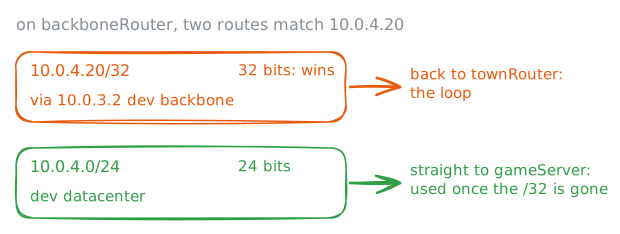
ip route getanswers one question: for this address, which route do you use? It's the router's own decision, not your reading of its table, which makes it the fastest way to see which router is wrong.Routes come with a length after the slash. A
/24covers a whole network of 256 addresses, like10.0.4.0/24, and a/32covers exactly one address.Ask
backboneRouterabout the game server. It sits on the data centre's network, so it should send the packets straight out onto it. If it points back towards town, that's the bad route, andip route delremoves it.Then go back to
cafePcand run the first step's ping once more: a fix isn't proven until the numbers match a good evening.backboneRouter:~# ip route get 10.0.4.20 backboneRouter:~# ip route del 10.0.4.20/32 cafePc:~# ping -c 20 -i 0.2 10.0.4.20
Run these steps on real machines