 Hack the Route Start learning Open app
The idea
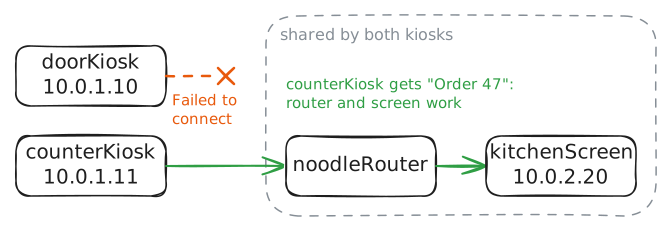
Lunch rush at a noodle bar, and the kiosk by the door has stopped sending orders to the kitchen. Find out why with a method instead of a guess, and fix it before the queue reaches the street.
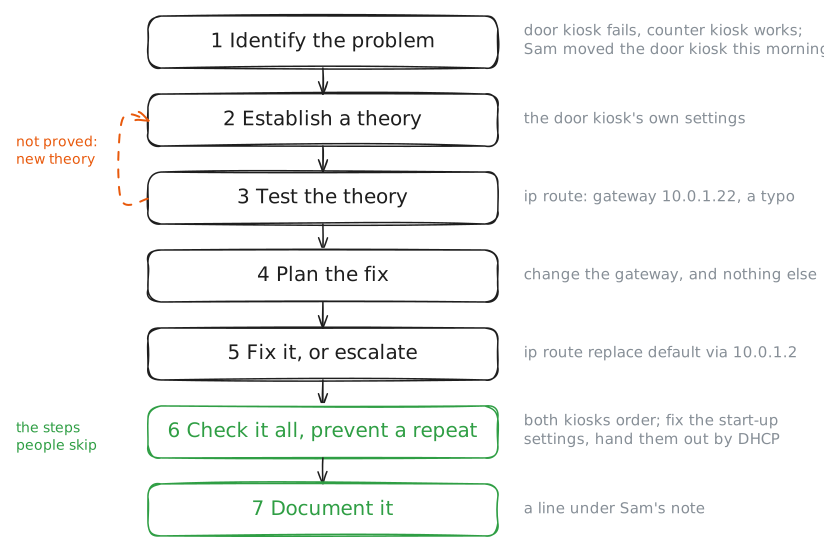
Steps
-
See it fail for yourself
The ticket reads: Door kiosk broken, orders not going through. Mia, front of house. "Broken" covers a hundred faults, so the first step of any troubleshooting method is to identify the problem, before you touch a single setting.
That takes three things. Make it fail in front of you, so you know what broken looks like and can tell later when it's fixed. Find out how far it reaches: one machine, or every machine?
And ask what changed, because working things rarely break on their own.
Mia answers the last one: this morning the kiosk moved to a new stand by the door, and Sam set it up there and left a note on it. Place an order from
doorKioskto the kitchen screen at10.0.2.20, then fromcounterKiosk, which sends its orders to the same kitchen screen through the same Router. Then read Sam's note.doorKiosk:~# curl -sS -m 5 http://10.0.2.20/order counterKiosk:~# curl -sS -m 5 http://10.0.2.20/order doorKiosk:~# cat /etc/motd
-
Start in the middle
Next comes a theory of probable cause: a guess that a test can confirm or kill.
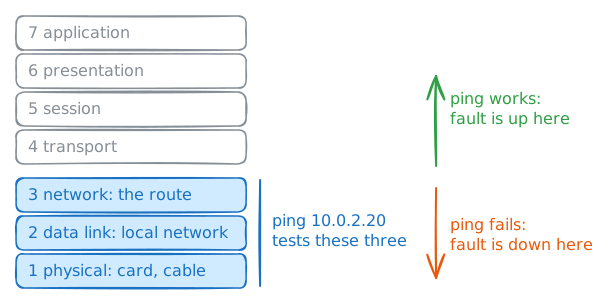
To test fast, think in layers. An order crosses every layer, from the card and cable at layer 1 to the kitchen screen's program at layer 7. You could check them one at a time, from the bottom up or the top down.
Faster is to start in the middle.
pingby address tests the bottom three layers in one go: the card, the local network and the route to the far side.If it works, the fault is above layer 3. If it fails, the fault is at layer 3 or below, or something filters ping itself, as many a Firewall does, which is why the error line matters.
Each test throws away half the suspects, which is why this is called divide and conquer.
Ping the kitchen screen from
doorKiosk, by its address.doorKiosk:~# ping -c 3 10.0.2.20
-
Compare with a kiosk that works
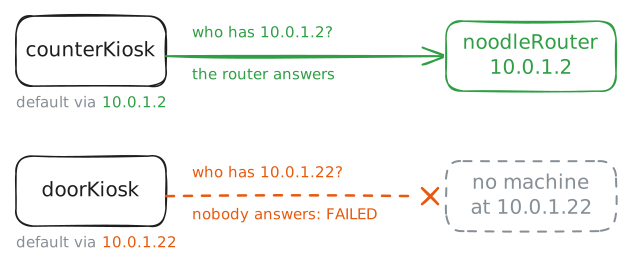
Time to test the theory. One of the strongest tests is a comparison: put a broken machine's settings next to a working one's and look for the difference. These two kiosks sit on the same network,
10.0.1.x, and should agree on almost everything.The kitchen sits on a network of its own,
10.0.2.x. To reach another network, a machine hands its packets to a router, andip routelists that choice along with the rest of its routes.Read the routes on both kiosks. Then run
ip neighondoorKiosk: before a machine sends anything on its own network, it asks who has the address it wants, andip neighlists the answers it got.doorKiosk:~# ip route counterKiosk:~# ip route doorKiosk:~# ip neigh
-
Change one thing, then test
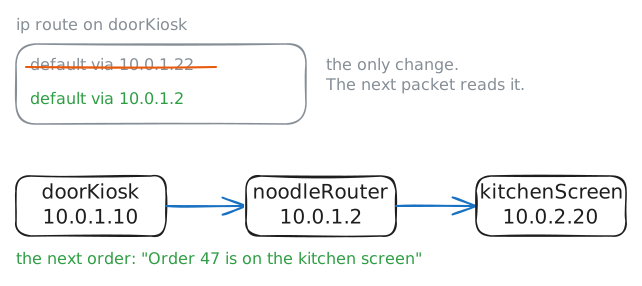
Before you change anything, make a plan and think about what else it touches. Here the plan is short: point the door kiosk's default route, the line naming its gateway, at
10.0.1.2. It affects only this kiosk, and putting the old line back undoes it.The same change on a router that carries the whole shop might wait until the lunch rush is over, or go to whoever owns that router.
Then change one thing at a time, and test after each. Change three settings at once and see the problem vanish, and you won't know which change fixed it. The other two may break something next week, and nobody will connect it to today.
Replace the default route on
doorKiosk, then place an order.doorKiosk:~# ip route replace default via 10.0.1.2 doorKiosk:~# curl -sS -m 5 http://10.0.2.20/order
-
Check the whole shop, then write it down
The method ends with three jobs people skip: check everything, prevent a repeat, and write it down. First, check the whole system, not only the part you fixed: the counter kiosk worked all along, and it must still work.
Then prevention. The typo still waits in the kiosk's start-up settings, so those need the same fix. And settings typed by hand will be typed wrong again one day, so the lasting fix is to let the kiosks take their settings from the router over DHCP, where nobody retypes them.
Last, document it: what you saw, what caused it, what you changed and how you checked. Sam's note got you to the cause in minutes, and yours will do the same for the next person.
Order from the counter kiosk. Then open Sam's note and add your line under it.
counterKiosk:~# curl -sS -m 5 http://10.0.2.20/order
Run these steps on real machines