 Hack the Route Start learning Open app
The idea
The door tablet at Lumen Gym checks members in on a web page that gymServer serves, and all week it keeps failing, a different way each day. Learn to tell the failures apart by what they say, and by how long they take to say it.
Steps
-
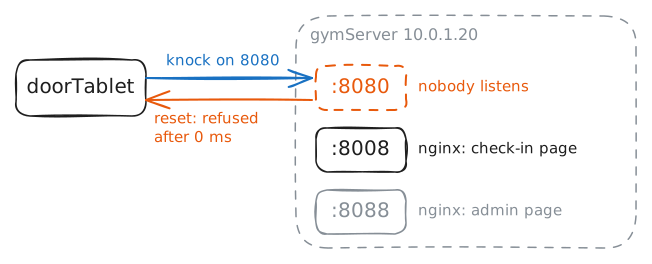
A no that comes at once
Monday, 6:00. The gym opens, and the door tablet can't load the check-in page. Over the weekend the vendor installed it on
gymServer, and their setup sheet says port 8080.An address gets a packet to a machine, and a Port gets it to one program on that machine. A program that wants visitors asks the machine to listen on a port for it, here a TCP port, the kind web pages use. Only then can anything connect.
When a knock arrives at a port nobody listens on, the machine answers it with a reset: nobody here. That's what connection refused means.
So try the page from the tablet, then ask the server what it listens on.
sslists it, and-padds the program behind each port.doorTablet:~# curl -sS -m 5 http://10.0.1.20:8080/ gymServer:~# ss -tlnp doorTablet:~# curl -sS -m 5 http://10.0.1.20:8080/
-
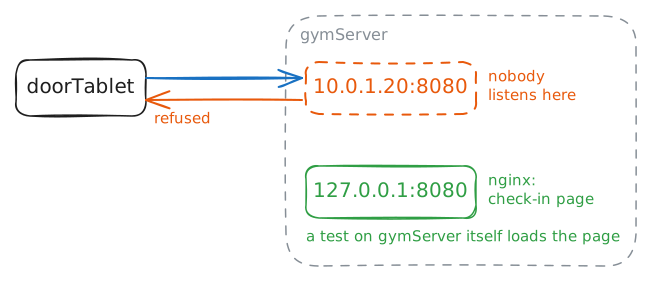
Listening, but only to itself
Tuesday. The vendor pushed a security update to
gymServerovernight, tested the page on the server, and it loaded. The tablet still can't check anyone in.A server has more than one address.
10.0.1.20is its address on the gym's network.127.0.0.1is its loopback address, which always means this machine and never leaves it.In nginx's config,
listen 8080;takes every address the machine has, andlisten 127.0.0.1:8080;takes loopback alone. Inss, the first shows as0.0.0.0:8080, the second as127.0.0.1:8080.So it works on the server proves less than it sounds.
doorTablet:~# curl -sS -m 5 http://10.0.1.20:8080/
gymServer:~# curl -sS -m 5 http://127.0.0.1:8080/
gymServer:~# ss -tlnp
doorTablet:~# curl -sS -m 5 http://10.0.1.20:8080/
-
Silence means something dropped it
Wednesday. IT came in to tidy
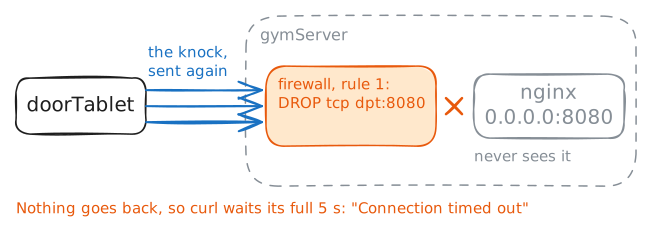
gymServer's Firewall rules, and now the tablet hangs on a blank screen for a while before it fails.A firewall checks every packet that arrives against its list of rules, before any program sees it. A rule can let the packet in, or drop it: throw it away and say nothing.
That silence changes what the tablet sees. With no answer, it can't tell a dropped knock from a lost one, so its TCP sends the knock again, a few times, while curl waits out its own timer. A long wait is the sign that something got in the way and kept quiet.
The gym's firewall has one job: stopping devices on the gym floor from reaching the admin page on 8088.
iptables -L INPUTlists the rules for packets arriving atgymServer,-vadds how many packets each rule has caught, and--line-numbersnumbers them.doorTablet:~# curl -sS -m 5 http://10.0.1.20:8080/ gymServer:~# ss -tlnp gymServer:~# iptables -L INPUT -n -v --line-numbers gymServer:~# iptables -R INPUT 1 -p tcp --dport 8088 -j DROP doorTablet:~# curl -sS -m 5 http://10.0.1.20:8080/
-
One scan, three answers
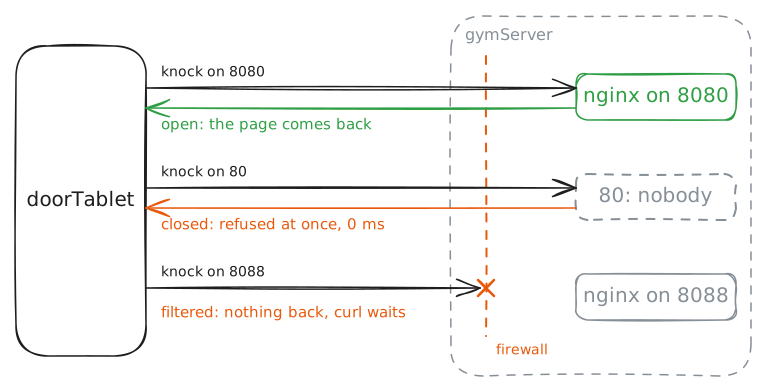
Three days, three kinds of answer: refused at once, silence until the timer ran out, and the page itself. Those are the three you'll meet most often when you knock on a TCP port.
nmap knocks on many ports at once and sorts what comes back into the same three:
- open: a program accepted the knock.
- closed: the machine answered no, nobody here.
- filtered: no usable answer, silence or an ICMP unreachable, so something got in the way.
Scan three ports: 80, where web pages usually live but nothing should listen at the gym, 8080 for check-in, and 8088 for the admin page.
-nskips looking up names, and-plists the ports to try.doorTablet:~# nmap -n -p 80,8080,8088 10.0.1.20 doorTablet:~# nmap -n -sV -p 8080 10.0.1.20
-
Open, but the wrong program
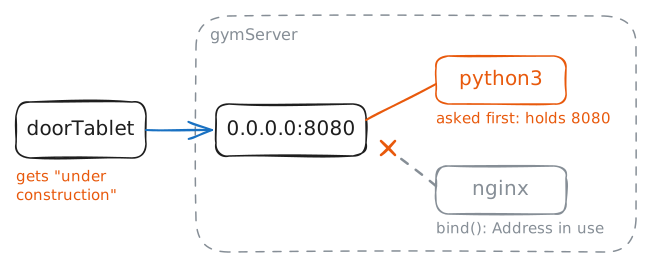
Friday, 6:00, after a power cut in the night. The tablet shows a page, only not the check-in one.
A port takes one listener, and whichever program asks for it first gets it. So when something unexpected answers on your port, the program you wanted may have lost the race. Asking for an address and port is called binding to it.
ss -pnames the program holding a port, with its pid, the number the system gave that running program.killand a pid stop that one program.doorTablet:~# curl -sS -m 5 http://10.0.1.20:8080/ gymServer:~# nginx -c /etc/nginx/checkin.conf gymServer:~# ss -tlnp gymServer:~# pkill -x python3 gymServer:~# nginx -c /etc/nginx/checkin.conf doorTablet:~# curl -sS -m 5 http://10.0.1.20:8080/
Run these steps on real machines