 Hack the Route Start learning Open app
The idea
Marisol runs the network for Kestrel Robotics' assembly floor. Before a security sign-off she has to list what
answers on the robot cell: which machines are up, and which ports they have open. The audit laptop on that network is
locked down. It has Python and scapy, a library for building and sending network packets by hand, and no
nmap.
So she writes the scan herself, one packet at a time, and then looks at the same scan from the defender's side.
Everything here is a harmless lab stand-in (marker KESTREL-LAB-INERT) on a network that reaches nothing outside it.
Steps
-
No nmap, so you write the probe
A port scan asks a machine which of its ports have a program waiting behind them, and the question is a single packet. Every TCP connection starts with a three-way handshake. The caller sends a SYN ("open a connection"), a listening program answers SYN-ACK ("go ahead"), and the caller sends a final ACK.
A scan never needs the third message. The answer to the SYN already tells you whether a program is listening, so you send one SYN and read the reply.
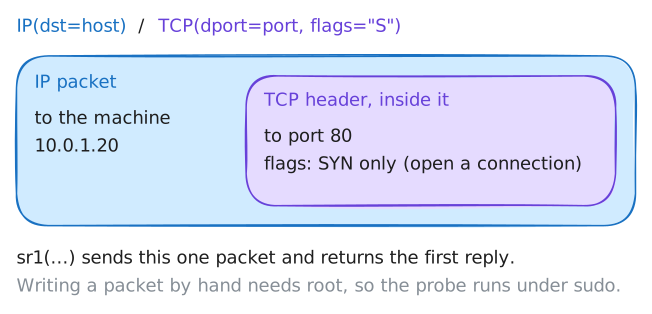
Scapy builds that packet in one line:
IP(dst=host)/TCP(dport=port, flags="S"). Scapy stacks protocol layers with/, so the line reads as a TCP header with only the SYN flag set, inside an IP packet to the host (a scanner's word for a machine).sr1("send, receive one") sends the packet and hands back the first reply.Building a packet by hand needs root, the administrator account. An ordinary program gets finished connections from the system and cannot write raw packets, so you run the probe under
sudo. Read the probe Marisol wrote, then point it at the controller's web port.kali:~# cat /home/kali/syn_probe.py kali:~# sudo python3 /home/kali/syn_probe.py 10.0.1.20 80
-
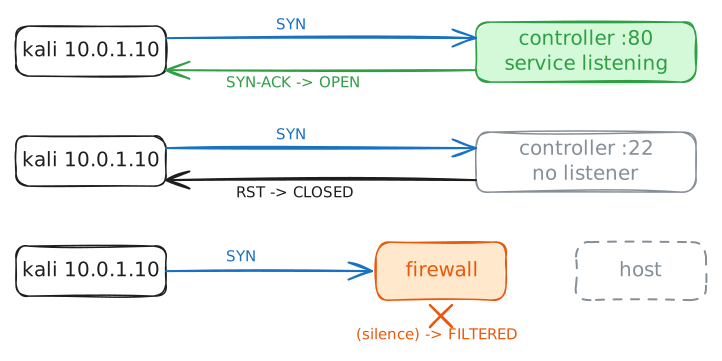
Open answers SYN-ACK, closed answers RST
One reply tells open from closed, so you also need to know what a closed port says. When no program listens on a port, the machine is still reachable. Its TCP code has nobody to hand the connection to, so it answers the SYN with a reset (RST): "nobody is here."
A reset is a real answer, and that is how you tell closed from filtered. Closed is a reset you heard. Filtered is silence: a firewall threw the probe away, and nothing comes back at all.
Nothing listens on the controller's port 22, because it runs a web page and no SSH. Point the same probe there. The machine is the same as in the last step, so the only thing that changed is whether a program was listening.
kali:~# sudo python3 /home/kali/syn_probe.py 10.0.1.20 22
-
Find the live hosts with an ARP sweep
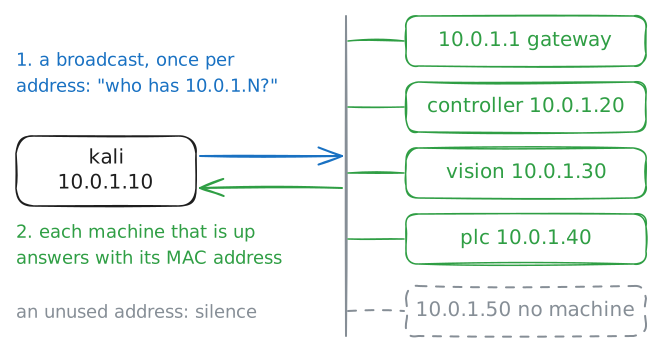
A probe needs a target, and an audit starts without knowing which addresses hold a machine. Underneath IP addresses sits the hardware level, called layer 2. There, machines on one network hand each other frames, addressed by each network card's MAC address and not by IP.
ARP joins the two: it asks "which MAC address has this IP address?". A machine cannot receive anything on the network unless others know its MAC address, so it must answer ARP for its own address, even when it is set to ignore ping.
That makes an ARP sweep the surest way to find live machines: ask about every address and list who answers. It works only on your own network, because the question travels as a broadcast, a frame addressed to everyone at once, and a broadcast stops at the router.
Read Marisol's
arp_sweep.py, then sweep the whole cell network,10.0.1.0/24(10.0.1.0 to 10.0.1.255).kali:~# cat /home/kali/arp_sweep.py kali:~# sudo python3 /home/kali/arp_sweep.py 10.0.1.0/24
-
The probe in a loop is a port scanner
You have the two halves: a probe that reads one port, and a list of live machines. A port scanner is the probe in a loop over a range of ports, keeping the ports that answered SYN-ACK. It holds no new idea, and that is the point.
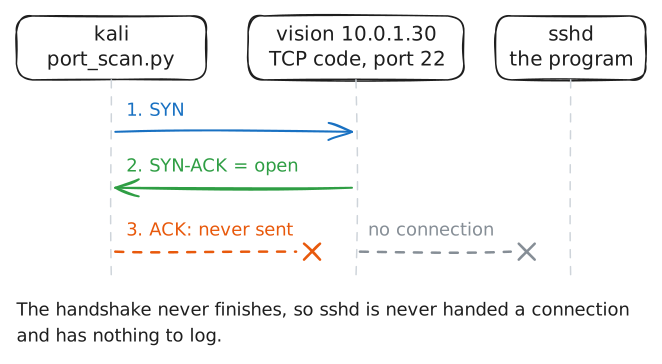
The loop never sends the final ACK, so the handshake never finishes and the program behind an open port is never handed a connection. With no connection, it writes no login or access line. This is a half-open scan: quieter than connecting properly, because the program never hears about it. Quieter is not silent, as the next step shows.
Read
port_scan.py, which issyn_probe.pyinside aforloop, then scan the vision server across ports 1 to 100.kali:~# cat /home/kali/port_scan.py kali:~# sudo python3 /home/kali/port_scan.py 10.0.1.30 1 100
-
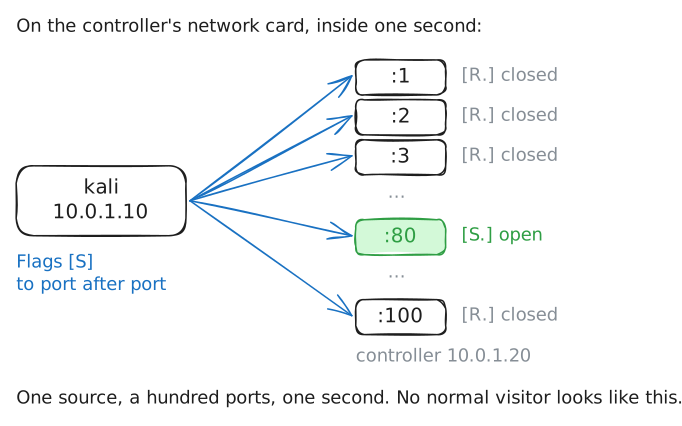
A scan is loud: the cell sees the burst
Now take the defender's side. Run the scanner against the controller while the lab records the traffic on the controller's own network card (a packet capture), and read what one scan looks like from the target.
This is also the line you do not cross. Scanning a system whose owner has not authorised you in writing is an offence in many places, whatever your intent, and the packets are plain to see and are logged. This lab's network is closed and yours to test, which is the only reason the scan is fine here.
kali:~# sudo python3 /home/kali/port_scan.py 10.0.1.20 1 100
Run these steps on real machines