 Hack the Route Start learning Open app
The idea
Fernhill Architects keeps every password on one Kerberos server, and none on the machines people use. Log in once, open the drawing archive with a ticket, and find out what Kerberos tickets can and can't do.
Steps
-
Log in once
Fernhill's office has two services:
archive, where the drawings live, andpayroll. Neither one knows a single password. They trust Kerberos instead.Kerberos has three parties: you, a service, and the KDC, the key distribution center, here on
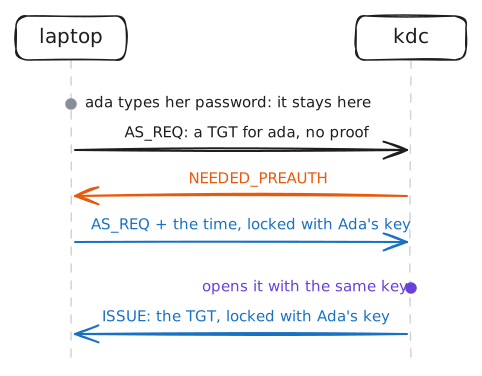
kdc. The KDC is the only machine that knows everyone's password, kept as a key made from it. So the password itself never has to travel: the laptop can lock something with that same key, and the KDC checks that it opens.Every person and every service has a name in its database, a principal. Ada is
ada@FERNHILL.LAB, and the archive isarchive/archive.lab@FERNHILL.LAB. The part after the@is the realm, everything this KDC looks after, written in capitals.You start the day with
kinit. It proves your password to the KDC once and gets back a ticket-granting ticket, or TGT: a ticket for the KDC itself, which you'll show it all day instead of your password. Tickets live in a cache file on the laptop, andklistlists them.Ada, an architect, is in first this morning. Her password is
copper-roof-9.laptop:~# kinit ada laptop:~# klist kdc:~# grep ada@ /var/log/krb5kdc.log
-
Open the archive
The archive runs
sserver, a small Kerberos service MIT ships for testing, and the laptop has its client,sclient. They do the same ticket exchange as any Kerberos service (SSH can use it too), and then the server answers with the name the ticket proved.To open the archive, the laptop needs a service ticket for
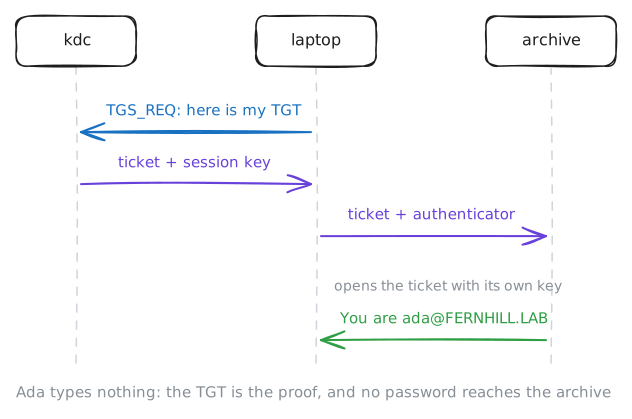
archive/archive.lab. It shows the KDC its TGT and asks for one. No password this time: the TGT is the proof.A service ticket is locked with the archive's own key. Services have keys too, like a password of their own, and only the KDC and the archive know this one (the next step shows where the archive keeps it). Inside the ticket are Ada's name, how long it's good for, and a fresh session key for the two of them.
The KDC's reply carries two things: the ticket, which the laptop can't open, and a copy of the session key, locked with a key only Ada's laptop has. The laptop passes the ticket on with an authenticator: Ada's name and the time, locked with the session key.
The archive opens the ticket, takes out the session key, and checks the authenticator with it. If it opens, whoever sent it holds the session key, which only Ada's laptop got.
laptop:~# sclient archive.lab 4444 archive
laptop:~# klist
kdc:~# grep TGS_REQ /var/log/krb5kdc.log
-
Open it again, with the KDC watching
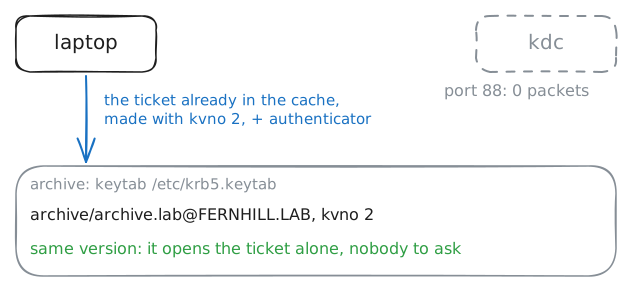
So the KDC hands out the tickets. Does it also have to vouch for each one, each time it's used? The lab records port 88, Kerberos's port, on
kdcwhile you open the archive a second time, with the ticket Ada already has.The archive has its own key, saved in a file called a keytab,
/etc/krb5.keytab. It fetched the key from the KDC once, when it joined the realm. With that key it can open any ticket made for it, with nobody to ask.A key has a version number, the kvno, which goes up each time the key changes. The KDC writes the kvno on every ticket it makes, so the server knows which key in its keytab to open it with.
klist -klists a keytab's keys with their versions, andkvnoon the laptop says which version a service ticket was made with.Think of a hotel key card: the desk writes it once, and after that the door checks it by itself.
laptop:~# sclient archive.lab 4444 archive
archive:~# klist -k
laptop:~# kvno archive/archive.lab
-
A clock ten minutes fast
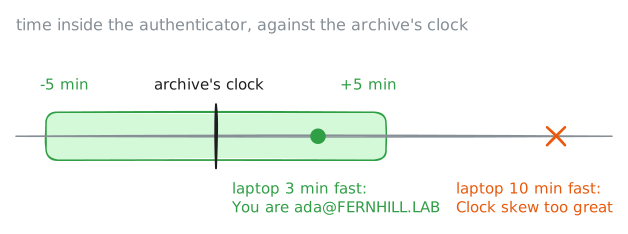
The authenticator carries the time, and that's what makes a copied one useless. The archive accepts an authenticator only if its time is within five minutes of the archive's own clock.
It also remembers the authenticators it has seen in those five minutes, in a replay cache. So someone who records Ada's authenticator off the wire can't send it again: it's either seen already, or too old.
That's why every machine in a realm needs the same time, give or take five minutes, and why Kerberos networks run NTP everywhere.
faketimeruns one program with a pretend clock, without touching the laptop's real one.faketime -f '+10m'runs it ten minutes in the future, like a laptop whose clock jumped after Ada logged in. Open the archive from that laptop, then from one only three minutes fast.laptop:~# faketime -f '+10m' sclient archive.lab 4444 archive laptop:~# faketime -f '+3m' sclient archive.lab 4444 archive
-
Log out
Tickets don't last forever. Ada's TGT and her archive ticket both end ten hours after she logged in, in the
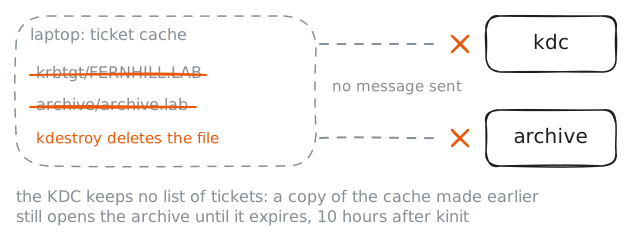
Expirescolumn ofklist, and then she runskinitagain. Some realms hand out renewable tickets, which the laptop can stretch without the password, up to a limit the KDC sets, often a week.Until they expire, the cache file is as good as Ada. Copy it to another machine and its tickets work there too, with no password. Attackers call that pass-the-ticket.
So a cache lives in a file only its owner can read, in
/tmphere, and on a shared machine you end the day withkdestroy, which deletes it.Ada's going home. Log her out, and then try the archive once more.
laptop:~# kdestroy
laptop:~# klist
laptop:~# sclient archive.lab 4444 archive
Run these steps on real machines