 Hack the Route Start learning Open app
The idea
A sailing school's two web apps keep no passwords at all. They send everyone to one sign-in service instead. Sign in there once, open both apps, and see what lets the second one skip the password, and what each app checks before it believes who you are.
Steps
-
Two apps, one sign-in
Tidewell is a sailing school with two web apps: a wiki for the instructors' notes, and a rota for who teaches when. Each used to keep its own accounts, so Noor, an instructor, had two passwords, and someone leaving had two accounts to close.
Now both apps use single sign-on: one sign-in service,
login.lab, does the authentication, checking who someone is, for both. It holds everyone's password, and it's the identity provider (IdP).The apps keep no passwords at all. They rely on
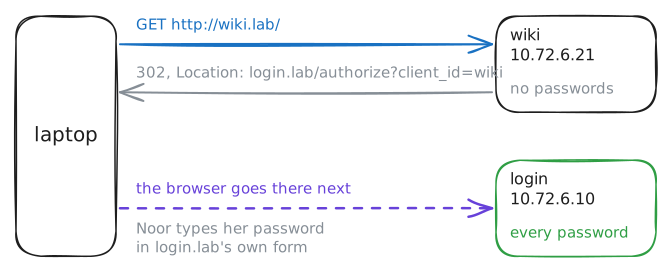
login.labto say who someone is, so they're called relying parties, and they talk OpenID Connect (OIDC), the protocol behind most "Sign in with…" buttons.The laptop is Noor's browser. Ask the wiki for its front page, with
curl -sI:-Ishows only the headers of the answer, where a redirect lives.Then read what
login.labpublishes about itself, at a fixed address every OIDC provider has.laptop:~# curl -sI http://wiki.lab/ laptop:~# curl -s http://login.lab/.well-known/openid-configuration
-
Sign in at login.lab
A browser keeps cookies, small values each site hands it and gets back on every later visit. They're how a site remembers you between pages.
curl keeps them too, in a file:
-c jarwrites them tojar, and-b jarsends them back.-Lfollows redirects, as a browser does.Open the wiki that way. The redirect lands on
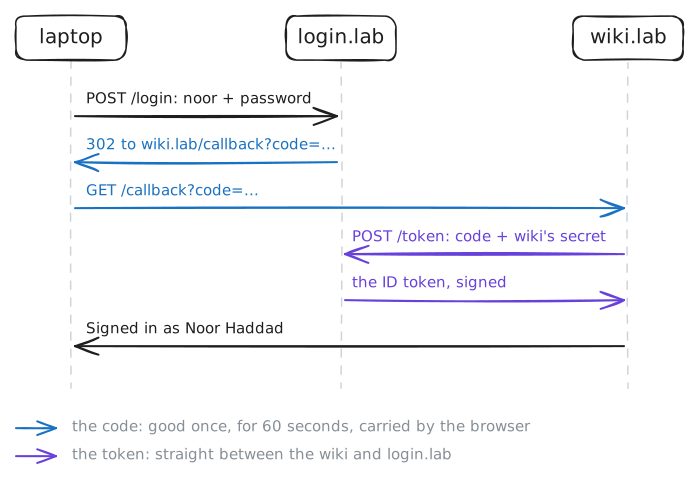
login.lab's sign-in form, which posts a username and password to/login. Then post Noor's, with-d, to the form's address.That one post sets off three redirects, and
-Lfollows them all:login.labchecks the password and remembers Noor's browser, with a cookie of its own;- it sends the browser back to the wiki's
redirect_uriwith a code, good once for 60 seconds; - the wiki takes the code to
login.lab'stoken_endpointitself, with its own secret, and gets an ID token: a signed note saying who Noor is.
The wiki checks that note and lets her in. It never sees her password.
laptop:~# curl -sL -b jar -c jar http://wiki.lab/
laptop:~# curl -sL -b jar -c jar -d username=noor -d password=harbour-light-7 http://login.lab/login
-
The second app
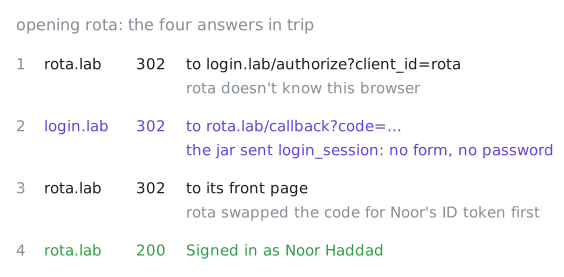
Noor hasn't opened the rota yet today. Rota knows nothing about her: it keeps no passwords either, and its own cookies are empty.
Look at the jar first, though.
login.labhanded the browser a cookie when Noor signed in, calledlogin_session, and the browser sends it with every visit tologin.lab. Rota will send her browser tologin.labexactly as the wiki did.Open rota, and keep a record of the trip on the way:
-D tripsaves the headers of every answer to a file,trip, while the page prints as usual. Then pick the status lines and the redirects out of it withgrep.laptop:~# grep login_session jar laptop:~# curl -sL -b jar -c jar -D trip http://rota.lab/ laptop:~# grep -E '^(HTTP|Location)' trip
-
What the wiki checks
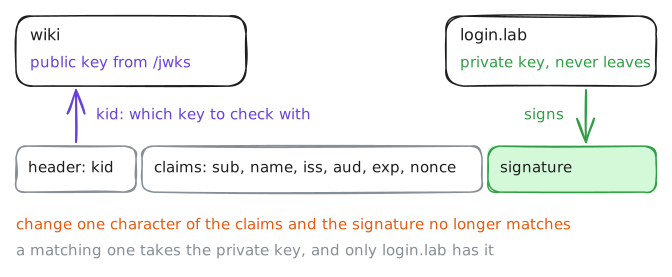
An ID token is a JSON Web Token (JWT): three parts, joined by dots.
- A header, which names the key that signed it (
kid). - The claims: who it's about (
sub,email,name), who made it (iss), which app it's for (aud), when it was made (iat) and when it runs out (exp). - A signature.
login.labsigns each token with its private key, which never leaves it. Anyone can check the signature with the matching public key, whichlogin.labpublishes at itsjwks_uri. A token with one character changed no longer matches its signature.So before the wiki believes a word, it checks:
state: the callback belongs to a sign-in this browser started;- the signature, with
login.lab's public key; iss: made by the sign-in service it expects;aud: made for the wiki, not another app;exp: not run out;nonce: the value it sent with this very sign-in.
The wiki writes each check to its log. Read it on
wiki, then fetch the public key it used.wiki:~# cat /var/log/wiki.log laptop:~# curl -s http://login.lab/jwks
- A header, which names the key that signed it (
-
A link that fishes for a code
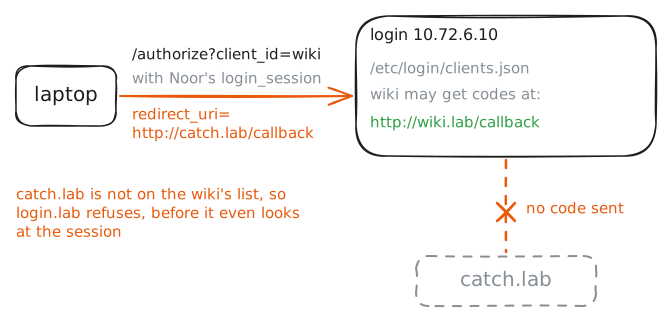
Single sign-on has a catch. While Noor is signed in at
login.lab, any link to its/authorizepage gets a code with no password asked. The code goes wherever the link'sredirect_urisays.Say a message tells Noor her wiki session ran out, with a link to sign in again. The link really goes to
login.lab, so it looks right, but itsredirect_uriishttp://catch.lab/callback, an attacker's server. Iflogin.labfollowed it, Noor's code would land there.So
login.labkeeps a list of each app's addresses, given when the app was registered, and sends a code to those only. It's in/etc/login/clients.jsononlogin, with each app's secret.Click the link as Noor's browser would, with her cookies.
-b jarsends them, and with no-Lyou seelogin.lab's first answer.laptop:~# curl -s -b jar 'http://login.lab/authorize?client_id=wiki&redirect_uri=http://catch.lab/callback' login:~# cat /etc/login/clients.json
-
Signing out
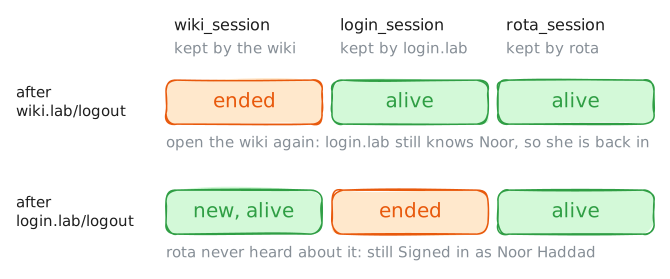
Noor is signed in three times over now, one cookie each:
login.lab's session, which hands out codes;- the wiki's own session,
wiki_session; - rota's,
rota_session.
Each app's
/logoutends that app's session.login.labhas a/logouttoo, for its own.Sign out of the wiki first, then open it again. Then sign out of
login.laband open rota.laptop:~# curl -sL -b jar -c jar http://wiki.lab/logout laptop:~# curl -sL -b jar -c jar http://wiki.lab/ laptop:~# curl -sL -b jar -c jar http://login.lab/logout laptop:~# curl -sL -b jar -c jar http://rota.lab/
Run these steps on real machines