 Hack the Route Start learning Open app
The idea
Larkspur Hosting reaches its customers' servers through one jump host, guarded by SSH keys alone. Add a one-time code from a phone on top, the kind banks ask for, and find out what it stops and what it doesn't.
Steps
-
One key, one factor
Larkspur Hosting runs websites for a few hundred small businesses. Its team reaches the customers' servers through one machine,
jump: the only way in, so it's the one to guard.Nobody types a password on
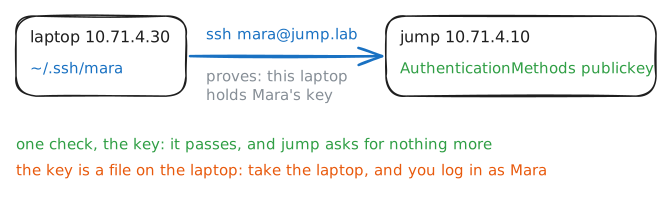
jump. Each person has an SSH key: a secret half on the team's laptop, in~/.ssh/, and a matching half in their home onjump. A login proves the laptop holds the secret half, and that's all it proves.Proof of who you are comes in kinds, called factors:
- something you know: a password, a PIN;
- something you have: a phone, a key file, a badge;
- something you are: a fingerprint, a face.
An SSH key is something you have. Whoever has the laptop has every key on it.
Mara leads the team. Log in to
jumpas her, then read its SSH settings.laptop:~# ssh mara@jump.lab hostname jump:~# cat /etc/ssh/sshd_config.d/jump.conf
-
Set up an authenticator
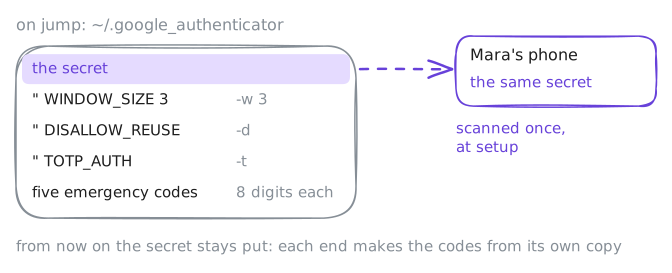
The second proof here is a one-time code from an authenticator app on Mara's phone. TOTP, time-based one-time passwords, the method behind it, starts with one secret, kept at both ends.
google-authenticatorsets it up. It makes a random secret, saves it in~/.google_authenticatoronjump, and shows it to you, normally as a QR code for the phone to scan. From then on the server and the phone each hold the secret, and each turns it into codes on its own.Run it on
jumpas Mara, through her login, with its questions answered up front:-t: codes that change with time;-d: each code works once;-w 3: also accept the code before and the code after this one, for a phone whose time is a little off;-u: no cap on login attempts, so the lab's back-to-back logins don't trip it (real servers keep one);-f: write the file without asking.
It then asks for a code from the app, to prove the scan worked, and the run answers
-1to skip that.laptop:~# ssh mara@jump.lab google-authenticator -t -d -w 3 -u -f laptop:~# ssh mara@jump.lab cat .google_authenticator
-
Read a code
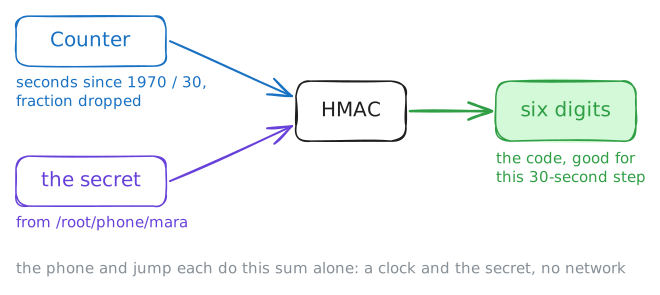
A code is the secret and the clock, mixed together. Count the 30-second time steps since 1 January 1970: that's the counter. Run the counter and the secret through HMAC, a hash that takes a key, and boil the result down to six digits.
The phone does that on its own, with no network: all it needs is the secret and the time.
jumpdoes the same sum when Mara logs in, and compares. Each code is good for the 30 seconds of its time step, and-w 3letsjumptake the code from the time step before and the one after as well.oathtoolis an authenticator for the command line. Onlaptopit plays Mara's phone: every second it makes the code for that moment and puts it on the phone's screen, the file/root/phone/screen.Run it yourself, to see the sum:
--totpmakes codes from the time;-bsays the secret is in base32, the alphabet of capital letters and digits the file uses;@reads the secret from a file,/root/phone/mara, where the phone keeps it;-vshows the sum.
laptop:~# oathtool --totp -v -b @/root/phone/mara
laptop:~# cat /root/phone/screen
laptop:~# oathtool --totp -w 2 -b @/root/phone/mara
-
Ask for the code
Two edits on
jumpput the code on top of the key.First, PAM, the library Linux programs ask to check a login.
/etc/pam.d/sshdlists what an SSH login must pass, and itsauthline sends it tobase-auth, the usual password check.Swap that for
pam_google_authenticator.so, which asks for a code and checks it against~/.google_authenticator.requiredmeans a login has to pass it.Then SSH itself.
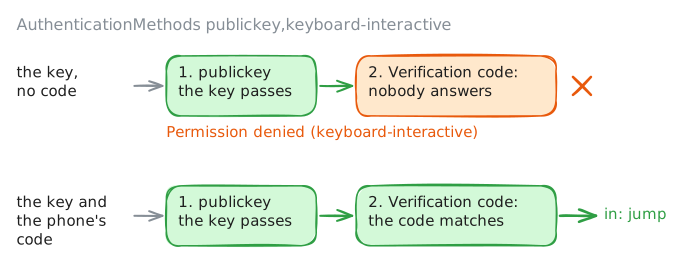
AuthenticationMethodslists the methods a login must pass, in order, split by commas.keyboard-interactiveis the one where the server asks questions and the person types answers.With
UsePAM yes, PAM picks the questions. Sopublickey,keyboard-interactivemeans the key first, then PAM's question.From then on, the laptop has to answer that question.
sshreads answers from a person at a keyboard only, sosshpassstands in for one. PAM's question isVerification code:, so-P codewaits for a question withcodein it, and-ftypes the first line of a file as the answer.laptop:~# ssh mara@jump.lab hostname laptop:~# sshpass -P code -f /root/phone/screen ssh mara@jump.lab hostname
-
The same code twice
A code shows on a screen and gets typed by hand, so it can be seen: over a shoulder, in a screen share, by malware on the laptop. Sending a captured code again is a replay. For the minute or so
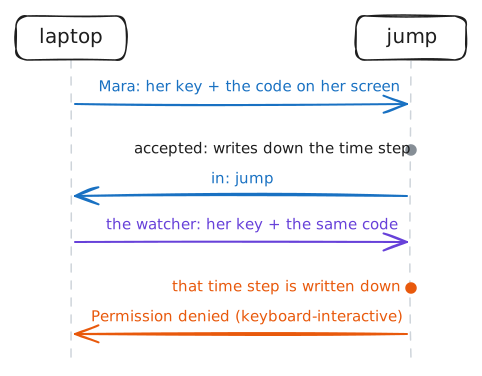
jumpstill takes a code (its own time step, and the next one, thanks to-w 3), someone with the laptop and that code is as good as Mara.-dcloses that gap.jumpwrites down the time step of each code it accepts, on theDISALLOW_REUSEline of Mara's file, and refuses a code from a time step it has seen. Each code works once, even while it's still good.PAM on
jumpwrites what it checks to/var/log/messages, taggedpam_google_authenticator.Before you start, the lab waited, out of sight, for a fresh time step, one whose code Mara hasn't used yet.
Now play the one looking over her shoulder. Write down the code on her screen:
cpcopies it to/root/noted, and-vsays what it copied. Then Mara logs in with that code, and right after her, the watcher types the same one.laptop:~# cp -v /root/phone/screen /root/noted laptop:~# sshpass -P code -f /root/noted ssh mara@jump.lab hostname laptop:~# sshpass -P code -f /root/noted ssh mara@jump.lab hostname jump:~# grep pam_google_authenticator /var/log/messages jump:~# grep DISALLOW_REUSE /home/mara/.google_authenticator
-
A lost phone
Mara's phone went over the side of the ferry this morning. No phone, no codes, and
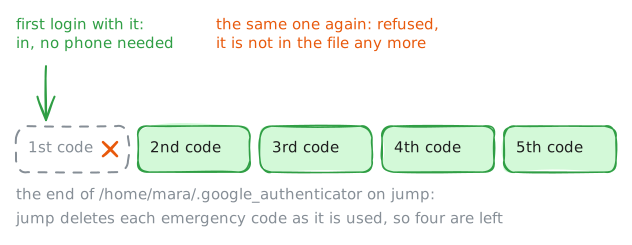
jumpwon't let her in without one.That's what the emergency codes are for: the eight-digit lines at the end of her file. Each one works once in place of a code, with no phone and no clock.
People print them, or keep them in a password manager: anywhere except the phone, or the laptop that holds the key. Mara printed hers, and here a file on the laptop,
/root/emergency-codes, stands in for that printout.The lost phone is a problem of its own. Whoever finds it, and gets past its lock screen, has the secret and makes Mara's codes. That alone won't get them into
jump, which wants her key first, but the secret is out.Running
google-authenticatoragain makes a new secret and new emergency codes, and the old phone's codes stop working.First, get Mara in. Read her codes, log in with the first one, then try that one again.
laptop:~# cat /root/emergency-codes
laptop:~# sshpass -P code -f /root/emergency-codes ssh mara@jump.lab hostname
laptop:~# sshpass -P code -f /root/emergency-codes ssh mara@jump.lab hostname
jump:~# cat /home/mara/.google_authenticator
Run these steps on real machines
Keep reading
- OWASP's Multifactor Authentication Cheat Sheet: the kinds of factor, and how each one fails article
- The README of pam_google_authenticator, the module this lab sets up: how to set it up, and every option it takes article
- The oathtool manual, the command-line authenticator that plays Mara's phone article