 Hack the Route Start learning Open app
The idea
Anwar is auditing Copperfield Logistics, a freight company. Their live ops server takes SSH logins by key
only — no passwords — which is exactly how it should be. But an old backup host nobody switched off is still on the
LAN, and it is serving a copy of the ops account's home directory over plain HTTP. In that copy sits
.ssh/id_ed25519: the private key the ops server trusts.
A private key is a credential. It does not expire when the server it came from is retired, and copying it is silent — no login, no alert, nothing for the ops server to notice. You'll browse the exposed backup, take the key, and use it to log straight into the live server with no password at all. Then you'll see why it worked, and close it: revoking a leaked key is removing its public half from the server, and rotating to a fresh one, because a key that has been copied is burned.
The hosts and the network are the lab's own. The line that matters outside a lab is simple: never touch a system whose owner has not authorised you in writing. Here, that system is your own.
Steps
-
The backup host nobody switched off
Decommissioned does not mean gone. A host pulled from a project but left powered and cabled still answers on the LAN, and it still runs whatever it ran the day it was retired — here, an HTTP server over its backup directory, with no authentication in front of it.
Browse it the way you would any web root.
curlfetches a URL to your terminal; point it at the backup host and read what it is willing to hand out. A directory with no index page lists its contents, so each level tells you where to look next.laptop:~# curl -s http://backup.lab/ laptop:~# curl -s http://backup.lab/ops-home/.ssh/
-
A private key in the clear
A private key is the secret half of a keypair: hold it, and you can prove you are its owner to any server that trusts the public half. There is no password around it here and no second factor — the file is the credential.
Read it first to confirm what it is, then save a copy. SSH refuses to use a private key that others could read, so the saved copy needs its permissions locked down to owner-only before it will touch it — the one guard that survived, now working for you.
laptop:~# curl -s http://backup.lab/ops-home/.ssh/id_ed25519
laptop:~# curl -s -o leaked_key http://backup.lab/ops-home/.ssh/id_ed25519
laptop:~# chmod 600 leaked_key
-
The password door is already shut
First, confirm what the ops server allows, so the key login means something. The server is configured for keys only: password authentication is switched off. Try to log in with a password — any password — and watch it be turned away before you ever get to type one.
sshpass -psupplies a password non-interactively;-o PreferredAuthentications=passwordtells SSH to try only the password method, and-o PubkeyAuthentication=nostops it quietly falling back to a key.laptop:~# sshpass -p anything ssh -o PreferredAuthentications=password -o PubkeyAuthentication=no -o StrictHostKeyChecking=no -o UserKnownHostsFile=/dev/null ops@ops.lab id
-
The key is a working login
Now spend the leaked key.
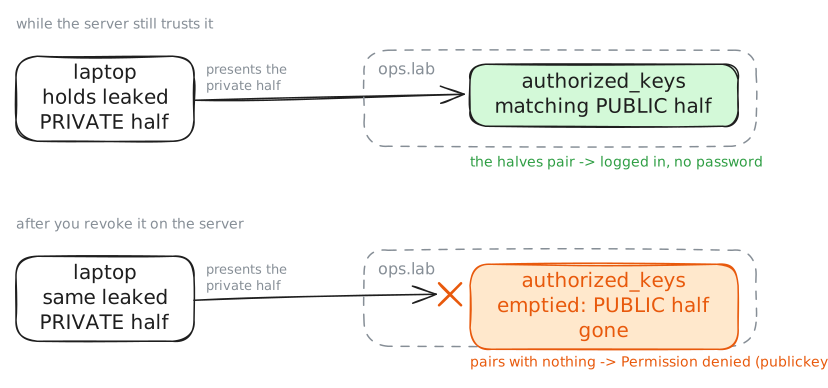
ssh -i leaked_keyoffers that specific private key as the credential. The server checks whether the matching public half is in the ops account's list of trusted keys — and it is, because that is the key this backup came from. No password is asked for, because the key is the proof.Run a command as
opsto show you are in, then read a file only someone on the server could reach.laptop:~# ssh -i leaked_key -o StrictHostKeyChecking=no -o UserKnownHostsFile=/dev/null ops@ops.lab id laptop:~# ssh -i leaked_key -o StrictHostKeyChecking=no -o UserKnownHostsFile=/dev/null ops@ops.lab cat /home/ops/manifests/next-sailing.txt
-
Why the server trusted it
SSH key login is one match: the private key you present must pair with a public key the account lists as trusted, in its
~/.ssh/authorized_keysfile. Read that list on the server, then fingerprint both the server's trusted key and your leaked copy — a key's fingerprint is a short hash of it, so two fingerprints that match are the same key.ssh-keygen -lf <file>prints a fingerprint for a key, or one per key in anauthorized_keysfile. Run it on the server's trusted list and on your leaked copy, and read the two lines together.laptop:~# ssh -i leaked_key -o StrictHostKeyChecking=no -o UserKnownHostsFile=/dev/null ops@ops.lab cat /home/ops/.ssh/authorized_keys laptop:~# ssh -i leaked_key -o StrictHostKeyChecking=no -o UserKnownHostsFile=/dev/null ops@ops.lab ssh-keygen -lf /home/ops/.ssh/authorized_keys laptop:~# ssh-keygen -lf leaked_key
-
Revoke the key, then rotate
You cannot un-leak a key — the copy in the backup is out, and anyone who took it has it forever. So the fix is on the server, not the key: remove the leaked public half from
authorized_keys, and the server stops trusting it. Here the account trusts only that one key, so emptying the file revokes it cleanly.Do it on the ops server, then try the leaked key again from the laptop and watch it be refused. In the real world the next move is to rotate: generate a fresh keypair, install its public half, and hand the new private key to the one person who should have it — because the old key is burned the moment it is copied.
ops:~# truncate -s 0 /home/ops/.ssh/authorized_keys
laptop:~# ssh -i leaked_key -o StrictHostKeyChecking=no -o UserKnownHostsFile=/dev/null -o BatchMode=yes ops@ops.lab id