 Hack the Route Start learning Open app
The idea
Elspeth runs IT for Vauxhall Mutual, a small building society. A "network optimizer" appeared on the office LAN last week, cabled in by a contractor nobody can reach. Staff say the member portal still loads, so nobody worried. But every laptop's traffic now passes through that box on its way out.
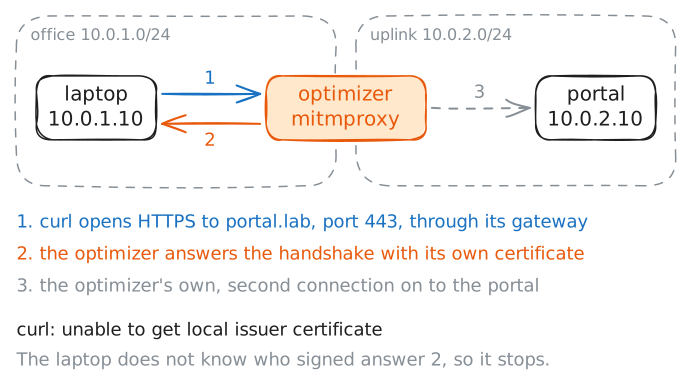
The box is a transparent proxy: it handles the traffic that crosses it without the laptop being set up to use
one. It cannot read HTTPS by watching: the session is encrypted end to end. To
read it, it has to become the server: present its own certificate for portal.lab and open a second
connection onward. You'll watch TLS catch that forgery, then watch it fail once the laptop is talked into
trusting the box's CA. The fix that holds even then is certificate pinning, and you'll end
by turning it on.
Everything here runs against the lab's own portal and the box on its own network. Outside a lab, the rule is simple: you touch only systems whose owner has authorised you in writing.
Steps
-
The portal through the box
The laptop's gateway is the optimizer, so every connection it makes to the member portal crosses that box. A plain web page would be the box's to read and rewrite at will. The portal is served over HTTPS, which is meant to shut the box out: the certificate the server presents is signed by an authority the laptop already trusts, and only the real server holds the matching private key.
Load the account page the way a member would, with
curl. Read the result before the next step explains it.laptop:~# curl -sS https://portal.lab/account
-
The forged certificate
The error named a trust problem, not a name problem. So the certificate was for
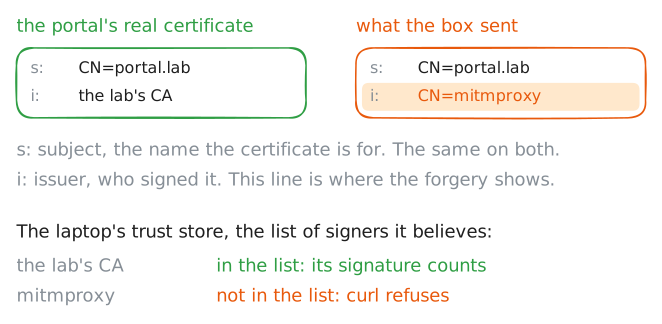
portal.lab, but signed by the wrong authority.openssl s_clientopens a raw TLS connection and prints the certificate chain the server sent: each entry's subject (s:, who it is for) and issuer (i:, who signed it).Read the two lines. On a sound connection the issuer would be a real certificate authority. Here it names the box.
laptop:~# openssl s_client -connect portal.lab:443 -servername portal.lab
-
Trusting the box's CA
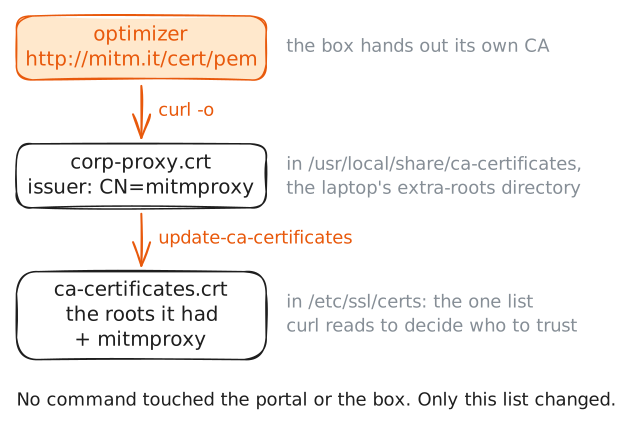
An intercepting proxy works the moment its CA is in the victim's trust store. Getting it there is social, not technical: a captive-portal page, an "install our security certificate to use the Wi-Fi" email, a managed-device policy. mitmproxy makes it one step: it serves its CA from the magic host
http://mitm.it, which answers only for a client whose traffic already runs through it.Play the victim who follows the instructions. Fetch the box's CA straight into the system's extra-roots directory, then rebuild the trust bundle. On Alpine that directory is
/usr/local/share/ca-certificatesand the command that rebuilds the bundle isupdate-ca-certificates.laptop:~# curl -sS http://mitm.it/cert/pem -o /usr/local/share/ca-certificates/corp-proxy.crt laptop:~# update-ca-certificates
-
The box reads the login
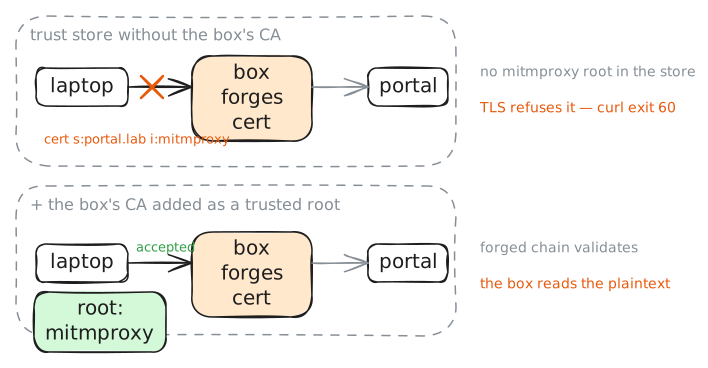
Run the exact command from the first step again. Nothing about the portal or the box moved, only the laptop's trust store. The box's forged certificate now chains to a root the laptop accepts, so
curlis satisfied and the page loads. And because the box terminated the TLS (it is the far end of the laptop's encrypted session), it holds the plaintext of the request and the response: the account page, cookies, anything a login would carry.The proxy's own flow log, below, is the box's point of view. Before, it recorded a handshake it could not complete; now it records the decrypted request, method and path and all.
laptop:~# curl -sS https://portal.lab/account
-
Pinning shuts the box out
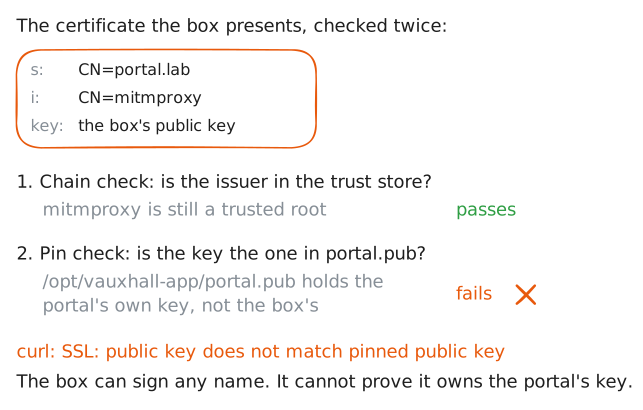
The trust store is a single point of failure: one bad root and every site is open. Certificate pinning stops leaning on it. The Vauxhall app is built with the portal's own public key, and it checks that the key in the certificate it is handed is that exact key, not merely that some trusted authority signed something. A forged certificate carries the box's key, not the portal's, so it is refused even though its chain now validates.
curlpins with--pinnedpubkey, given the genuine key the app ships with. The rogue CA is still trusted from the last step; pinning does not care. Run it and watch the connection die on the key, not the chain.laptop:~# curl -sS --pinnedpubkey /opt/vauxhall-app/portal.pub https://portal.lab/account
Run these steps on real machines