 Hack the Route Start learning Open app
The idea
A record shop's site falls over every release day, so it buys a second server. Spreading customers across both works beautifully, right up to the moment the baskets start to vanish.
Steps
-
A second server, the same address
A bigger server only moves the limit, so the shop has a second one now, and that brings a new problem: customers type one address.
The old answer is DNS round robin: publish both addresses under one name and let each client pick. That spreads people out, but DNS never learns a server died. Its address stays published until someone removes it, the DNS servers customers ask keep handing it out until their copy expires, and a client that gets it has to time out and try the next address.
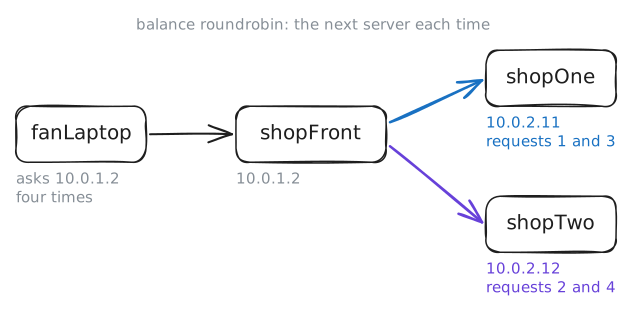
A load balancer stands in front instead. Customers talk to its one address, and it hands each request to a server behind it. Here that's
shopFront, with10.0.1.2facing the street and10.0.2.2facingshopOneandshopTwoin the back room. Fetch the home page four times fromfanLaptop, a customer's machine, then read howshopFrontis set up.fanLaptop:~# curl -s http://10.0.1.2/ http://10.0.1.2/ http://10.0.1.2/ http://10.0.1.2/ shopFront:~# grep -A5 "backend web" /etc/haproxy/haproxy.cfg
-
The basket that vanished
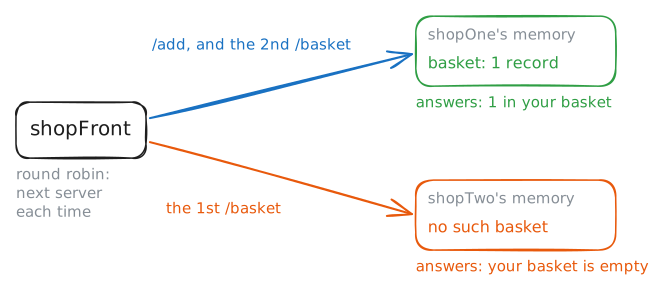
Release day, and a fan puts a record in the basket. Where does the shop remember that? This site does what plenty of small sites do: it keeps each basket in the memory of the server that made it, and hands the browser a cookie, a short value sent back with every later request, to find the basket again. With one server, that always worked.
curlcan play the browser.-csaves cookies to a file, and-bsends them back. Add a record, then look in the basket twice.fanLaptop:~# curl -s -c jar http://10.0.1.2/add fanLaptop:~# curl -s -b jar http://10.0.1.2/basket fanLaptop:~# curl -s -b jar http://10.0.1.2/basket fanLaptop:~# curl -si -c fresh http://10.0.1.2/add fanLaptop:~# curl -s -b fresh http://10.0.1.2/basket fanLaptop:~# curl -s -b fresh http://10.0.1.2/basket
-
One slow server
A week on,
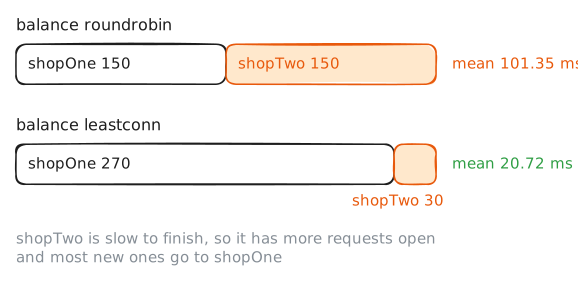
shopTwo's disk starts to fail. The server is up, it answers, it passes every check, and each page takes a fifth of a second longer than it should. Round robin gives it its turn anyway.Send a burst of requests with
h2load, then count how many reachedshopTwoin the log it keeps. The lab empties that log before each burst.There's a better rule than taking turns. Least connections,
leastconnto HAProxy, sends each new request to the server with the fewest connections open, which here means requests in progress. A slow server holds on to its work for longer, so its count stays high, and new requests go elsewhere. The balancer never needs to know why. Change that one word in thewebbackend and send the same burst again.fanLaptop:~# h2load --h1 -n 300 -c 5 http://10.0.1.2/ shopTwo:~# grep -c GET /var/log/shop.log fanLaptop:~# h2load --h1 -n 300 -c 5 http://10.0.1.2/ shopTwo:~# grep -c GET /var/log/shop.log
-
Everyone has the same address
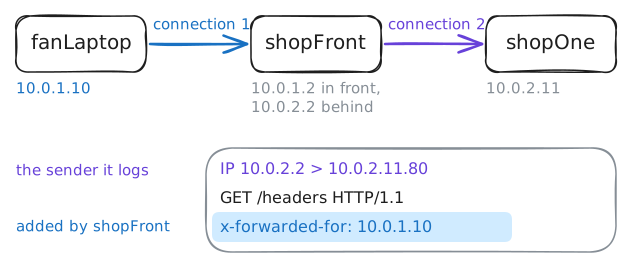
Release day again, and one buyer takes every copy of a limited pressing. The owner wants that buyer's address, to block it, and the obvious place to look is the server's log.
Read the log, then capture a request as it reaches
shopOne.greater 120keeps packets of 120 bytes or more, counting their headers, which skipsshopFront's short health checks.shopOne:~# tail -n 3 /var/log/shop.log shopOne:~# tcpdump -n -A -c 1 dst port 80 and greater 120 fanLaptop:~# curl -s -b SERVERID=one http://10.0.1.2/headers
-
Four pages, one server
Everything so far needed
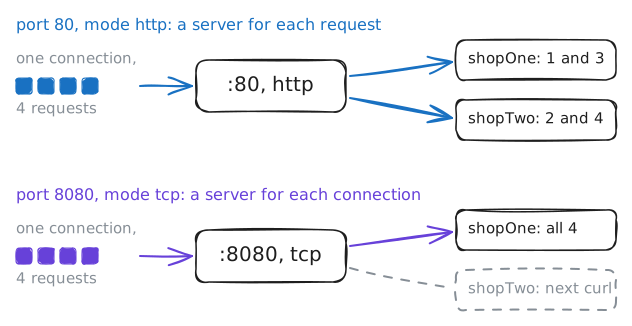
shopFrontto read HTTP: cookies, headers, one request at a time. That's balancing at layer 7, near the top of the OSI model. A balancer at layer 4 looks no higher than TCP. It sees addresses, ports and connections, and passes the bytes along unread.Why settle for less? It does less work per request, it carries anything that runs over TCP, a database the same as a website, and it can pass encrypted traffic through without holding the keys.
shopFrontruns one on port8080, set tomode tcp, in front of the same two servers. Send the same four requests from the start of this lab, twice, then try the cookie and the headers.fanLaptop:~# curl -s http://10.0.1.2:8080/ http://10.0.1.2:8080/ http://10.0.1.2:8080/ http://10.0.1.2:8080/ fanLaptop:~# curl -s http://10.0.1.2:8080/ http://10.0.1.2:8080/ http://10.0.1.2:8080/ http://10.0.1.2:8080/ fanLaptop:~# curl -si http://10.0.1.2:8080/add fanLaptop:~# curl -s http://10.0.1.2:8080/headers
Run these steps on real machines