 Hack the Route Start learning Open app
The idea
A radio station can't go quiet, and everything in its studio reaches the transmitter through one Router. Buy a spare, then make the studio's machine use it without ever being told.
Steps
-
One gateway address, two routers
The studio's audio reaches the transmitter through
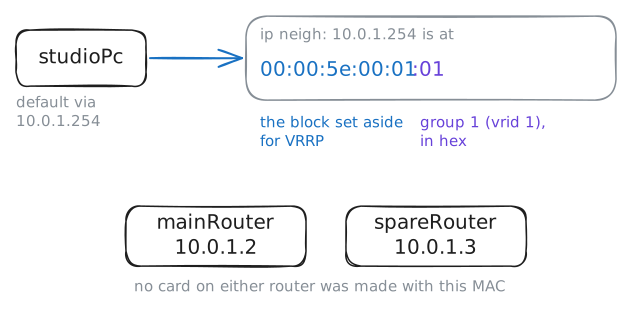
mainRouter, and if that router dies the station plays dead air. Buying a second router is the cheap half. The hard half is that every machine has one default gateway in its settings, and when that router stops answering, the machine doesn't go looking for another.First-hop redundancy turns the problem around: the machines keep one gateway address, and that address stops belonging to any one box.
Start on
studioPc. Read its gateway, ask who's at that address, and trace the way to the transmitter.studioPc:~# ip route studioPc:~# ip neigh show 10.0.1.254 studioPc:~# traceroute -n 10.0.2.20
-
Listen to the routers agree
For this to work the two routers have to stay in step, and they do it over the network with VRRP, the Virtual Router Redundancy Protocol. On these routers a Linux program called keepalived runs it.
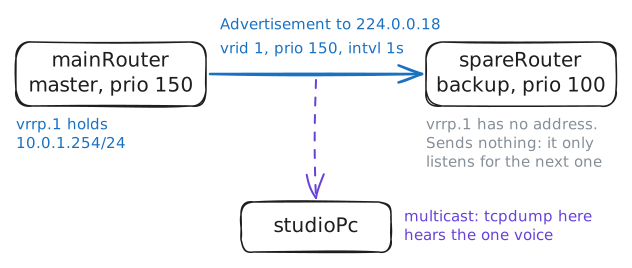
Cisco got there first with HSRP in the 1990s, but that was theirs alone, so the IETF, the body that writes internet standards, wrote VRRP as the open version every vendor could speak. The idea is plain enough: routers in a group have a priority, and the highest becomes master and holds the address. Here
mainRouterhas priority 150,spareRouter100.Check who holds the address, on a virtual card called
vrrp.1that keepalived made for this group. Then listen onstudioPc: VRRP messages go to a Multicast address, one that any machine on the network can hear.mainRouter:~# ip -br addr show vrrp.1 spareRouter:~# ip -br addr show vrrp.1 studioPc:~# tcpdump -n -v -c 3 vrrp
-
Cut the power
It's time to break it. In a moment
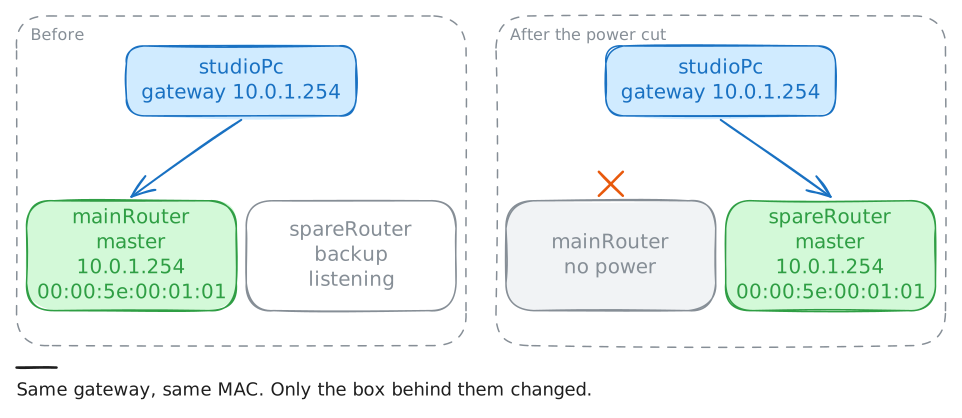
mainRouterloses power: no goodbye, no warning, cards dark.studioPcis sending a ping five times a second through the gateway, the lab's stand-in for the audio stream, and the meter calls each one a probe.spareRoutercan't tell a dead master from one late packet, so it doesn't move at the first silence. It counts missed advertisements, and adds a small extra wait worked out from its priority. With several backups, the best one moves first and the others hear it and stand down.studioPc:~# ping -i 0.2 -c 100 -W 1 10.0.2.20 studioPc:~# ip neigh show 10.0.1.254 studioPc:~# traceroute -n 10.0.2.20
-
The main router comes back
Someone finds the breaker, and
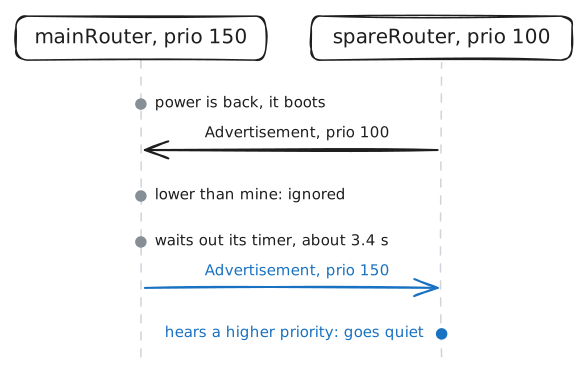
mainRouterboots.spareRouteris working fine right now, and traffic is flowing.There are two schools of thought here. If the main router is the better box, on the better line, you want it back in charge. But a router fresh from a boot may not be ready yet, and one that's failing may go down again a minute later.
Run the meter again while the power comes back.
studioPc:~# ping -i 0.2 -c 100 -W 1 10.0.2.20
studioPc:~# traceroute -n 10.0.2.20
studioPc:~# tcpdump -n -v -c 3 vrrp
-
Up, and of no use
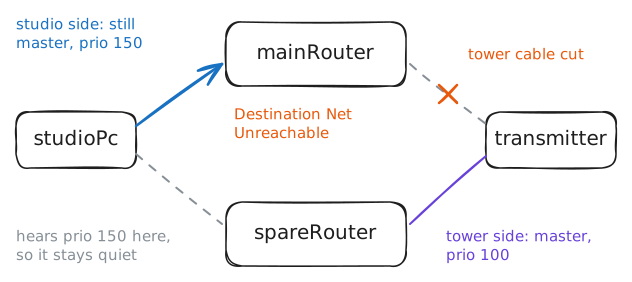
A digger goes through the cable between
mainRouterand the tower. The router is fine, and so is its power.Run the same checks as before, and listen on both sides of the network, since each network's group runs on its own.
keepalived has a setting for the day those checks look bad:
track_interfacenames a card, and a group gives up its job when that card goes down.studioPc:~# ping -c 3 -W 1 10.0.2.20 studioPc:~# tcpdump -n -v -c 2 vrrp transmitter:~# tcpdump -n -v -c 2 vrrp studioPc:~# ping -c 3 -W 1 10.0.2.20 studioPc:~# traceroute -n 10.0.2.20
Run these steps on real machines