 Hack the Route Start learning Open app
The idea
A ferry company bought a second server so that losing one wouldn't matter. On the busiest morning of its year, it loses one.
Steps
-
One server dies
It's the morning the summer sailings go on sale, and the ferry company's booking site runs on two servers behind one address,
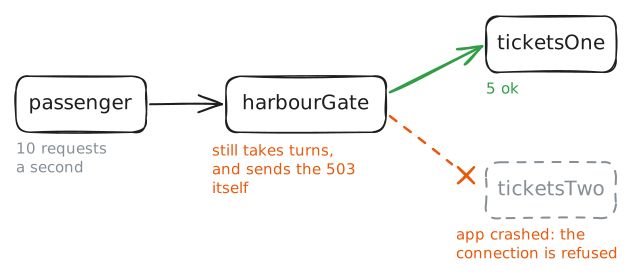
10.0.1.2.harbourGateis the load balancer, a machine running a program called HAProxy, and it passes each request toticketsOneorticketsTwoin turn. The company bought the second server so that losing one wouldn't matter.Nobody has tested that, so test it. From
passenger, the machine playing a customer, fetch the timetable twice to see both servers answer. Then crash the app onticketsTwo, which is what a bad update or a memory leak does on a real server, and watch what a passenger gets.passenger:~# curl -s http://10.0.1.2/ http://10.0.1.2/ ticketsTwo:~# pkill python3 passenger:~# sitewatch http://10.0.1.2/ 4
-
Teach the balancer to look
harbourGatekeeps sending every second request to a dead server because nothing has told it otherwise. A server can't report its own crash, since the thing that would send the news is the thing that died. So the news has to come from outside: a health check is the balancer asking each server, over and over, whether it's there, and leaving out any server that stops answering.HAProxy's settings file has a few sections:
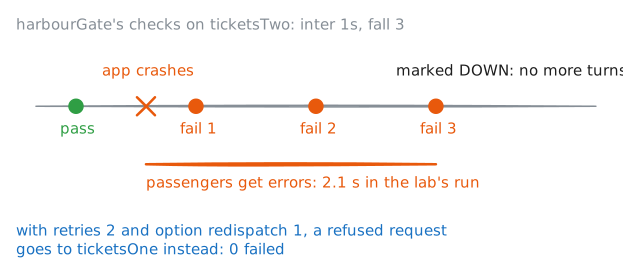
frontend webis the door passengers come in by,backend webis the list of servers, anddefaultsholds settings for both. The wordcheckon aserverline turns checking on. Left at that, a check is a plain TCP connection, and a server that accepts it passes. Thedefault-serverline in the file sets the pace:inter 1sis one check a second,fall 3is how many must fail in a row before a server is marked down, andrise 2is how many must pass before it's let back. One failure isn't enough because one failure might be a lost packet, and pulling a healthy server out over a lost packet is how you make outages of your own.Add
check, crash the app again, and time the gap. Then hide that gap with two more lines.retries 2tells HAProxy to try a failed connection again, andoption redispatch 1lets every retry go to a different server. Repeating a request sounds risky on a site that takes money, so notice what's being repeated here: a connection the server refused. Nothing reached the app, so nothing can happen twice.passenger:~# sitewatch http://10.0.1.2/ 8 harbourGate:~# grep DOWN /var/log/haproxy.log passenger:~# sitewatch http://10.0.1.2/ 8
-
Alive, and no use
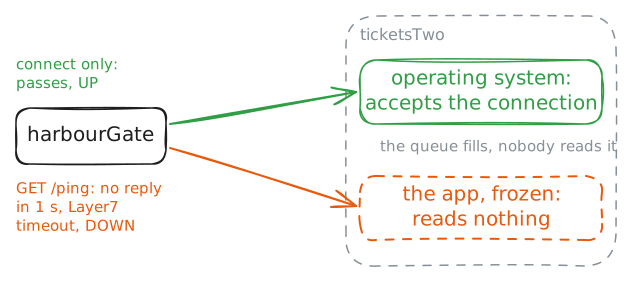
A crash is the kind failure, because a dead program refuses connections and says so at once. The failures that hurt are quieter: a thread stuck on a lock, a disk that has stopped answering, a program waiting for something that never comes. From outside the machine looks fine.
Freeze the app on
ticketsTwo, watch the site, and ask HAProxy what it thinks of the server.HAProxy can also ask a harder question.
option httpchk GET /pingmakes each check a real HTTP request, and a server passes only by sending back a good status in time, withtimeout check 1sin the file setting how long it has. Whether you need it is what the freeze tells you.ticketsTwo:~# pkill -STOP python3 passenger:~# sitewatch http://10.0.1.2/ 5 harbourGate:~# gatectl status passenger:~# sitewatch http://10.0.1.2/ 3 harbourGate:~# grep DOWN /var/log/haproxy.log
-
A deeper check
It's the afternoon now, and
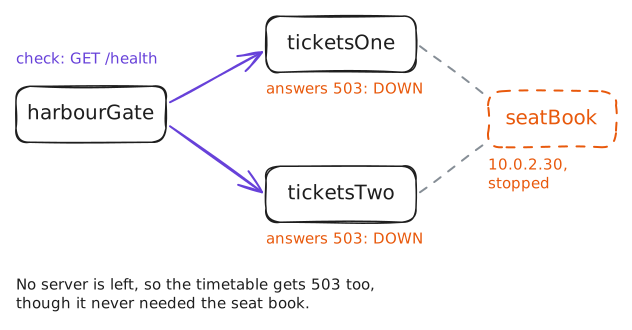
seatBook, the one machine that holds every booking, falls over. All the servers lean on it, and a booking needs it, while the timetable doesn't. The new check says nothing's wrong, because/pingonly asks whether the app can answer, and it can.Someone reads that and has the obvious idea: the check is too shallow, so make it deeper. The app already has a page for it,
/health, which answers200only if the app can reach everything it needs, seat book included. Point the check at that, and HAProxy will know the truth.It sounds right, so try it. Watch
/bookfail, see what the balancer thinks, and fetch the timetable. Then swap the check, and when you've seen what it does, put/pingback.seatBook:~# pkill python3 passenger:~# sitewatch http://10.0.1.2/book 2 harbourGate:~# gatectl status passenger:~# curl -s http://10.0.1.2/ passenger:~# curl -s http://10.0.1.2/ passenger:~# curl -s http://10.0.1.2/
-
A spare on the bench
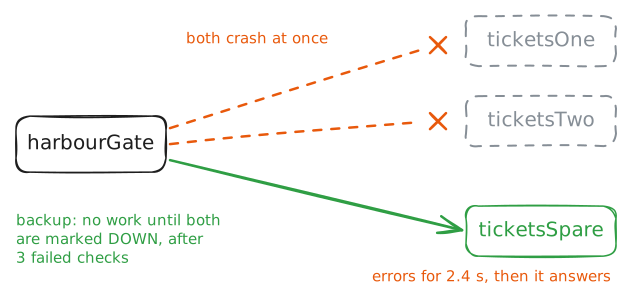
So far both servers work at once, which is called active-active. It's a good use of money, with one catch: when one dies, the other takes all of its load, so neither can run more than half full. You have to buy room for the failure you're expecting, usually one server more than you need, known as N+1.
The other way is active-passive: a server that takes no work until the others have gone. It sounds wasteful, and people do it anyway, for machines that can't share work or a second site that's only for emergencies. The trouble with a spare is that nobody uses it, so nobody finds out it stopped working in March. That's why the health check keeps running on it.
ticketsSparehas been sitting there since the start. The wordbackupon itsserverline makes it the spare. Add it, then take both normal servers away at once and watch the handover. Then startticketsOneagain, and see where the requests go. That return trip is called failback.passenger:~# curl -s http://10.0.1.2/ http://10.0.1.2/ http://10.0.1.2/ http://10.0.1.2/ passenger:~# sitewatch http://10.0.1.2/ 8 passenger:~# curl -s http://10.0.1.2/ ticketsOne:~# start-tickets passenger:~# curl -s http://10.0.1.2/ http://10.0.1.2/
-
Leaving on purpose
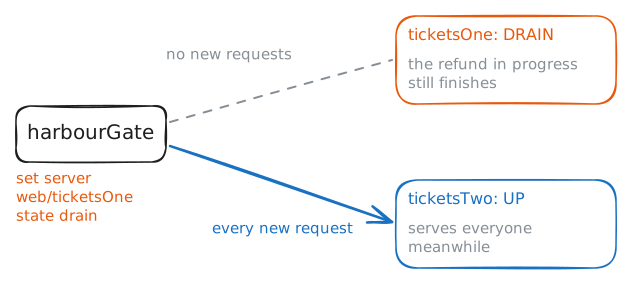
Every server so far left by accident. Most servers leave on purpose, because somebody has an update to install, and the careless way to do it is to stop the app and let the health check find out. Anything the server was in the middle of gets cut off, and a passenger halfway through a refund gets an error and no idea whether the money moved.
The careful way is called draining: you tell the balancer to send a server no new work. HAProxy takes that command while it runs, through
gatectl, with no file to edit and no reload.A refund on this site takes twenty-five seconds, which is slow enough to watch. Run the first line, which starts two refunds, one on each server. You then have twenty-five seconds to drain
ticketsOneand read the status.passenger:~# curl -s -Z --parallel-immediate http://10.0.1.2/refund http://10.0.1.2/refund harbourGate:~# gatectl set server web/ticketsOne state drain harbourGate:~# gatectl status passenger:~# sitewatch http://10.0.1.2/ 3 ticketsOne:~# pkill python3 ticketsOne:~# start-tickets harbourGate:~# gatectl set server web/ticketsOne state ready
Run these steps on real machines