 Hack the Route Start learning Open app
The idea
Every time the seat map stops, the box office blames the network and the server team swears nothing arrived. Capture the real packets and settle it before the 19:30 show.
Steps
-
Watch the seat map's traffic
The cinema's box office,
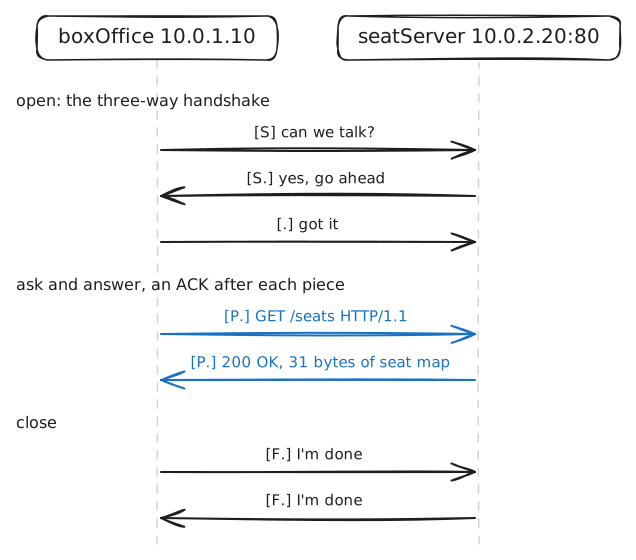
boxOffice, asksseatServerfor the seat map once a second. Two teams look after those two machines, and each trusts its own screen.A packet capture is the way out of that argument: a copy of every packet crossing a network card, the part of a machine the cable plugs into, with no opinion about any of them.
tcpdumpmakes one. It's a small package on any Linux machine, and the programs on that machine carry on as normal while it listens.Run it on
seatServerand keep only the web traffic, which uses Port 80.seatServer:~# tcpdump -n -c 14 port 80
-
Read what's inside the packets
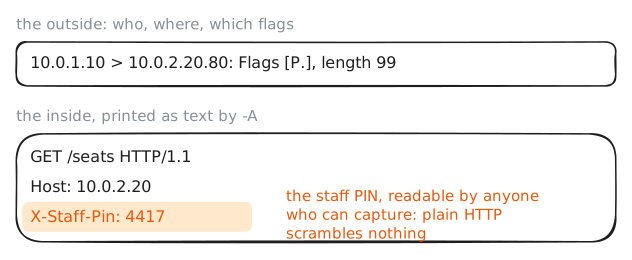
Those lines show the outside of each packet: who, where and which flags. The contents came along too, and
-Aprints them as text.The box office's request carries a staff PIN in an HTTP header, a
Name: valueline at the top of a request, calledX-Staff-Pin. It's meant to show the request comes from the box office. That's a common habit on private networks, and it rests on a hope that nobody is looking.HTTP was built in the early 1990s for sharing documents between researchers, and nobody on that network expected a stranger on the wire, so it sends everything as readable text. TLS, the encryption behind HTTPS, came later to fix that, and this server doesn't use it.
seatServer:~# tcpdump -n -A -c 14 port 80
-
The box office goes quiet
19:12, and the seat map on the box office freezes. The manager phones to say the network is down.
Start where the complaint is, and test each claim.
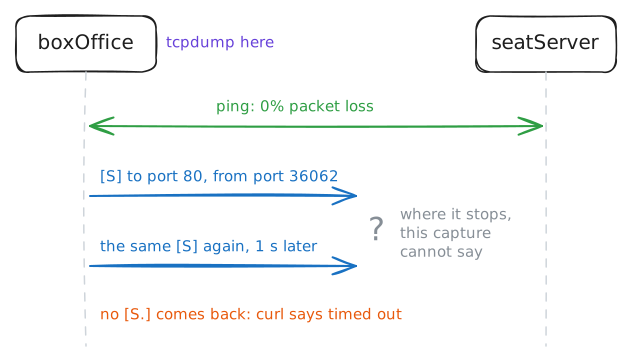
pingasks whether the two machines can reach each other at all, andcurlasks for the page the box office asks for.An error message tells you what a program noticed, and that's as far as it goes. A timeout means no answer came back, and it can't say whether the question or the answer got lost. So capture on
boxOfficetoo, while its seat map keeps trying every few seconds.boxOffice:~# ping -c 2 10.0.2.20 boxOffice:~# curl -sS -m 3 http://10.0.2.20/seats boxOffice:~# tcpdump -n -c 4 port 80
-
Capture at the other end
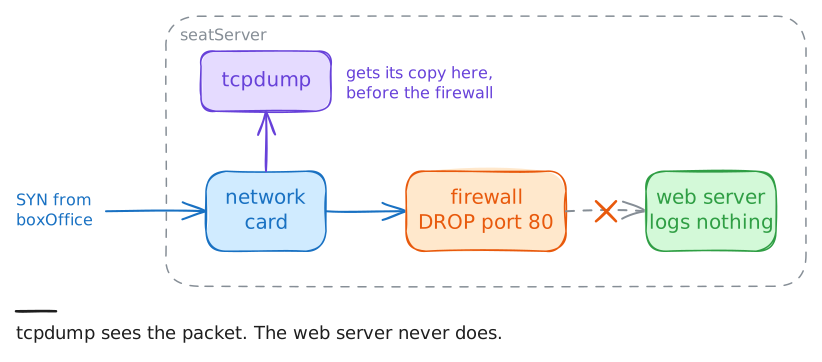
The server team says their web server has logged nothing since 19:12, and they're telling the truth about that log.
So run the same capture on
seatServer. This is the whole method: capture at each end of a conversation and walk towards the first place where the story stops matching.If packets arrive and no answer leaves, the fault is on this machine, and the next place to look is its Firewall, the rules that decide which packets get through to its programs. Read them, delete any rule dropping port 80, and capture once more to prove the fix.
seatServer:~# tcpdump -n -c 4 port 80
seatServer:~# iptables -L INPUT -n -v
seatServer:~# iptables -D INPUT -p tcp --dport 80 -j DROP
seatServer:~# tcpdump -n -c 14 port 80
-
Save a capture and ask it questions
Live output scrolls away, and the moment you wanted is often over before you look.
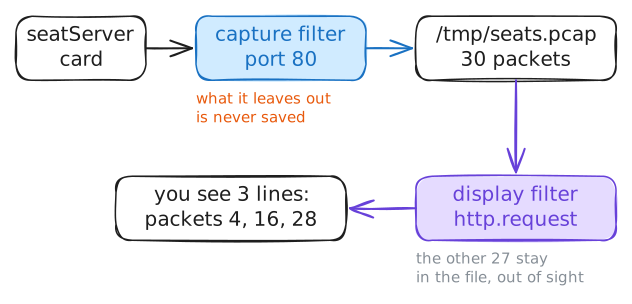
-wwrites the raw packets to a file instead of the screen, known as a pcap file, and you can read it as often as you like, on any machine.Reading one is where
tsharkcomes in. It's the terminal version of Wireshark, the program with a window that most engineers open a capture in, and the same file works in both.This splits the job in two, with a filter for each half. A capture filter, like
port 80, decides what gets saved, and anything it leaves out is gone for good. A display filter, likehttp.request, decides what you see from a file that's already saved. Display filters know each protocol's fields, so they can ask for HTTP requests by name. The two languages differ, too:port 80in a capture filter istcp.port == 80in a display filter.seatServer:~# tcpdump -n -c 30 -w /tmp/seats.pcap port 80 seatServer:~# tshark -r /tmp/seats.pcap -Y http.request seatServer:~# tshark -r /tmp/seats.pcap -q -z follow,tcp,ascii,1
-
Stand in the right place
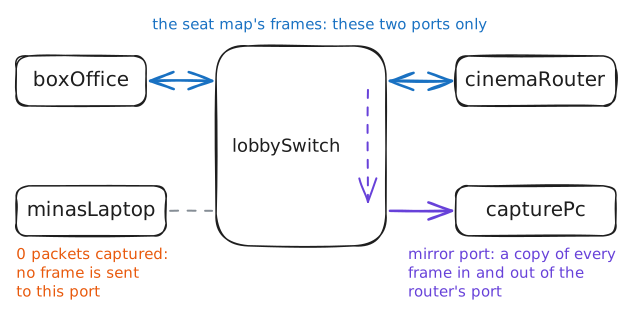
So far you've captured on the machines at each end. Often you can't: a card reader or a phone has no terminal, and a server may belong to someone else. Mina, who looks after the cinema's machines, has an idea: plug her laptop into the lobby Switch, the one the box office uses, and listen from there.
That idea used to work. Older networks used hubs, which repeated every signal out of every port, so any machine could hear the lot. A switch learns which machine sits on which port and sends a frame for a machine it knows to that port alone, while broadcasts and frames for unknown machines still go everywhere. That was built for speed, and it keeps neighbours out of each other's traffic as a side effect.
Try her laptop, then
capturePc, a machine on the same switch whose port has been set up differently.minasLaptop:~# timeout 4 tcpdump -n port 80 capturePc:~# tcpdump -n -c 14 port 80
Run these steps on real machines