 Hack the Route Start learning Open app
The idea
A signature describes a file known to be bad, so a scanner can find it again by its
contents, not its name. At Ravenscourt Veterinary, Saskia keeps a /quarantine folder of files pulled off staff
machines after a phishing scare.
She writes a YARA rule and a ClamAV signature, flags the bad attachment even after it is renamed to look like a photo, and hands round a hash to sweep for. Then she meets the wall every signature hits: a file no one has catalogued passes clean.
Steps
-
A rule that names a file by its content
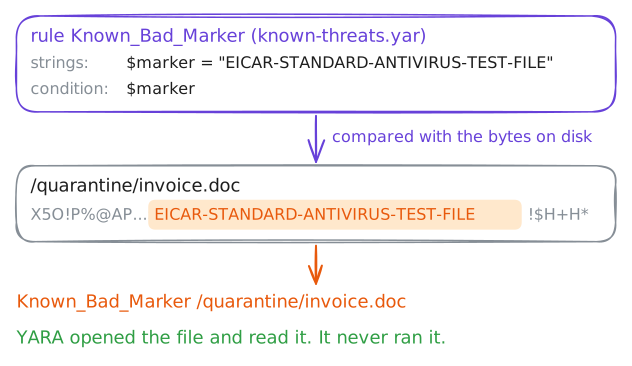
A signature is a description of something known to be bad, written so a scanner can match it again. A YARA rule is the readable form of one: a name, a set of strings to look for, and a condition saying which must appear. The scanner opens each file, reads its bytes, and reports the files whose contents satisfy the rule. It never runs them, so a scan is safe on the worst file you own.
The rule below looks for a single string: the EICAR marker. EICAR is a standard test file: 68 harmless bytes that every antivirus maker agrees to flag, so detection can be demonstrated without handling a real sample. Write the rule onto Saskia's
workstation, then scan the first file in quarantine.workstation:~# yara /root/known-threats.yar /quarantine/invoice.doc
-
The pattern is in the bytes, not the name
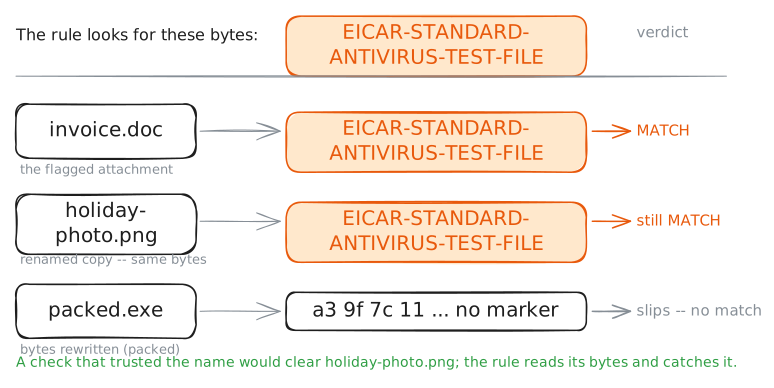
A common trick is to rename a bad file so it looks harmless: an invoice becomes a holiday photo. It fools a person skimming the folder, and it fools any check that trusts the file extension. It does not fool a signature, because the pattern a rule matches lives in the file's contents, and renaming a file changes its name, not its bytes.
Scan the whole
/quarantinefolder at once with-rand read which files match. Four files sit there now: the flagged attachment, a copy of it under a photo's name, the clean appointments list, and the unknown file from reception.workstation:~# yara -r /root/known-threats.yar /quarantine
-
A real antivirus engine, offline
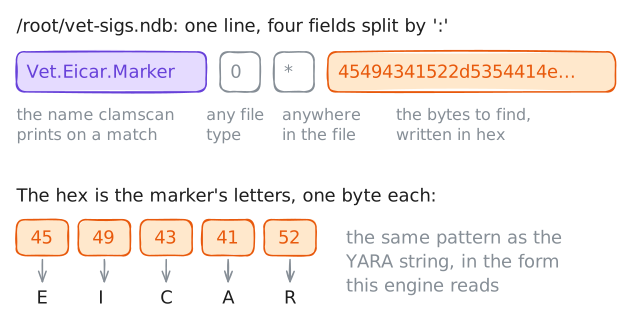
YARA is one way to write a signature. A full antivirus ships millions of them in its own database. ClamAV is an open-source antivirus engine. One of its database formats,
.ndb, is plain text: one line per known sample, with a name, a file type, an offset (how far into the file to look), and the pattern written in hexadecimal, two characters per byte.The line below says: match this hex anywhere (the
*offset) in any file (type0). The hex is the letters of the EICAR marker, one byte each. Pointclamscanat the folder with-dso it loads only this one-line database, with no internet and no downloaded signatures, and read its verdict on every file.workstation:~# clamscan -d /root/vet-sigs.ndb --no-summary -r /quarantine
-
The hash you hand to everyone else
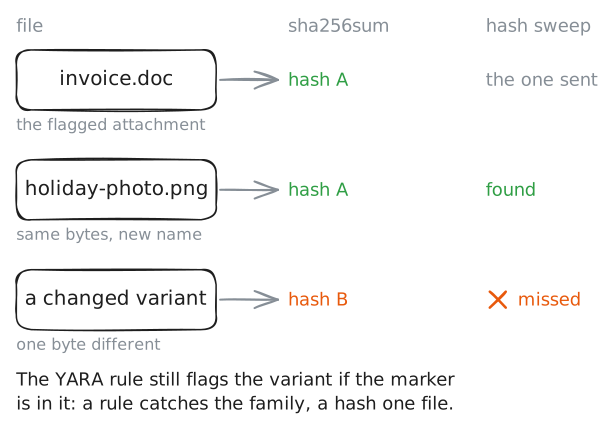
A match on one machine is worth more if the other clinics can look for the same file without ever seeing it. The cheapest shareable form is a hash: run the file through SHA-256 and out comes a short fingerprint that stands for its exact contents. Send that fingerprint round and every other site checks its own machines against it.
A hash is an indicator of compromise: a concrete fact from one incident, reused on every machine the firm owns. It is exact, which is its strength and its weakness: change a single byte and the hash is completely different, so a hash finds identical copies and misses a changed variant. A pattern rule, by contrast, catches the family.
workstation:~# sha256sum /quarantine/invoice.doc
-
What a signature cannot catch
Every check so far rests on knowing the bad thing in advance: a YARA string, a hash, a line in a database. That is the strength of signatures and their hard limit.
The unknown file in quarantine,
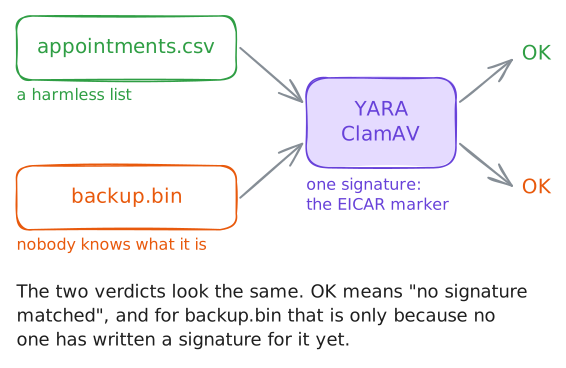
backup.bin, came off a reception machine and matches nothing in any database, because no one has catalogued it yet. Scan it on its own with both tools and watch them pass it.A clean verdict here does not prove the file is safe; it means neither scanner has ever been told what this file is. That gap is a false negative, a real threat that raised no alert, and it is not a bug to fix with a better rule.
Brand-new or one-off malware is invisible to signatures by definition. Catching it needs a different question: not what is this file, but what does it do. The answer comes from running it in a sandbox and watching its behaviour. That is the next lab.
workstation:~# yara -r /root/known-threats.yar /quarantine/backup.bin
workstation:~# clamscan -d /root/vet-sigs.ndb --no-summary /quarantine/backup.bin