 Hack the Route Start learning Open app
The idea
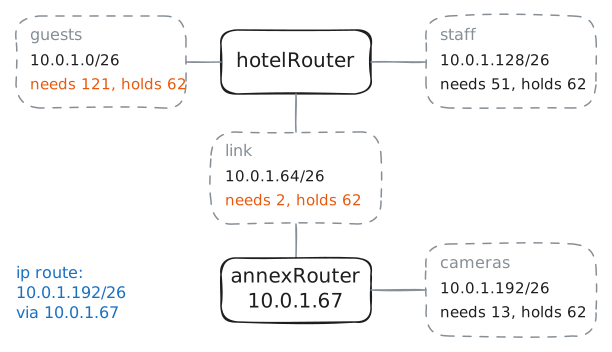
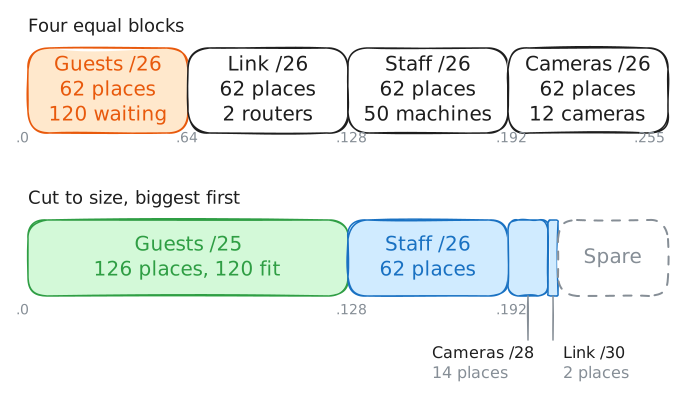
Lena's hotel has 184 machines and 256 addresses, yet the guests have run out, because the addresses are cut into four equal parts. Cut them again so that every group fits.
Steps
-
Read the hotel's four subnets
Lena looks after the network at a small hotel. The hotel group gives each hotel one block of IP addresses, the four-part numbers machines use to find each other. Her block is
10.0.1.0/24, the 256 addresses from10.0.1.0to10.0.1.255.The block is cut into subnets, smaller blocks that each hold one group of machines.
hotelRouteris the Router that carries traffic between them, so its list of routes shows the whole plan.The hotel has 184 machines: 120 guest devices, 50 for staff, 12 door cameras and 2 routers. Type
ip routeinhotelRouter's terminal, the window where you type commands to a machine. It prints one line for each block the router knows.hotelRouter:~# ip route
-
Size a subnet for each group
The number after the slash can be anything from 0 to 32, and that wasn't always true. Until the early 1990s the internet handed out blocks in three sizes: about 16 million addresses, about 65,000, or 256. A company with 2,000 machines took 65,000 addresses or a pile of small blocks, and the middle size was running out.
A 1987 standard had already let one network use several subnet masks, the older way of writing a slash number. That idea is variable-length subnet masking, VLSM: one block cut into subnets of different sizes.
In 1993, Classless Inter-Domain Routing (CIDR) took the same freedom to the whole internet. "Classless" means the three sizes are gone, so a block's size comes from its slash number alone. "Inter-domain" means across networks run by different organizations.
So CIDR is how the internet hands out blocks and finds its way to them, and VLSM is how you cut your own block.
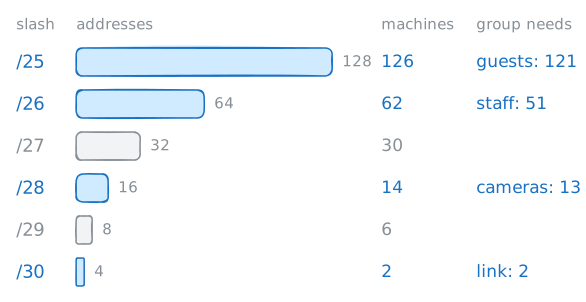
To size a subnet, count its machines, add one for its router, and take the lowest line here that still holds them:
slash   addresses   machines
/25        128        126
/26         64         62
/27         32         30
/28         16         14
/29          8          6
/30          4          2
Each line halves the one above. So 120 guest devices and a router need a
/25, and 50 staff machines and a router need a/26. The link holds 2 routers and nothing else, so it needs a/30.Work out the cameras, then check with
ipcalc, a calculator for addresses.hotelRouter:~# ipcalc -m -b 10.0.1.0/25 hotelRouter:~# ipcalc -m -b 10.0.1.0/28
-
Start a block in the wrong place
A size isn't a plan yet, because each subnet also needs a place in the block.
Lena writes the groups down in the order they come to mind, cameras first, at
.0to.15. The guests come next, from.16, and 128 addresses from there would end at.143. So she writes10.0.1.16/25.It looks right on paper. Check it with
ipcalcbefore it goes on any machine, then try the block that starts at.128.hotelRouter:~# ipcalc -n -b 10.0.1.16/25 hotelRouter:~# ipcalc -n -b 10.0.1.128/25
-
Give the link a /30
Lena has one quiet night for the recut, and the order of the moves matters. The guests' new block runs to
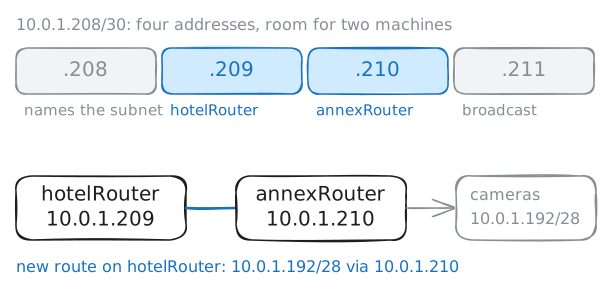
.127, and the link between the routers sits at.64, right in the way. So the link moves first.A link between two routers is a subnet with exactly two machines, so a
/30fits it..208names the subnet,.209and.210go on the routers, and.211is the broadcast address, which reaches every machine in a subnet at once. Engineers like a/30here because no third machine can land on the link by mistake.A network card can hold two addresses at once, so the old link keeps working while the new one comes up. Add
.209tohotelRouter's card on the link, calledannexLink, and the lab adds.210at the other end. Then test the new link withping, which sends a test message, called a packet, and waits for a reply.The route to the cameras has to change too. A route names a block, and the slash number is part of that name.
hotelRoutercan't work out a block's size from its address, so the route must say/28itself.hotelRouter:~# ip -echo addr add 10.0.1.209/30 dev annexLink hotelRouter:~# ping -c 1 -W 2 10.0.1.210 hotelRouter:~# ip -echo route replace 10.0.1.192/28 via 10.0.1.210
-
Widen the guests' subnet
With
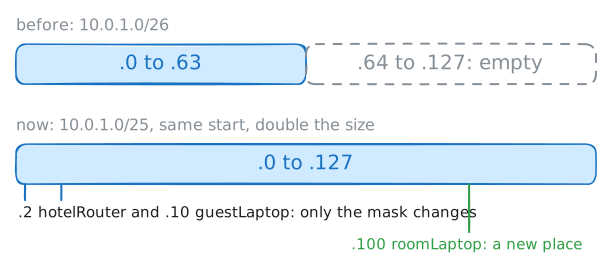
.64empty, the guests' subnet can double. A wider block has to start in the same place, and it can, because.0is a multiple of 128. Every machine keeps its address, and only the mask changes, along with the broadcast address.Narrowing takes more care, because machines near the top of the old block fall outside the new one. Widening a block at
.64wouldn't work at all, because no/25starts there.Start with the router. On
hotelRouter, add the address10.0.1.2again with/25, on the cardguestWing. The lab then removes the old/26copy and makes the same change onguestLaptop.On a real hotel network, a Dynamic Host Configuration Protocol (DHCP) server, the machine that hands out addresses, gives each guest device its mask. So devices pick up the new mask one by one, as each asks for its address again, and both masks are in use for a while.
Room 101's laptop is the first guest the old plan couldn't hold, and its card has no address yet. Give it
10.0.1.100/25, an address in the block that held the link until tonight, and the lab sets its default gateway, the router that takes everything outside its block, to10.0.1.2. The front desk's page sits in the staff's subnet, so opening it from Room 101 proves the laptop can reach the rest of the hotel.hotelRouter:~# ip -echo addr add 10.0.1.2/25 dev guestWing roomLaptop:~# ip -echo addr add 10.0.1.100/25 dev eth0 roomLaptop:~# curl -s http://10.0.1.140/
-
Find out why Room 101 lost the front desk
A week later, a contractor sets up a till, a small cash register, at the pool bar, behind
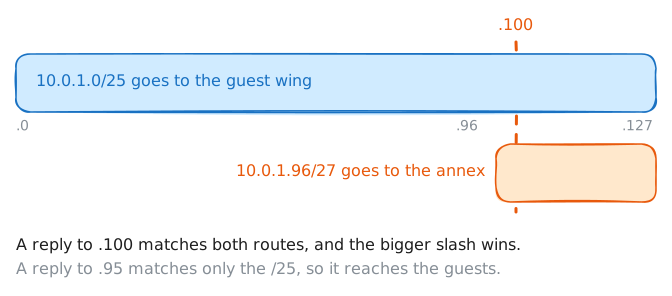
annexRouter. The bar will have 20 tills, so the contractor needs a/27, and picks10.0.1.96/27from an old copy of Lena's plan, where.64to.127held nothing but the link.The contractor builds the subnet in the annex, then adds one route on
hotelRouterso that the rest of the hotel can reach the bar. No router complains, because no router checks its blocks against the ones on another router, and a route inside a bigger block is normal. Nobody touches the guests' cable or their laptops.The lab has added that work. Now try the front desk from Room 101 with
ping, and the lab records what reachesfrontDesk. Then readhotelRouter's routes, and ask it how it would send to.100withip route get, which shows the way a machine would choose without sending anything.roomLaptop:~# ping -c 1 -W 2 10.0.1.140 hotelRouter:~# ip route hotelRouter:~# ip route get 10.0.1.100
-
Move the pool bar to spare addresses
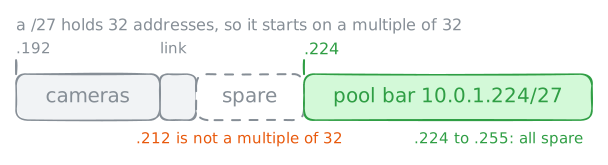
The plan already holds the fix, because it keeps a record of what's free:
.212to.255. The bar needs a/27, 32 addresses, and a block starts on a multiple of its size..212isn't a multiple of 32, so the bar can't start where the spare addresses start.Find the first multiple of 32 at or after
.212. The lab then moves the bar there. It putsannexRouteron.225andpoolTillon.230, and takes the/27at.96away from both.hotelRouterstill has the bad route, and that's your job. Delete it, add the route to the new block, then try the front desk from Room 101 again.hotelRouter:~# ip -echo route del 10.0.1.96/27 hotelRouter:~# ip -echo route add 10.0.1.224/27 via 10.0.1.210 roomLaptop:~# curl -s http://10.0.1.140/
Run these steps on real machines