 Hack the Route Start learning Open app
The idea
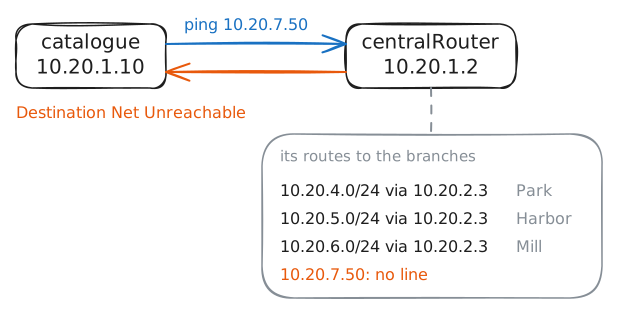
Noor's main Router lists every branch library on its own line, though they all go the same way. Swap them for one line, then find out what that one line gets wrong.
Steps
-
Read the main library's list
Noor looks after the network for a city's libraries. Every branch reads the same catalogue, a server at the main library that lists each book, so branch traffic goes through
centralRouter, the Router there.A router decides where each packet goes from its list of routes. A packet is a small piece of data with an address on it. Each route names a block of IP addresses and the next stop for that block, and each branch has a block of its own, called a Subnet and prefix length.
Type
ip routeincentralRouter's terminal, the window where you type commands to a machine. Then find out what the router does with an address that's on none of its lines. Nobody has10.20.7.50, so send it apingfromcatalogue.centralRouter:~# ip route catalogue:~# ping -c 1 -W 2 10.20.7.50
-
Join blocks into one
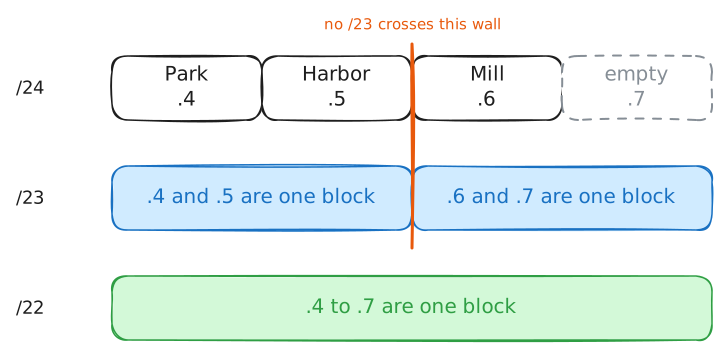
Three lines that point the same way could be one line, if one block held all three branches. Joining neighboring blocks into one bigger block is called supernetting, and the bigger block is a supernet. A route that covers a supernet is a summary route, because it stands for all the routes inside it.
Noor's list is small, but this problem was once the internet's. By 1991 the lists in the internet's biggest routers were growing too fast, and engineers expected the problem to turn critical between 1993 and 1995.
A 1992 proposal called "Supernetting" grew into Classless Inter-Domain Routing (CIDR) in 1993: routing across networks with no fixed block sizes. A provider with thousands of customers could now show the rest of the internet one block for all of them.
Supernetting uses the same slash number as subnetting, moved the other way. A bigger number cuts a block into smaller ones. A smaller number joins blocks, and each step doubles the block: a
/23is two/24s, and a/22is four.Supernet and subnet say how two blocks relate, not how big one is.
10.20.4.0/22is a supernet of Park's/24, and a subnet of10.20.0.0/16, a block of 65,536 addresses.Not every pair of neighbors can join. Test Harbor and Mill with
ipcalc, a calculator for addresses: ask for the/23around each one, then for the/22around Park. It prints each block's first address asNETWORKand its last asBROADCAST.centralRouter:~# ipcalc -n -b 10.20.5.0/23 centralRouter:~# ipcalc -n -b 10.20.6.0/23 centralRouter:~# ipcalc -n -b 10.20.4.0/22
-
Swap three routes for one
Changing routes on a working router has a safe order: add the new line first, delete the old lines after. A list that's too long for a moment keeps traffic moving. A list that's too short for a moment drops traffic.
While both are in the list, nothing changes. A packet for Mill matches
10.20.6.0/24and10.20.4.0/22, and the router always takes the line that matches the most bits of the address. That rule is called longest prefix match. A prefix is the first part of an address, the bits a block keeps the same.A
/24keeps 24 bits the same, and a/22only 22, so the biggest slash number wins.So the old lines keep working until the moment they're gone.
Add the summary to
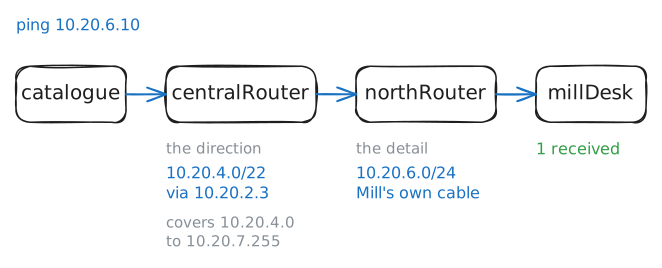
centralRouter. The lab then deletes the three branch lines. Read what's left, and pingmillDesk, the machine at the Mill branch, fromcatalogue.centralRouter:~# ip -echo route add 10.20.4.0/22 via 10.20.2.3 centralRouter:~# ip route catalogue:~# ping -c 1 -W 2 10.20.6.10
-
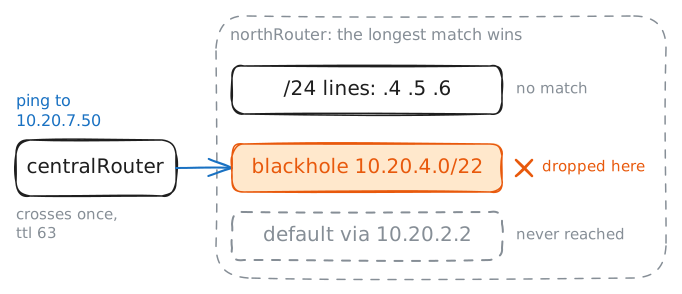
Ping the empty block again
Send the same ping as in the first step, to
10.20.7.50. Nobody has that address, and no branch uses.7. Back thencentralRouterhad no line for it and sent an error straight back.Now
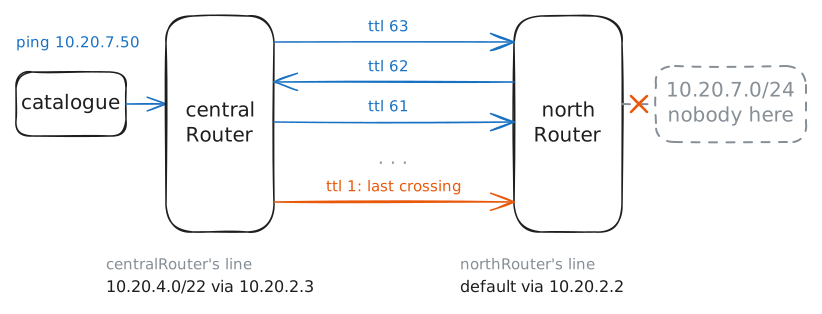
10.20.4.0/22covers it, socentralRouterhands the packet tonorthRouter. What happens from there depends onnorthRouter's own list, so read that too.This time the lab records the cable between the two routers while the ping runs.
tcpdump, a program that prints the packets crossing a network card, shows you each crossing.-vadds detail about each packet, and-tleaves out the time of day.If the output looks strange, nothing has gone wrong on your side. The result walks through it.
catalogue:~# ping -c 1 -W 2 10.20.7.50
northRouter:~# ip route
-
Drop what the summary can't deliver
The loop has one cause:
.7matches the summary on one router and the default route on the other. What's missing is a line that catches.7and stops it.A blackhole route is that line. It names a block and has no next router and no card, so a packet that matches it is dropped on the spot.
That sounds like a bad thing to own, but longest prefix match keeps it in its place: a blackhole only gets packets that match no line with a bigger slash number. Give it the size of the summary, and every real branch still beats it, while the empty addresses reach it before they can reach the default route.
Decide which router needs it, then add it. Run the ping with the cable recording again, and ping
millDeskto check that a real branch still answers.northRouter:~# ip -echo route add blackhole 10.20.4.0/22 catalogue:~# ping -c 1 -W 2 10.20.7.50 catalogue:~# ping -c 1 -W 2 10.20.6.10
-
Move Mill to the other router
Mill's building is being rewired, and its cable moves from
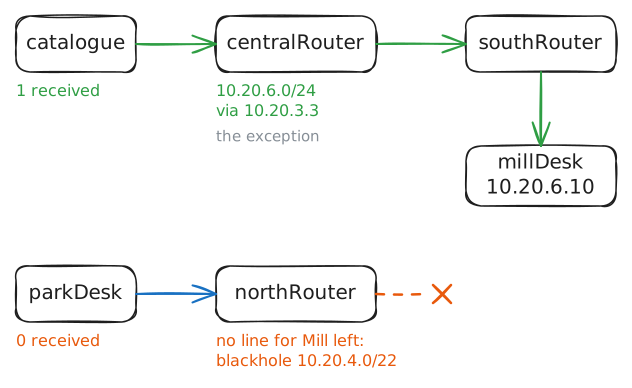
northRoutertosouthRouter, the new router with its own cable to the main library. The lab moves it first. Mill's block still sits inside.4to.7, but it's no longer behindnorthRouter.Noor doesn't have to tear up the summary. Longest prefix match lets a block have exceptions: one line for Mill,
10.20.6.0/24 via 10.20.3.3, beats10.20.4.0/22, and the summary goes on standing for everything else.Add that line to
centralRouter. Then test Mill from two places:catalogueat the main library, andparkDeskat the Park branch.centralRouter:~# ip -echo route add 10.20.6.0/24 via 10.20.3.3 catalogue:~# ping -c 1 -W 2 10.20.6.10 parkDesk:~# ping -c 1 -W 2 10.20.6.10
-
Give northRouter the exception
Two lines on
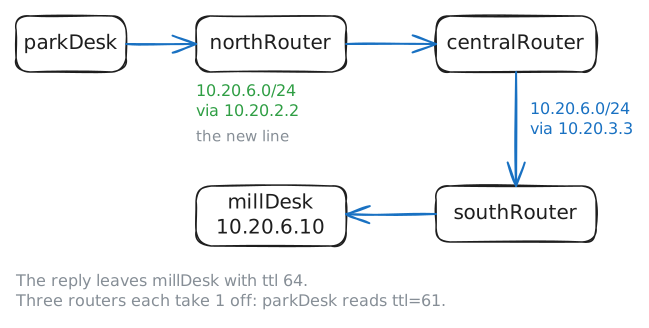
northRoutercould take Park's packets for Mill: the blackhole and the default route. The blackhole wins, because/22matches 22 bits, and a default route matches every address and checks no bits at all.Neither line is wrong on its own.
northRouterneeds a line for Mill that's longer than the blackhole.List the lines that cover Mill's address first. Then add
10.20.6.0/24with the right next router, and ping Mill fromparkDesk.northRouter:~# ip route show match 10.20.6.10 northRouter:~# ip -echo route add 10.20.6.0/24 via 10.20.2.2 parkDesk:~# ping -c 1 -W 2 10.20.6.10
Run these steps on real machines