 Hack the Route Start learning Open app
The idea
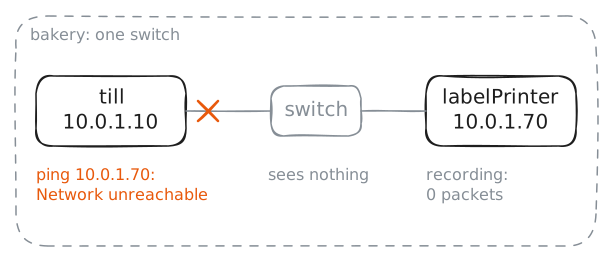
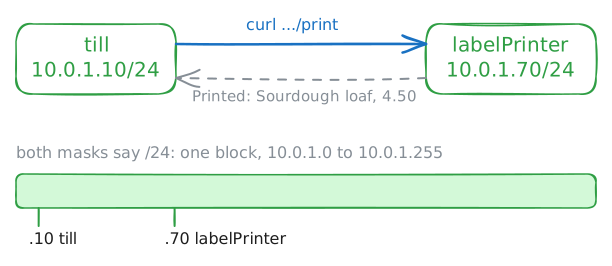
Priya plugs a new label printer in right beside the till, the bakery's cash register, but the till can't reach it. Find the setting that stops the till, and print the first label.
Steps
-
Ask the till to reach the label printer
Every machine on a network has an IP address, four numbers that name it. The till's is
10.0.1.10, the label printer's is10.0.1.70, and one Switch joins them. A switch is a box that moves traffic between the machines plugged into it.pingsends a test message, called a packet, and waits for a reply. Type it in the till's terminal, the window where you type commands to a machine.-c 1sends one packet, and-W 2waits 2 seconds for the reply. The lab records what reaches the label printer.till:~# ping -c 1 -W 2 10.0.1.70
-
Read the till's subnet mask
An address looks complete, but it holds two things: which network a machine is on, and which machine it is. A phone number works the same way, with an area code followed by the line. Nothing in the four numbers says where the first part stops, so each machine needs a second setting to mark the split: the subnet mask.
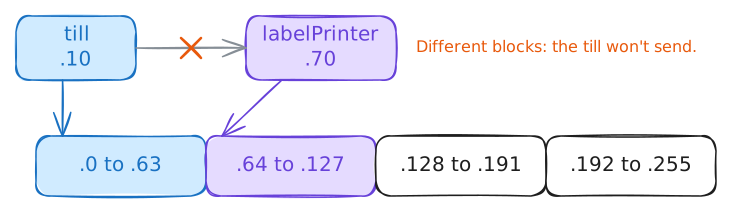
The mask cuts addresses into blocks, each called a Subnet and prefix length, and a machine talks directly only to its own block. In this lab, block and subnet mean the same thing.
Read the mask on
eth0, the till's network card, the part that joins a machine to a network: look forMask:in the output. Then read the till's routes, its list of where it can send traffic, withip route. Finish withipcalc, a calculator for addresses, on the label printer's address.till:~# ifconfig eth0 till:~# ip route till:~# ipcalc -n 10.0.1.70 255.255.255.192
-
Give the till a wider mask
You've found the fault: the till's block stops at
.63, and the label printer is at.70.The mask
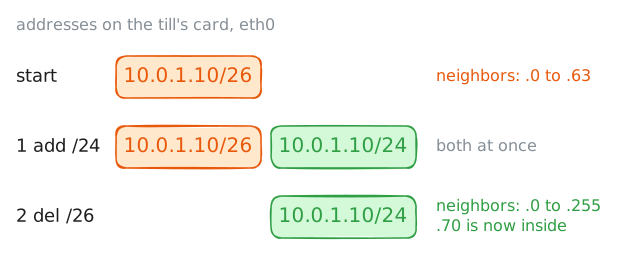
255.255.255.0makes one block of all 256 addresses, which holds both. In bits it's 24 ones and 8 zeros, soipwrites it as/24. A smaller number after the slash means a wider block.On a real network, a Dynamic Host Configuration Protocol (DHCP) server, the machine that hands out addresses, usually sets the mask. A machine with a fixed address, like a till or a printer, often gets its mask typed in once by whoever sets it up. So a wrong mask can sit there until somebody reads it.
ipcan't edit a mask in place, but a card can hold several addresses. Add the till's address again with the wider mask, then remove the copy with the old mask.till:~# ip -echo addr add 10.0.1.10/24 dev eth0 till:~# ip -echo addr del 10.0.1.10/26 dev eth0
-
Try the label printer again
The till now counts
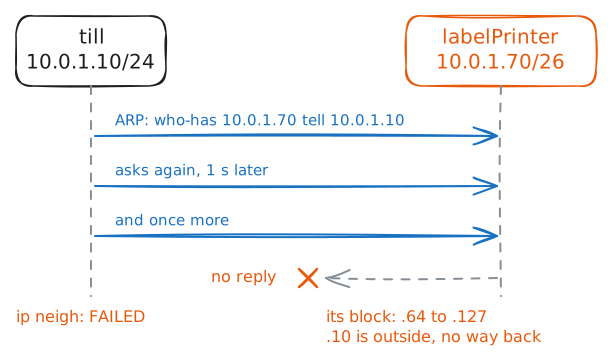
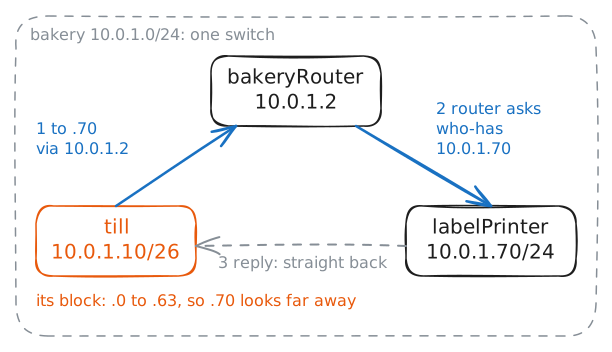
.70as a neighbor, so it will send this time. A plain switch, the kind in a home or a small shop, doesn't read IP addresses, so reaching a neighbor takes one more stage. The switch moves traffic by a different name, the hardware address each network card carries, whichifconfigshowed afterHWaddr.So the till must find the label printer's hardware address first, using the Address Resolution Protocol (ARP). The till sends the question to every machine on the switch: who has
10.0.1.70? The machine that holds the address replies with its hardware address, and only then can thepinggo.If nobody answers, the till asks up to three times, a second apart. The lab records what reaches the label printer. Then read what the till learned with
ip neigh, which lists the hardware addresses a machine has found.till:~# ping -c 1 -W 2 10.0.1.70 till:~# ip neigh show 10.0.1.70
-
Fix the other end and print a label
The label printer's block still runs from
.64to.127. People forget this rule: every machine on one network needs the same mask.Take two neighbors that disagree, with no gateway. The one with the narrower mask can't answer a machine outside its block, but it still answers those inside. So
.70on/26would work with.80and fail with.10, and the fault looks random.Give the label printer the wide mask the same way: add first, then remove. Then ask for a label from the till.
curlfetches a web page and shows it as text, and this printer prints a label when anything opens its/printpage.labelPrinter:~# ip -echo addr add 10.0.1.70/24 dev eth0 labelPrinter:~# ip -echo addr del 10.0.1.70/26 dev eth0 till:~# curl -s http://10.0.1.70/print
-
Watch the till choose who to ask
A mask does a second job: it tells a machine what is far away. For every packet, the till checks its routes. With one card, that comes down to one question: is this address in my block?
If it is, the till asks for that machine on the switch. If it isn't, the till hands the packet to its default gateway, the router that carries traffic out of the network. On an ordinary network, a gateway must sit inside the machine's own block, or the machine can't reach it.
The flour supplier at
10.0.2.80is beyondbakeryRouter. The lab gives the till a default gateway,10.0.1.2, which isbakeryRouter. Open the supplier's page, and the lab records who the till asks for.Then the lab puts the till's old
/26mask back for one test, and leaves the gateway in place. You are about to repeat half of the first fault, because the label printer keeps/24. Ask the till how it would reach the label printer withip route get, then ask for a label.till:~# curl -s http://10.0.2.80/ till:~# ip route get 10.0.1.70 till:~# curl -s http://10.0.1.70/print
-
Read a mask you haven't seen
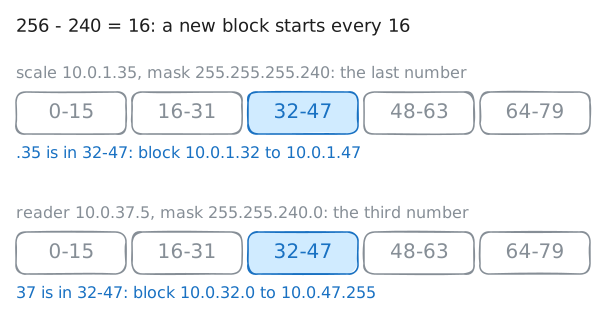
You don't need to write bits every time, because a rule gives the same answer:
- Read the mask from the left and find the first number that isn't
255. - Subtract that number from 256, and you have the block size in that place.
- Start at 0 and go up by that size until you pass the address. The last start at or below the address opens the block, and the next start minus 1 ends it.
Priya's new shelf scale comes set to
10.0.1.35, with the mask255.255.255.240. Work out its block before she plugs it in, then check your answer withipcalc.-badds the block's last address.Her card company then sends a card reader set to
10.0.37.5, with the mask255.255.240.0. This mask ends in0, which is why the rule starts from the left. Runipcalcon that one too.till:~# ipcalc -n -b 10.0.1.35 255.255.255.240 till:~# ipcalc -n -b 10.0.37.5 255.255.240.0
- Read the mask from the left and find the first number that isn't
Run these steps on real machines