 Hack the Route Start learning Open app
The idea
Noah texts Mia the address of his holiday photos, but something else answers when Mia opens it at home. Follow that one address into both houses and find out why nothing is broken.
Steps
-
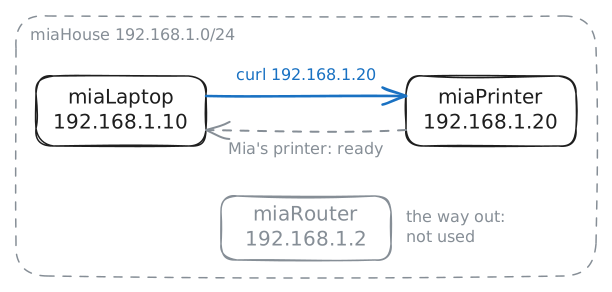
Open Noah's address
Every machine on a network has an IP address. The common kind, IPv4 (Internet Protocol version 4), is four numbers from 0 to 255, with dots between them. One machine reaches another by sending a request to that address.
Noah's text says his photos are at
192.168.1.20. Type the command into the terminal on Mia's laptop, the window where you type commands to a machine.curlasks an address for its web page and shows the page as text.miaLaptop:~# curl -s http://192.168.1.20/
-
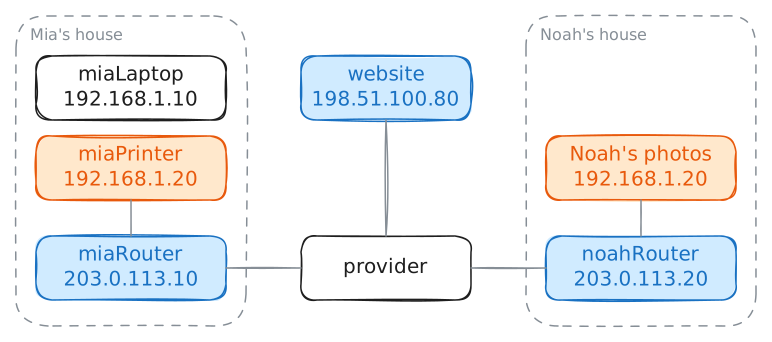
Try the same address at Noah's house
Noah's address comes from an old problem. Four numbers from 0 to 255 give about 4.3 billion addresses, and by the early 1990s engineers could see that the internet would run out. More and more companies wanted an address for every computer.
One answer was to set aside a few blocks of addresses that anyone may reuse. That rule now stands as RFC 1918, one of the numbered documents that record how the internet works.
A machine inside a home or an office usually takes one of those. Its Router, the machine that joins that network to the internet, deals with the outside world.
In the lab, the machine with Noah's photos sits behind
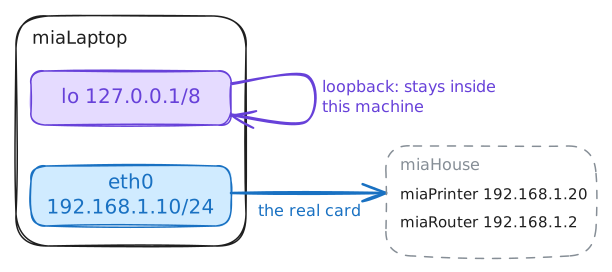
noahRouterand has no terminal of its own. So test Noah's side from that router, where a command stays inside his house. Run the samecurlcommand there.Then try
127.0.0.1, an address with an even smaller reach, onmiaPrinter. Most printers have no terminal, but the lab gives this one a terminal. Last, list the addresses onmiaLaptop.noahRouter:~# curl -s http://192.168.1.20/ miaPrinter:~# curl -s http://127.0.0.1/ miaLaptop:~# ip -br addr
-
See which address a website sees
Mia's laptop calls itself
192.168.1.10, and millions of other homes use that address too. A website can't reply to an address that millions of machines hold, so something has to change on the way out of the house.198.51.100.80is a website that shows each visitor the address it saw. Fetch it from Mia's laptop. Then list the addresses onmiaRouter, and compare the two.Last, try Noah's router directly.
203.0.113.20is the address ofnoahRouteron the internet, so sendcurlthere from Mia's laptop.miaLaptop:~# curl -s http://198.51.100.80/ miaRouter:~# ip -br addr miaLaptop:~# curl -sS -m 3 http://203.0.113.20/
-
Ask the provider about Noah's address
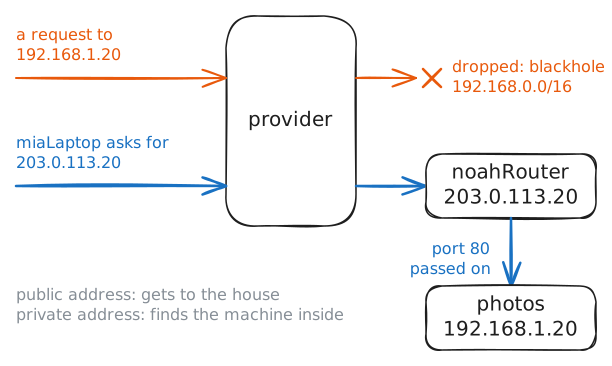
Noah could send
192.168.1.20to more people, but that won't help.providerin this lab is a router that belongs to the company connecting Mia and Noah. Read itsblackholelist, the blocks of addresses it has a special rule for.One private block is the one people get wrong: it starts at
172.16, but some addresses that start with172are public. Check where it ends withipcalc, a calculator for addresses.Noah's fix is one more rule on his router: pass web requests from the street to the machine with the photos. That rule is port forwarding, which has a lab of its own, so the lab adds it for you here. Then try Noah's public address again.
provider:~# ip route show type blackhole
provider:~# ipcalc -n -b 172.16.0.0/12
miaLaptop:~# curl -s http://203.0.113.20/
Run these steps on real machines