 Hack the Route Start learning Open app
The idea
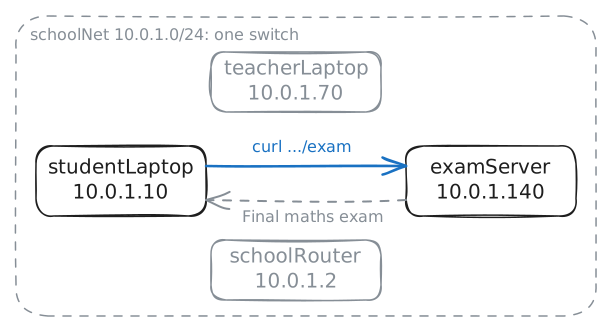
A student at Hillside School opened Friday's exam paper from a laptop, and nothing stood in the way. Cut the school's one network into smaller ones, so that the school can stop it.
Steps
-
Open the exam paper from a student's laptop
Every machine at Hillside School plugs into one Switch, a box that joins machines, and they all use one network. The exam server is the machine that keeps the papers. It holds Friday's maths paper at
10.0.1.140, its IP address, the number that names it on the network.Fetch the paper from the student's laptop, at
10.0.1.10. Type the command in that laptop's terminal, the window where you type commands to a machine.curlfetches a web page and shows it as text.studentLaptop:~# curl -s http://10.0.1.140/exam
-
Check whether the router saw it
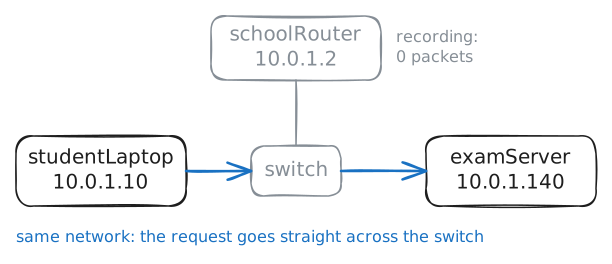
A small network starts flat, as one network on one switch, because that works with no planning. The trouble comes as it grows: every machine can reach every other, so no control sits between them.
A broadcast, a message sent to every machine at once, also lands on all of them. So a big flat network wastes time on messages that most machines don't need.
The school's Router connects its network to other networks, and a router can refuse traffic. So the router looks like the place to stop the student. Fetch the paper again, and the lab records the web traffic that reaches the router.
studentLaptop:~# curl -s http://10.0.1.140/exam
-
Plan the cut
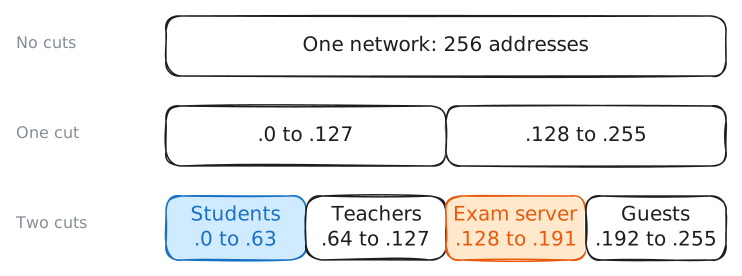
Cut a network in half and you get two smaller networks, each called a Subnet and prefix length. Cut those in half and you get four. Hillside's network,
10.0.1.0/24, has 256 addresses,10.0.1.0to10.0.1.255, and it must serve four groups: students, teachers, the exam server and guests.A common IP address, called IPv4, looks like four numbers, but a machine reads it as 32 bits, ones and zeros, 8 for each number. The number after the slash says how many bits are fixed, the same on every address in the network.
/24leaves 8 bits free (books call them host bits). Each free bit can be 0 or 1, so each one doubles the choices. 8 free bits make 2 to the power of 8, or 256 addresses.Each cut fixes one more bit, so it doubles the subnets and halves their size. A machine holds the number of fixed bits in a setting called its subnet mask, which tells it which addresses count as its own network.
Two cuts give four subnets, so the mask becomes
/26. The same mask can be written as four numbers,255.255.255.192, one number for each 8 bits.From the left, the 8 bits of a number are worth 128, 64, 32, 16, 8, 4, 2 and 1. A number is the sum of the bits that are on.
255has all 8 on.192is 128 plus 64, the first 2 bits, so 8 plus 8 plus 8 plus 2 makes 26.Check the plan with
ipcalc, a calculator for addresses. Ask where the exam server lands.studentLaptop:~# ipcalc -n -b 10.0.1.140 255.255.255.192
-
Cut the network into four subnets
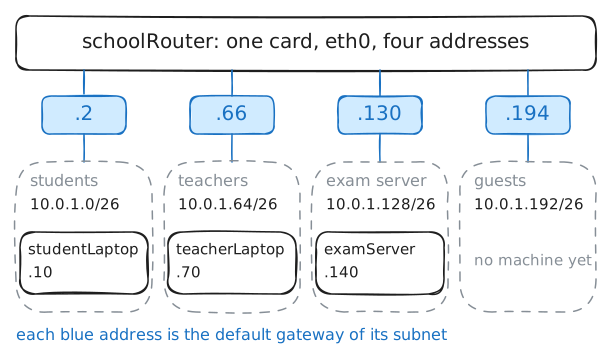
A plan changes nothing until the machines hold it. Each machine needs its new mask, and a default gateway, the router address it sends traffic to when the target is outside its subnet.
On an ordinary network, a machine reaches its gateway directly, so the gateway must sit inside its subnet. That's why the router needs one address in each subnet.
A network card is the part of a machine that joins it to a network. One card can hold several addresses, so the router stays on one cable and joins all four subnets. Each address makes it a member of that subnet.
Give the router
10.0.1.130/26oneth0, its network card. The router can take any free address in a subnet, and this plan uses.2,.66,.130and.194.ipis the standard tool for network settings on Linux, the operating system that runs on every machine in this lab.The lab then gives the router its other three addresses and moves each machine into its subnet. Read the routes, a machine's list of networks and the way to each one, on the router and then on the student's laptop.
schoolRouter:~# ip -echo addr add 10.0.1.130/26 dev eth0
schoolRouter:~# ip route
studentLaptop:~# ip route
-
Watch the request cross the router
The student's laptop now counts
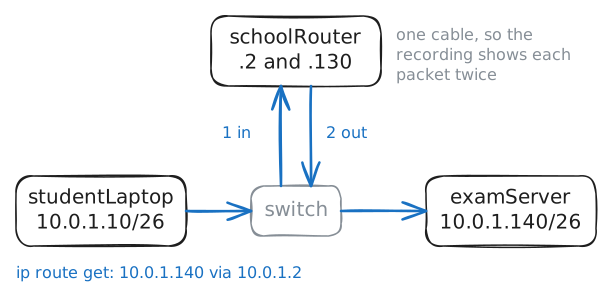
.140as outside its subnet, so it should hand the request to the router. A request travels in small pieces called packets.The laptop, the router and the exam server still share one switch, and the router still has only one cable. So the router has to take each packet in on that cable and send it back out on the same one.
Forwarding, a setting that passes packets between networks, is off by default on Linux, and the lab's router has it on.
Ask the laptop how it would reach the server with
ip route get, which sends nothing. Then fetch the paper, and read what the router records.studentLaptop:~# ip route get 10.0.1.140 studentLaptop:~# curl -s http://10.0.1.140/exam
-
Stop students at the router
The router now carries every packet between subnets, so it can refuse them. A Firewall filters packets, and a firewall rule tells a machine what to do with packets that match a description.
iptablesis a Linux tool that adds these rules.One rule can name a whole subnet, so you plan subnets around groups of people: one rule covers every laptop in a group.
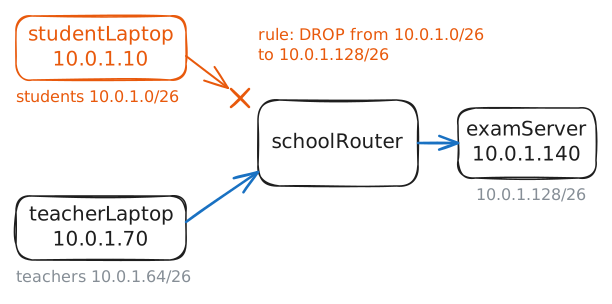
This rule reads: from the students' subnet, to the exam server's subnet, throw the packet away.
You are about to lock every student out of the exam server. Add the rule on
schoolRouter, then try the paper from both laptops.-m 3makescurlgive up after 3 seconds.schoolRouter:~# iptables -v -A FORWARD -s 10.0.1.0/26 -d 10.0.1.128/26 -j DROP studentLaptop:~# curl -sS -m 3 http://10.0.1.140/exam teacherLaptop:~# curl -sS -m 3 http://10.0.1.140/exam
-
Count what the cut cost
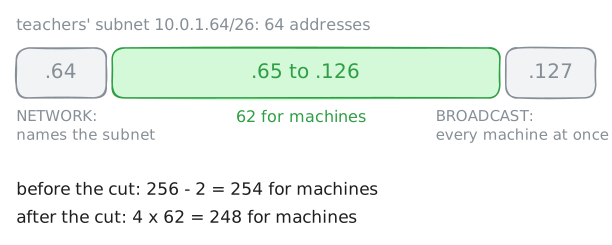
Cutting costs addresses, because some addresses in a subnet are reserved and don't go on a machine. You met two special addresses in
ipcalcoutput, and nearly every subnet has them.Read the teachers' subnet first. Then read the whole network as it was before the cut, so that you compare before and after.
teacherLaptop:~# ipcalc -n -b 10.0.1.70 255.255.255.192
teacherLaptop:~# ipcalc -n -b 10.0.1.0 255.255.255.0
Run these steps on real machines