 Hack the Route Start learning Open app
The idea
Osei has an authorised engagement against Dunmore Savings, a small online bank. He cannot read another customer's balance and he has no one's password. But the bank has a habit worth testing: it decides a money transfer is genuine the moment the request arrives carrying a valid session cookie — nothing more.
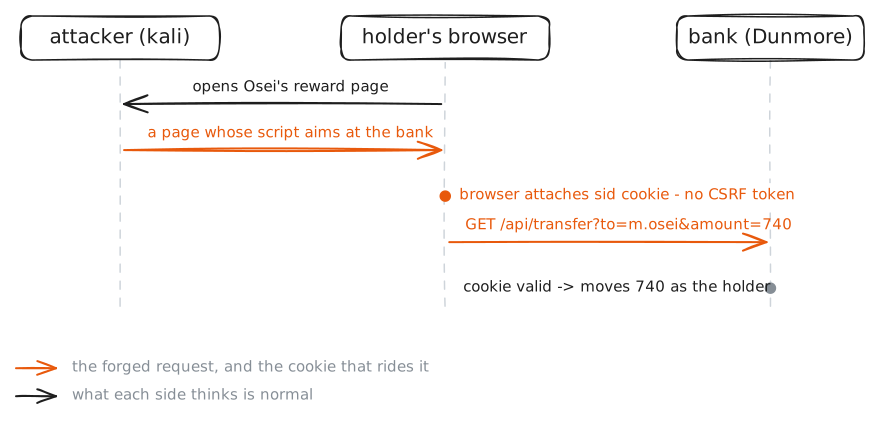
A browser attaches a site's cookies to every request to that site, even one set off by a different site's page. So if Osei can get a logged-in customer's browser to send a transfer request, the bank will honour it as the customer's own — Osei never sees the cookie, he only causes the action. That is cross-site request forgery. On this LAN a customer's browser (the holder bot) keeps opening a page Osei controls, already signed in to the bank. Osei's job: make that page move the customer's money to his account.
Steps
-
The bank trusts the cookie
You are on Osei's box,
kali. Osei has his own Dunmore account (m.osei) — opened to receive the payment and read the result. Sign in to it and read the account, keeping the session in a cookie jar so the next request reuses it. Open the bank in the Viewer too, to see what a customer sees.The point of this step is small but decisive: the bank identifies you by the
sidcookie alone. Nothing else proves who you are.kali:~# curl -s -c /tmp/osei.jar -H "Content-Type: application/json" -d '{"username":"m.osei","password":"osei-lab-account-pw"}' http://10.0.1.20/api/login kali:~# curl -s -b /tmp/osei.jar http://10.0.1.20/api/account -
A transfer is a GET with no token
Look at how a transfer is made. Move £1 from Osei's account to the holder's, the ordinary way the bank's own page does it, and watch the shape of the request: it is a plain
GETwith the details in the URL, authorised by the cookie, with no anti-CSRF token anywhere. Anyone — or any page — that can make this request with the cookie attached can move money.kali:~# curl -s -b /tmp/osei.jar -G --data-urlencode "to=d.whitlock" --data-urlencode "amount=1" --data-urlencode "memo=probe" http://10.0.1.20/api/transfer
-
Forge it from a page the victim opens
Now the forgery. Write a web page whose script navigates the viewer's browser straight to the bank's transfer URL —
to=m.osei— and serve it from your box. The holder's browser, already signed in to the bank, keeps opening this page. When it does, the script runs, the browser makes a top-level GET navigation to the bank, and — because the bank set noSameSiteand the browser's Lax default still sends cookies on a top-level navigation — the holder'ssidrides along. The bank sees the holder's session and pays Osei.Serve the page, then watch Osei's own statement: the forced credit from
d.whitlockwill appear, carrying the holder's wire reference.kali:~# python3 -m http.server 8000 --directory /tmp kali:~# curl -s -b /tmp/osei.jar http://10.0.1.20/api/account
-
Swap seats: the token fix
Now you run Dunmore. The fix is not to check the
Referer(spoofable, and privacy tools strip it) but to demand a secret the forging page cannot get: a per-session anti-CSRF token the bank issues to its own pages and checks on every state change. The bank's correct transfer endpoint,POST /api/transfers, does exactly that. Send Osei's forgery to it — the same cookie, but no token — and watch it refused.kali:~# curl -s -o /dev/null -w "%{http_code}" -b /tmp/osei.jar -X POST -H "Content-Type: application/json" -d '{"to":"m.osei","amount":740}' http://10.0.1.20/api/transfers
Run these steps on real machines